System compare
“It works in QA, not in PROD” – the system compare shows what really differs between two systems. It takes a snapshot of the metadata of the same SAP Fiori® or UI5 app on each system and puts them side by side, section by section. The tab is part of the Enterprise edition.
- Edition
- from Enterprise
- Tab
- “Compare”
- Snapshot content
- metadata only, no business data
- Storage
- in the browser, at most 10 snapshots per app and system
- On PROD
- allowed – the snapshot only reads
Prerequisite: host profiles
The compare works with the systems you have set up as host profiles – name, colour and PROD flag in the extension popup, see Host profiles and PROD. Without another profile the tab says: “No other systems yet: give the other system a host profile in the popup (name, colour, PROD).”
Take snapshots
- Open the app on the first system, the Compare tab in the FrontTailor panel, and click Take snapshot.
- Under Other systems, click Get snapshot from QA (or your profile’s name). If needed, FrontTailor asks once for access to the system.
- FrontTailor uses an open tab of that system or opens the same app page there in the background, waits at most 60 s for the app and takes the snapshot. You stay in your tab.
- The comparison of the two snapshots appears below.
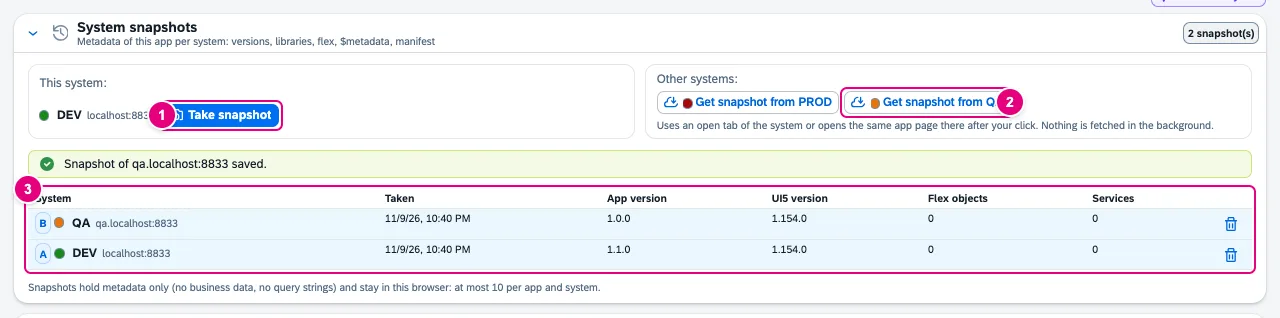
- Take snapshot on this system.
- Get snapshot from … – one button per host profile. Nothing is fetched in the background; everything happens after your click in a tab of the other system.
- The list of this app’s snapshots with system, time, app version, UI5 version, flex objects and services; the bin icon deletes one.
If the other system’s tab shows another app, FrontTailor stores the snapshot under that app’s ID and says so. There is no snapshot on the launchpad home page: open the app first.
What a snapshot contains
| Section | Content |
|---|---|
| App and versions | app ID, title, component, app and component version, deployed version, ETag and Last-Modified of manifest.json |
| UI5 runtime | version, build, theme, language |
| Libraries | loaded libraries with version |
| Cache buster | active or not, index files, tokens of the app resources, outdated resources (see Enterprise deployment) |
| Flex changes | count per layer and change type, change IDs – without content |
| Services and $metadata | per data source URI, version, hash and structure of $metadata: types, properties, navigations, entity sets, actions |
| Manifest | relevant settings such as data sources, models, routing targets, minUI5Version, flexEnabled |
| Launchpad | platform, intent, application type, component, resolved URL, system alias, target mapping |
Not included are business data, query strings, values of intent parameters, content of flex changes, labels from $metadata, and users, cookies and tokens. FrontTailor reads $metadata only from the same origin; services of another origin stay without structure.
The comparison
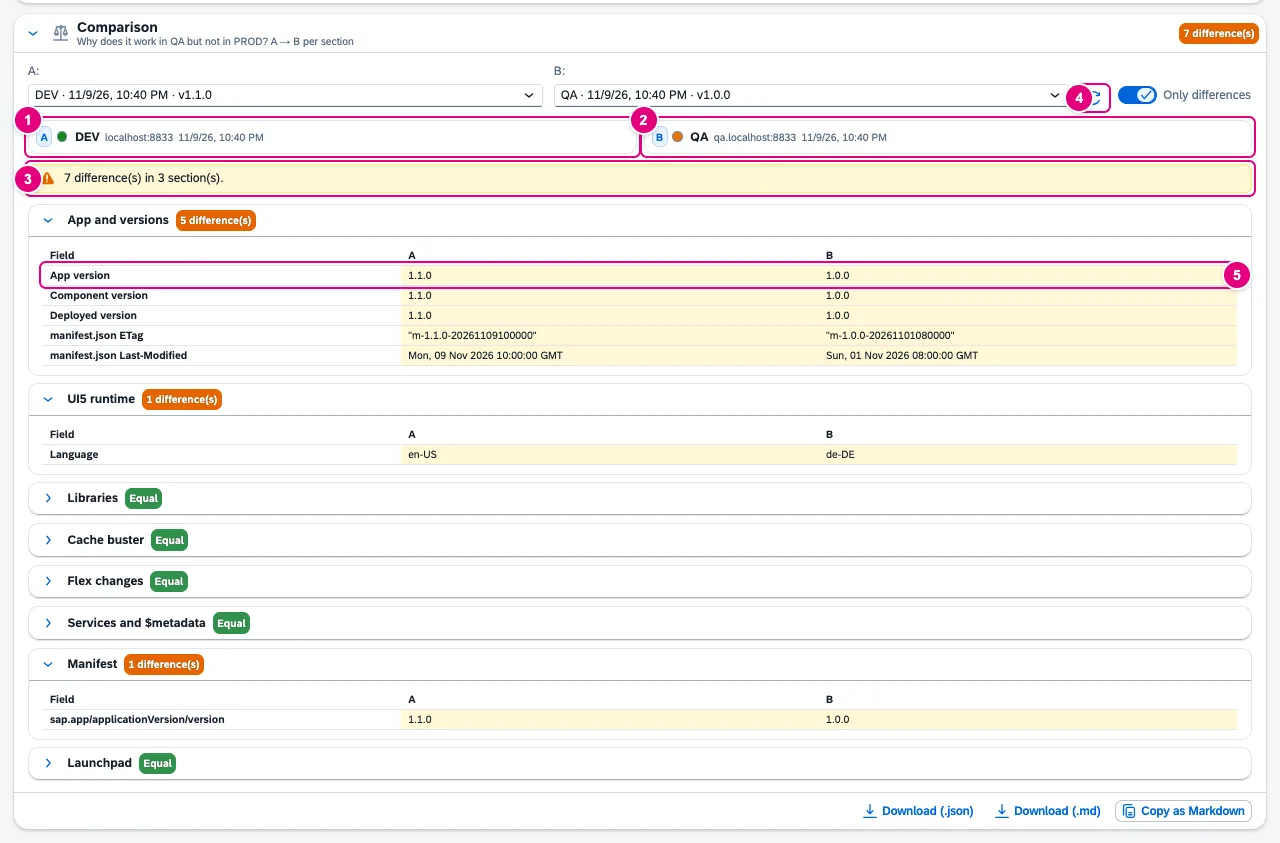
- A: preselected is the newest snapshot of this system.
- B: preselected is the newest snapshot of another system. Both can be chosen in the selection above.
- The summary: number of differences and sections.
- Swap A and B; next to it Only differences, on by default.
- A changed row. Sections with differences are expanded, equal ones show Equal.
Every row has a state: equal, changed, only A or only B. Services are matched by data source name, because the URI may differ per system. If the $metadata hash is equal, there is nothing to show; otherwise the section lists added, removed and changed types and properties, for example title: Edm.String(100) → Edm.String(60). For flex changes it lists the change IDs “only in A” and “only in B”.
Share the result
| Button | Result |
|---|---|
| Copy as Markdown | only the differences, for a ticket or chat |
| Download (.md) | the same as a file |
| Download (.json) | both snapshots and the comparison |
FrontTailor masks e-mail addresses, phone numbers and IBANs with the rules of “Report a problem”. Nothing is sent.
Typical problems
| What you see | Cause and fix |
|---|---|
| No Get snapshot from … button | There is no host profile for another system. Create one in the popup. |
| “No app is shown” | The tab shows the launchpad home page. Open the app and take the snapshot again. |
| The app on the other system does not start in time | FrontTailor gives up after 60 s. Check the tab (login?) and try again. |
| FrontTailor is not activated for the other system | Activate it in the popup of that tab. |
| Differences in libraries or language | Libraries that load on demand depend on what you did in the app before the snapshot, and the language follows the session. Take both snapshots in the same state. |
See also
- Features at a glance Features · betrieb
- Further reading Configuring SAP Business Technology Platform – The Practical Guide for Administrators (SAP PRESS)
- Help from people Release and transport quality
- Docs Release check
- Docs Enterprise deployment
- Docs Host profiles and PROD
- Sources ADR-0301 · ADR-0242