Roles and authorizations
Two tabs for authorization questions in SAP Fiori® apps: Authorizations evaluates the app’s 401, 403 and SAP authorization messages and checks why a tile is missing. Roles asks the system itself through the ABAP add-on – roles, catalogs, start authorization, also for another user. Both are part of the Enterprise edition.
- Edition
- from Enterprise
- Tabs
- “Authorizations” and “Roles”
- Data source
- the OData console’s recording; optionally the ABAP add-on
- Users
- always masked (
D********1) - On PROD
- allowed – both tabs only read
Evaluate authorization errors
The Authorizations tab reads along with the recording of the OData console; it does not ask the page again and sends nothing. As soon as a request comes back with 401, 403 or an SAP message about authorization, service activation or system alias, a finding appears. The tab groups identical findings and counts them.
- Open the FrontTailor panel in DevTools (F12) and choose the Authorizations tab.
- Trigger the action that fails in the app.
- Read the missing object with field and value in the finding and follow the next steps.
- Pass the finding to the basis team with Copy as Markdown or Create ticket….
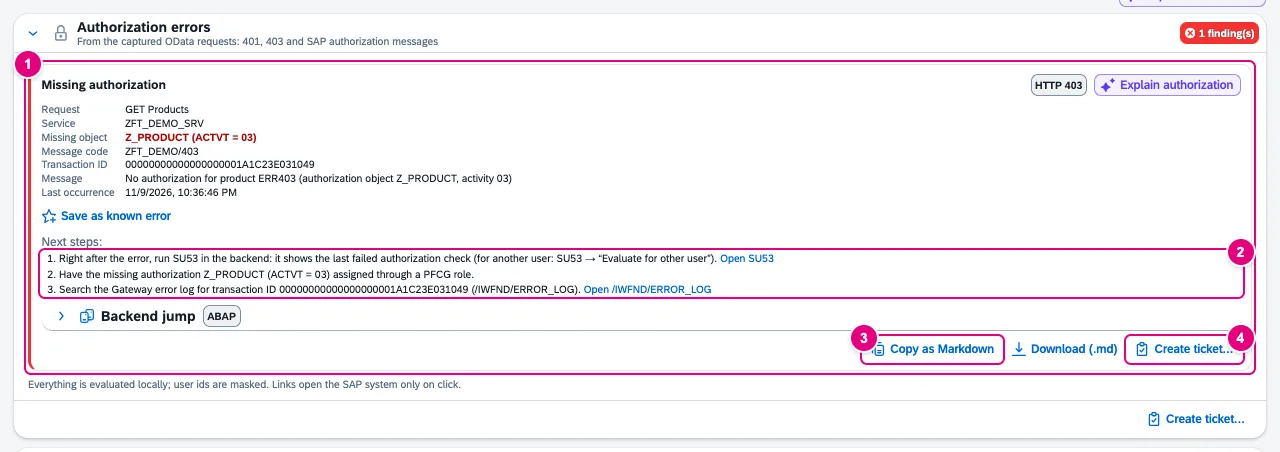
Z_PRODUCT, activity 03.- The finding: kind, request, service, missing object, message code, transaction ID, message and last occurrence.
- Next steps with links such as Open SU53 and Open /IWFND/ERROR_LOG. They open SAP GUI for HTML of the same system – only on click.
- Copy as Markdown and Download (.md) – per finding or for all.
- Create ticket… opens the ticket dialog of the issue reporter with the finding, for example for ServiceNow.
| Kind in the tab | Detected by | Next step (excerpt) |
|---|---|---|
| Missing authorization | HTTP 403 or /IWBEP/CM_MGW_RT/022 | SU53, assign the object through a PFCG role, start authorization |
| Not logged on (HTTP 401) | HTTP 401 | log on again, logon procedure of the ICF node (SICF) |
| CSRF token rejected (no authorization problem) | 403 with x-csrf-token: Required | reload the page; otherwise check proxy or Web Dispatcher |
| Service not registered or not active | /IWFND/MED/170 | /IWFND/MAINT_SERVICE, ICF node |
| No system alias for the service | /IWFND/CM_MGW/096 | system alias in /IWFND/MAINT_SERVICE, RFC destination in SM59 |
| ICF node inactive | ICF message | activate the node in SICF |
It detects standard objects such as S_SERVICE and S_START and named objects (“authorization object Z_PRODUCT”), plus field and value (“activity 03” becomes ACTVT = 03) and named PFCG roles. It evaluates JSON (OData V2 and V4), XML and CAP errors, and parts of a $batch one by one. User ids never appear in clear text: DEVELOPER1 becomes D********1. Exports contain the page URL without query and hash.
Why don’t I see this tile?
The check chain in the same tab explains why a tile is missing in the launchpad. Since the tile cannot be seen, you enter its intent – suggestions come from the launchpad content; if the current hash holds an intent, it is pre-filled.
- Open the Authorizations tab in the launchpad.
- Enter the intent under Intent, for example
SalesOrder-display. - Click Check. The chain runs stage by stage; the summary names the stage where the tile is blocked.
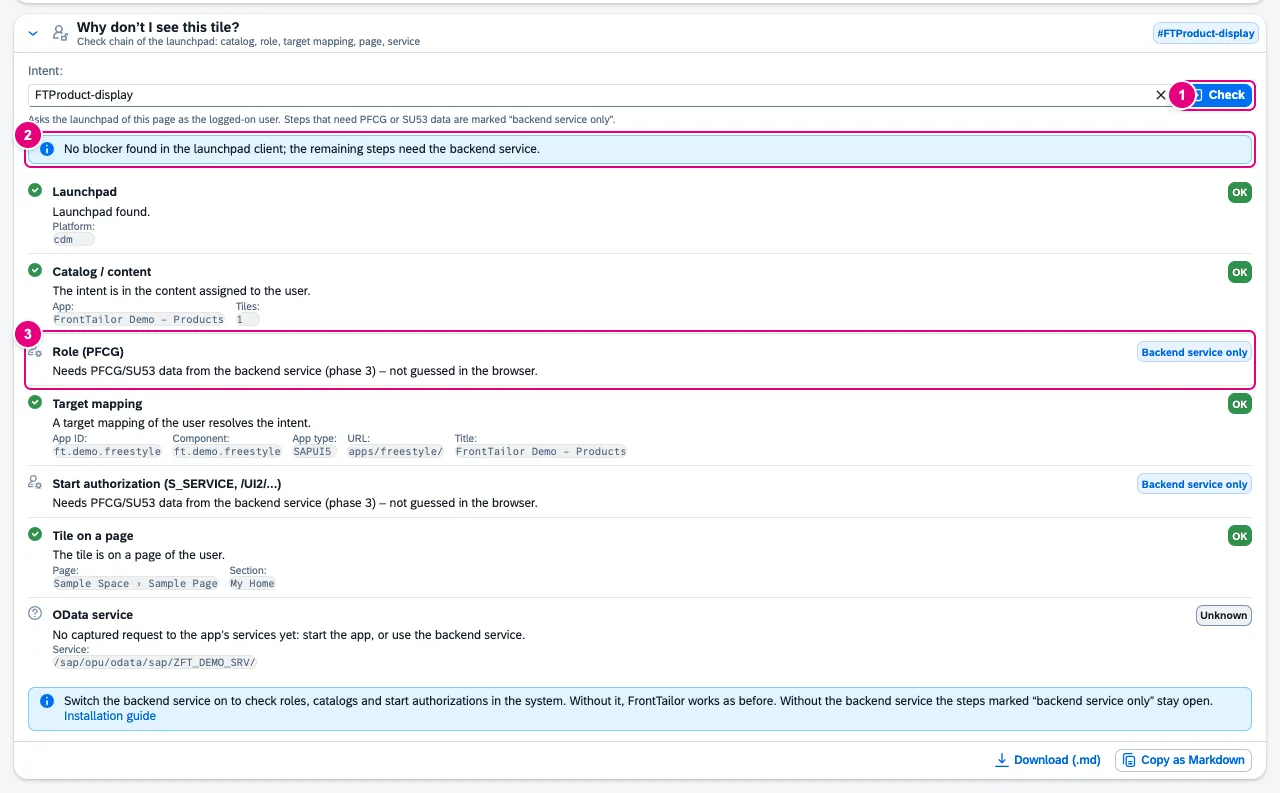
- Check starts the chain for the intent entered.
- The summary, here: no obstacle found in the launchpad client.
- Stages that need PFCG or SU53 data are marked Backend service only – the browser does not guess.
| Stage | Where the answer comes from |
|---|---|
| Launchpad | launchpad in the page, with platform and client |
| Catalog / content | the user’s content in the launchpad |
| Role (PFCG) | backend service only |
| Target mapping | the launchpad’s resolution: app ID, component, URL |
| Start authorization (S_SERVICE, /UI2/…) | backend service only |
| Tile on a page | the user’s spaces and pages; warning if the app is in the catalog but on no page |
| OData service | the app’s data sources against the OData recording |
If a launchpad version does not expose some information, the stage is Unknown – never Blocked. Every query has a time limit of 10 s. The chain only runs on click; the launchpad may then load its own modules and page content, and if the target app is not running, FrontTailor reads its manifest.json once from the same origin. For a visible tile, the Launchpad inspector is the right tool.
Roles tab and backend service
What the browser cannot know – PFCG roles, catalogs of the role, start authorization – comes from the ABAP add-on /CDNA/FIORITAILOR, a read-only OData V4 service for S/4HANA on-premise and Private Cloud. The Roles tab switches it on per host.
- Open the app on the SAP system and the Roles tab in the panel.
- Switch on Use backend service. Only now does FrontTailor send any request to the service – with your browser session, on the same host.
- If the path differs from the default, enter it under Service path and click Apply.
- The state changes to Available; below are system, client, user, add-on, contract and whether you may check other users.
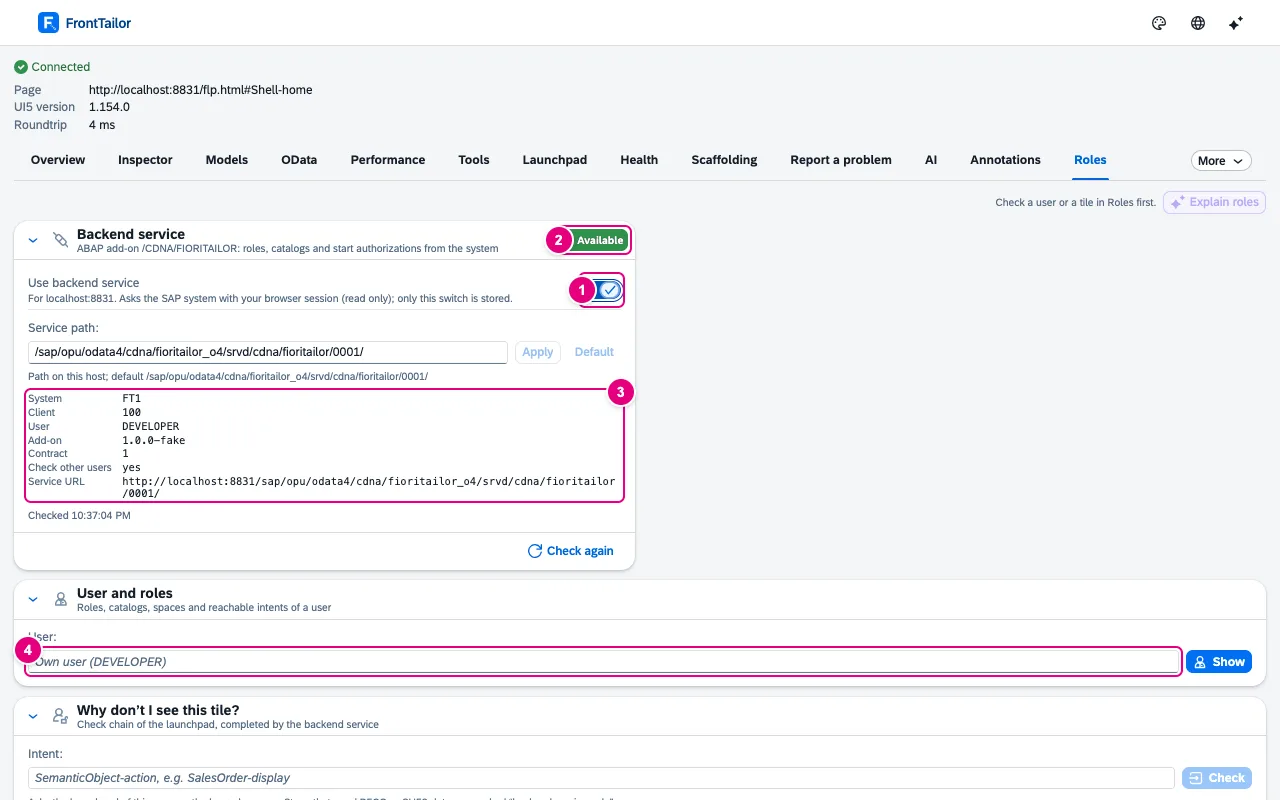
- Use backend service – only this switch is stored (and a different path), no answers, no users, no tokens.
- The service’s state.
- System, client, user, add-on, contract, Check other users and service URL.
- User: empty for your own user, otherwise another one.
| State | Meaning |
|---|---|
| Off | switch off; FrontTailor sends nothing to the service. |
| Available | The service answers. |
| Not installed | HTTP 404: add-on missing or SICF node inactive. |
| Not logged on | no SAP session in this browser |
| No authorization | The user lacks the role /CDNA/FT_USER. |
| Incompatible | unknown contract version: update the add-on or the extension |
Without the service, FrontTailor works as before; the “Backend service only” stages stay open. When the service is available, Health also takes the ICF timeout from the system.
Role simulator: what does another user see?
- Enter the user in the User and roles card. Before sending, the tab warns that the check is logged in the application log.
- Click Show. Roles, catalogs, spaces, groups and reachable intents appear, each with the role that assigns it.
- Click a reachable intent to start the check chain for this user – or enter an intent below under Why don’t I see this tile?.
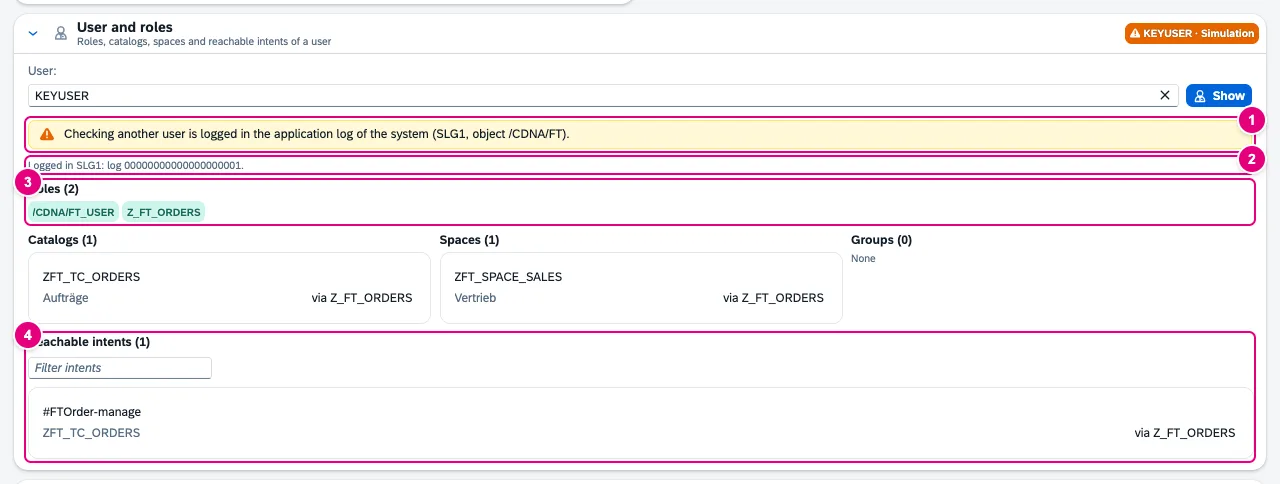
- The note before sending: checking another user is logged (SLG1, object
/CDNA/FT). - The log number after the check.
- The user’s roles.
- Reachable intents with filter and assigning role.
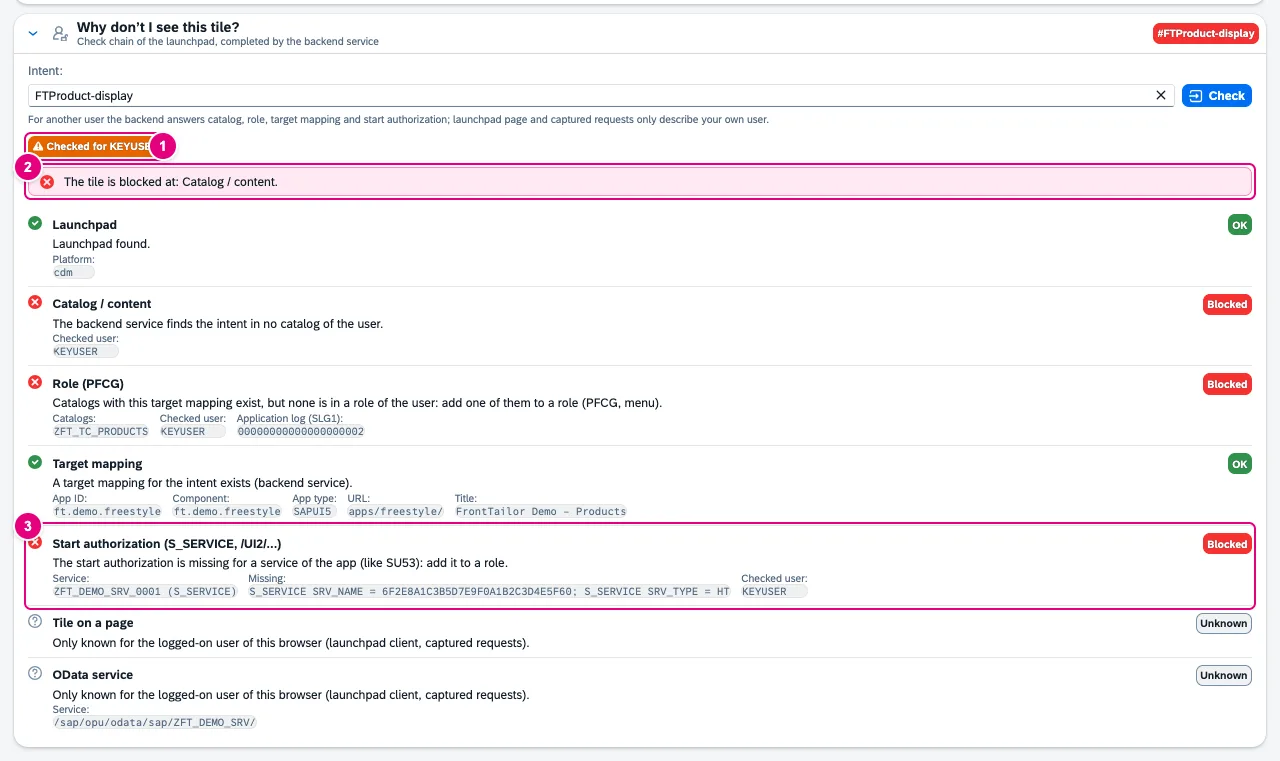
- Checked for – the simulated user.
- The summary: The tile is blocked at: Catalog / content.
- Start authorization with service and missing value, here
S_SERVICEwithSRV_NAMEandSRV_TYPE.
For another user the backend answers catalog, role, target mapping and start authorization. Tile on a page and OData service only describe this browser’s user and stay Unknown in a simulation. For your own user, the Authorizations tab also uses the service once it is available.
Only users with the role /CDNA/FT_SIM (object /CDNA/SIM, activity 03) may check other users. The add-on writes every such check to SLG1 first – with caller, target user and intent or service. If it cannot save the entry, it refuses the check.
Typical problems
| What you see | Cause and fix |
|---|---|
| No findings despite errors | OData recording is off for the host. Without it the tab shows a note; the check chain keeps working. |
| The finding names no object | The system’s message names none. SU53 or the authorization trace (STAUTHTRACE) shows which check failed. |
| Check chain: stage Launchpad blocked | The page is not a launchpad. Open the tab in the launchpad, not in the standalone app. |
| Roles tab: Not installed | Add-on missing, SICF node inactive or a different service path. See ABAP add-on. |
| Roles tab: other users not allowed | You lack the role /CDNA/FT_SIM. |
See also
- Features at a glance Features · betrieb
- Further reading Security and Authorizations for SAP Business Technology Platform (SAP PRESS)
- Help from people Launchpad, roles and authorizations
- Docs Launchpad inspector
- Docs ABAP add-on
- Docs Backend jump
- Docs OData console
- Sources ADR-0251 · ADR-0322 · ADR-0313