Scaffolding & recorder
The “Scaffolding” tab generates test code from the app as it is running: page objects with stable selectors, journeys from a recording, a QUnit skeleton for the controller, mock data from the recorded OData requests and snippets. The shared recorder provides the click path.
- Edition
- from Pro
- Tab
- “Scaffolding”
- Sections
- Page object, Journey, Unit test, Mock data, Snippets
- Frameworks
- OPA5, wdi5, Playwright
- Recorder
- Community, also in “Report a problem” and “Health”
- On PROD
- unrestricted, it only reads
The tab at a glance
Open the app and the Scaffolding tab in the panel. At the top, choose the Scope: Automatic (largest visible view), a specific rendered view or the control selected in the Inspector. Read again reads the view again. On the right you see what was detected: view, controller, number of controls and controller methods. from Pro
The Getting started card sums up the path in three steps: record, generate, run. Each section also has Learn more with prerequisites, where the file goes and next steps, and next to every piece of code, Code explained jumps to the relevant lines.
Generate a page object
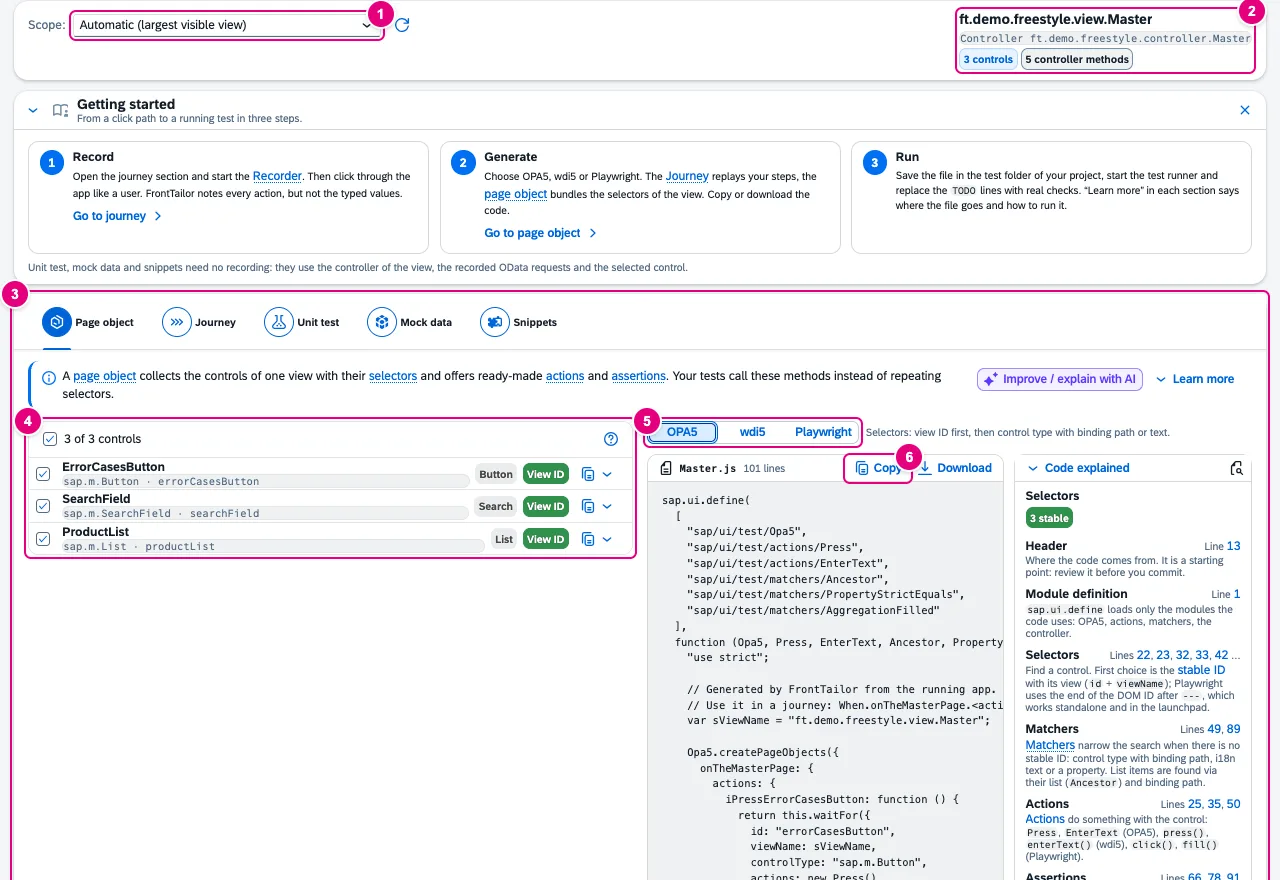
- Scope: which view or container is described.
- The detected view with controller, number of controls and controller methods.
- The five sections: Page object, Journey, Unit test, Mock data, Snippets.
- The interactive controls of the view, each with role and selector strategy. The checkbox decides whether a control goes into the page object. Next to it: Copy selector as ….
- Test framework: OPA5, wdi5 or Playwright.
- Copy and Download the code.
For every control, FrontTailor picks the most stable selector available:
| Strategy | When |
|---|---|
| View ID | Stable ID in the view – the most robust selector. In Playwright the end of the DOM ID, so the same locator works standalone and in the launchpad. |
| Global ID | Own ID outside a view: stable as long as the ID is unique. |
| Matcher | Generated ID: the selector uses control type, binding path or text instead. |
| Generated ID | Generated ID without text or binding: the selector will break. The UI warns and the code marks the spot – give the control an ID. |
The code addresses list items via the list and the item’s binding path. Values typed into input fields are never part of the view description.
Record the click path
The recorder is a shared recording bar. It appears in the Journey section, in the Report a problem tab and in the Health tab – all three show the same recording. The recorder itself is part of the Community edition; what you turn it into has the edition of the respective module. Community
- Click Record – or start from the command palette with Start/stop recording.
- Use the app like a user. Presses, selections, searches and navigation become steps.
- Click Stop. You can now move or delete steps.
- Choose under Use as … what it should become.

- The state: Recording … or Not recording.
- Step counter and time, each with its limit: at most 200 steps and 10 minutes. If a recording ends at a limit, the bar says so.
- Stop, next to it Discard.
- Record typed text (masked) – off by default, see below.
- The steps with kind, control and time offset; move and delete on the right.
Inputs: without the opt-in, the recorder records no typed text and no search terms. The step then reads “value not recorded”, the generated code has TODO: value not recorded. The opt-in applies to this recording only, and the values are masked inside the page already with the privacy rules of Report a problem, including your administrator’s mandatory rules. The key of a selection and the state of a switch are app data and are kept, masked as well.

| Use as … | Result |
|---|---|
| Bug report (steps to reproduce) | Attaches all steps as a “Recorded steps” table to the report in Report a problem. |
| OPA5 journey, wdi5 journey, Playwright journey | Opens the Journey section with this framework. |
| Synthetic check | Takes presses and switches into a check in Health; inputs and selections are skipped and counted. |
If a module is not licensed, its output appears locked with an edition tag; if it is switched off by policy, it is missing. Under Recordings you save recordings under a name in the browser (at most 20 per origin), load and delete them and exchange them as a JSON file.
Journey from the recording
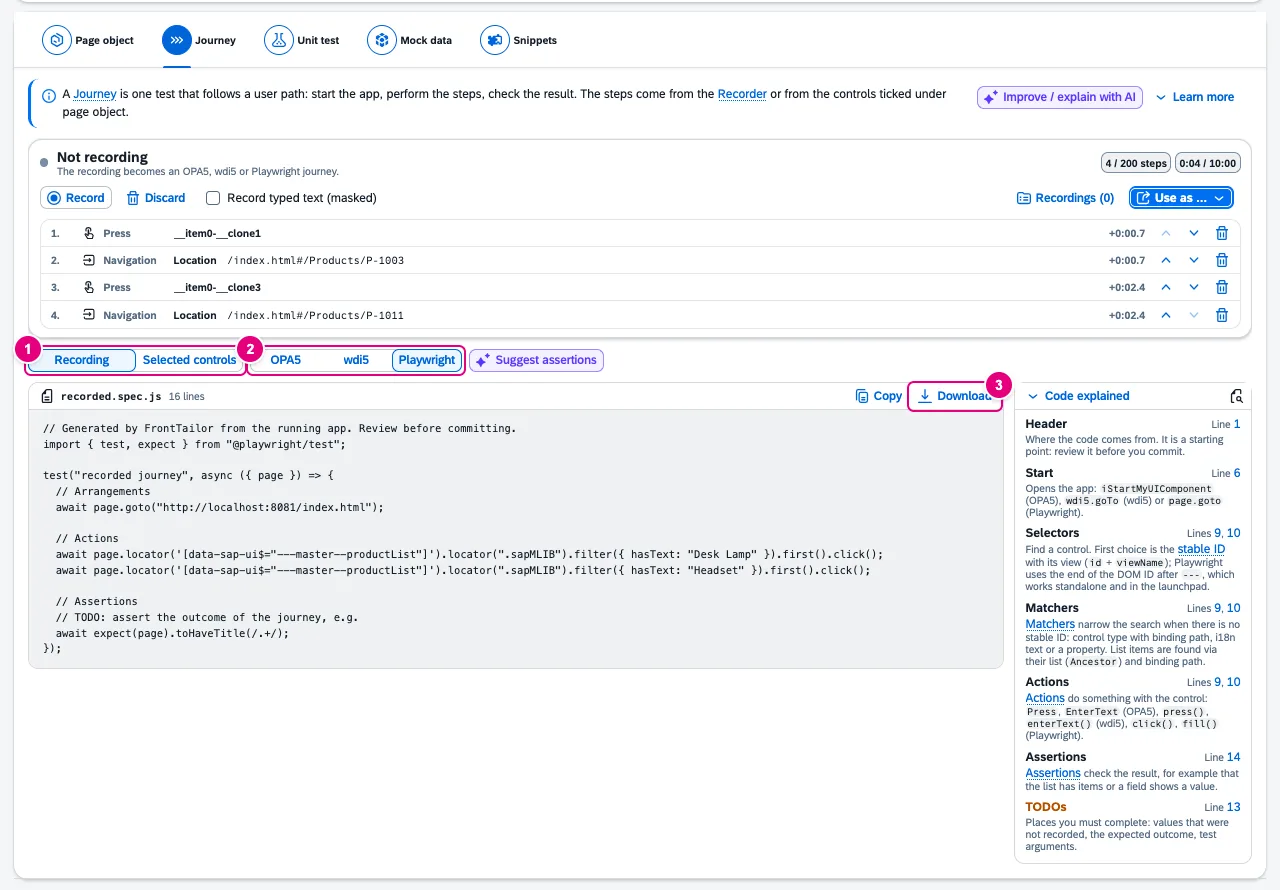
- Steps from: Recording or Selected controls (the checkboxes in the page object).
- Framework: OPA5 starts the component with
iStartMyUIComponent, wdi5 withwdi5.goTo, Playwright withpage.goto. - Copy and Download.
You add the assertions yourself: the code contains TODO lines for the expected outcome. With a configured AI assistant, Suggest assertions proposes some.
Unit test for the controller
The Unit test section generates a QUnit skeleton with sap/ui/thirdparty/sinon: one test per own controller method, view, router and owner component stubbed, event handlers get an oEvent stub. FrontTailor loads no source code for this – the methods come from the running app.
Open in the editor opens the controller in VS Code (vscode://file/…). For that you map a namespace to a local folder once (Map workspace folder); only paths are stored. SAP Business Application Studio is not covered.
Mock data
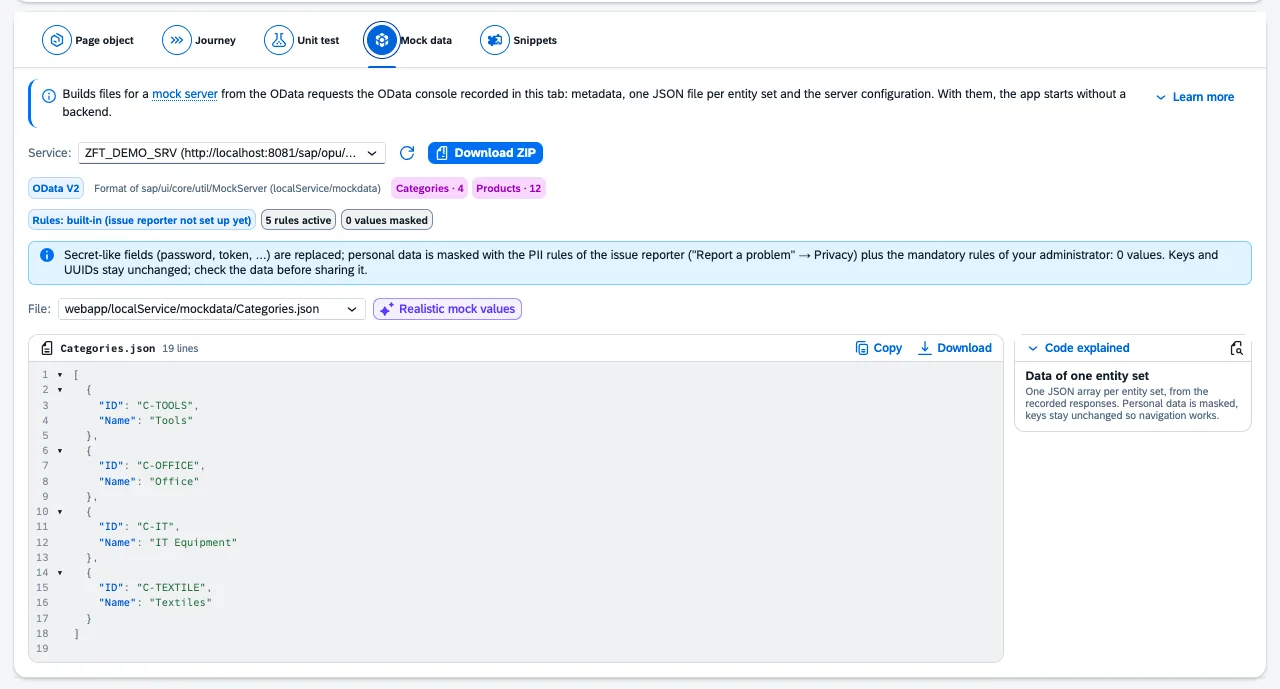
The source is the recording of the OData console in this tab. For OData V2 you get localService/metadata.xml, mockdata/<EntitySet>.json and a mockserver.js; for OData V4 the layout of @sap-ux/ui5-middleware-fe-mockserver with ui5-mock.yaml. Download ZIP gets everything at once.
- Expanded navigations become rows of their entity set, duplicate rows are dropped.
- Secret-like fields (
password,token…) are replaced. - FrontTailor masks personal data with the rules of Report a problem plus the policy’s mandatory rules. The bar names the rule set, the number of rules and of masked values.
- Keys and UUIDs stay unchanged so that navigations work in the mockserver. Check the data before sharing it.
Snippets
The Snippets section contains 12 built-in templates – among them formatter, dialog fragment, UI.LineItem, UI.FieldGroup, Common.ValueList, UI.HeaderInfo, CAP entity and handler, RAP projection and behavior, OPA5 waitFor. FrontTailor fills placeholders from the selected control and an entity set of the recorded metadata; open placeholders stay visible. Create your own snippets with New (at most 200, stored in the browser) and exchange them via import and export.
Common problems
| Message or symptom | Cause and fix |
|---|---|
| “No rendered view found.” | Open a view of the app and click Read again. |
| Controls with Generated ID | Their selectors are not stable. Give them an ID in the view. |
| “The recording has no actions a journey can replay (only navigation).” | Record presses or selections in the app, not just page changes via the address bar. |
| “This UI5 version offers no event hook” | In very old versions the recorder only records clicks and navigation. |
| “No OData requests recorded in this tab yet.” | Use the app so the OData console records requests, then read again. |
| “Some requests were recorded without content” | They ran before FrontTailor was active in the page. Reload the app and read again. |
| “The PII rules could not be loaded” | Without a rule set, FrontTailor deliberately creates no mock data. Read again in a moment. |
See also
- Features at a glance Features · Test & report
- Further reading SAPUI5 – The Comprehensive Guide (SAP PRESS)
- Further reading SAP Fiori Elements – Development and Extensibility (SAP PRESS)
- Help from people Hands-on workshops on SAPUI5, Fiori elements, OData and CAP
- Docs Report a problem
- Docs Health and morning check
- Docs OData console
- Sources ADR-0201 · ADR-0282