Health and morning check
Two tabs for running SAP Fiori® and UI5 apps: Health shows how the app is doing right now – latency, error rate, session, login and last error – and replays recorded click sequences as a synthetic check. The morning check opens all apps of a list one after another and reports by traffic light what does not start. Both are part of the Enterprise edition.
- Edition
- from Enterprise
- Tabs
- “Health” and “Morning check”
- Data source
- the OData console’s recording, no extra request
- Morning check
- up to 20 lists of 30 apps, 7 runs per list
- On PROD
- reading and morning check allowed, replaying clicks locked
The Health tab
Open the FrontTailor panel in DevTools (F12) or the side panel and choose Health. The status bar at the top is computed from the recording of the OData console: it sends no request of its own but evaluates what the app talks to its backend anyway. In the side panel it is compact.
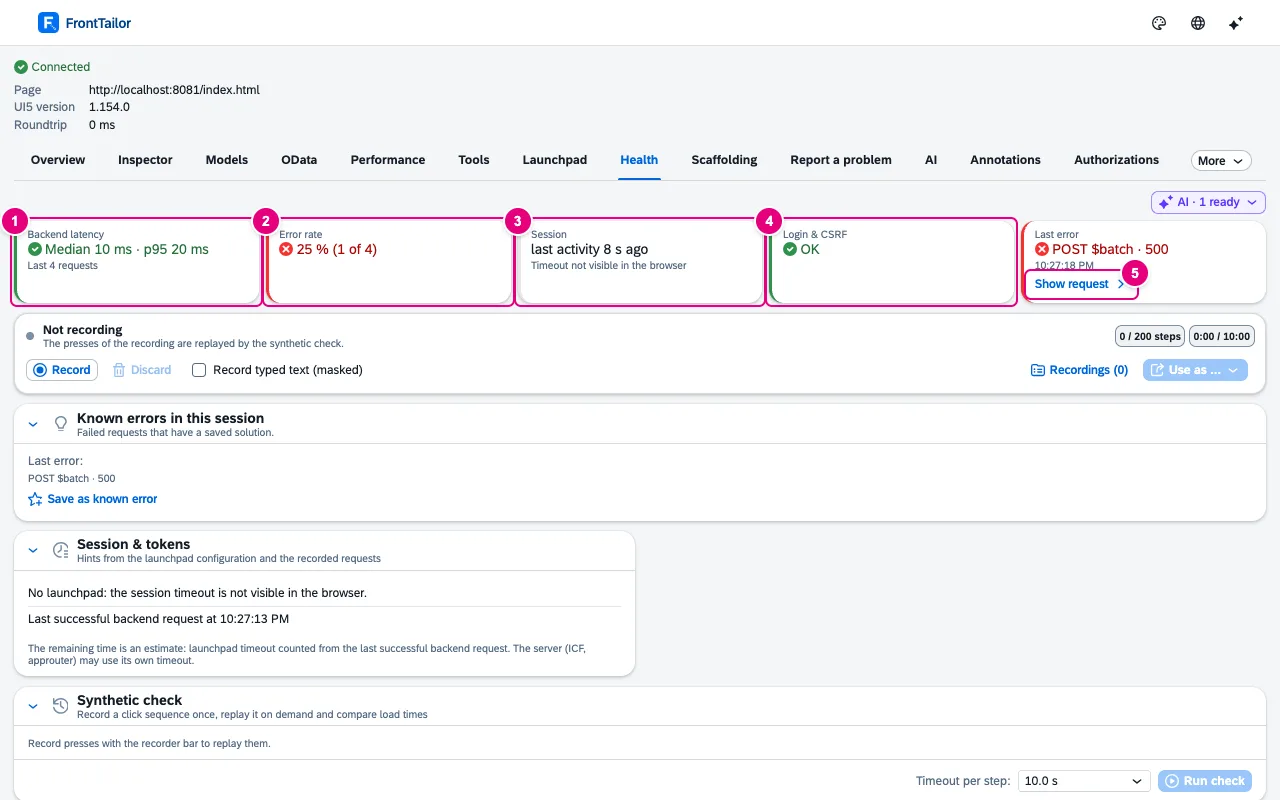
- Backend latency: median and p95 of the last 50 completed requests.
- Error rate: share of responses with status 400 or above, status 0 or network errors – including single parts of a
$batch. - Session: estimated time left or last activity … ago.
- Login & CSRF: 401 and 403 of the last two minutes and rejected CSRF tokens.
- Show request jumps to the OData console and selects the failed request.
| Figure | Yellow from | Red from |
|---|---|---|
| Backend latency (p95) | 1 s | 3 s |
| Error rate | 5 % | 20 % |
| Login (401/403 in two minutes) | 1 | 3 |
| CSRF | – | token rejected |
Replays from the OData console do not count. If OData recording is off for the host (policy or your own choice), the tab says so instead of showing empty values.
Session and tokens
The browser does not know when the server session expires: the cookie is HttpOnly, and FrontTailor reads no cookies. The Session & tokens card therefore estimates:
- the timeout from the launchpad configuration (the same setting the launchpad uses for its own sign-out dialog) – with reminder and automatic sign-out, if set;
- the starting point from the last successful backend request;
- a new backend session when
sap-contextidchanges between two requests.
The remaining time is marked as an estimate; ICF, approuter or identity provider may have their own timeouts. Without a launchpad it only says “No launchpad: the session timeout is not visible in the browser.” If the ABAP add-on is installed (backend service), the timeout comes from the system instead of the launchpad. A rejected CSRF token (403 with x-csrf-token: Required) is reported explicitly: session or token expired, the app must fetch a new token.
Synthetic check
Record a click sequence once and replay it when needed – for example after a deployment, to compare load times. The recorder bar is the same as in the Report a problem and Scaffolding tabs; all three see the same recording.
- Click Record in the recorder bar. The bar counts steps and time (at most 200 steps and 10 minutes).
- Click through the flow in the app. Only real user clicks count; typed text is only recorded if you tick Record typed text (masked).
- Click Stop. The Synthetic check card lists the steps.
- Choose the Timeout per step (5, 10 or 30 s) and click Run check.

- The steps with status, wait until the control appears, load time and number of requests.
- The result: Check passed in … or Check failed after ….
- Run check replays the sequence in the current tab, starting at the same location hash.
For each step the check finds the control, clicks it and waits until the page has been quiet for 500 ms. If it cannot find a control (Control not found) or time runs out (Timeout), it skips the remaining steps. Generated ids like __button3 often differ after a reload; the tab marks such steps with generated id.
The morning check
Instead of opening ten apps by hand every morning: a check list opens them one after another in a background tab, waits until each one is quiet and closes it again. Nothing runs before you click.
- Choose the Morning check tab and click Create list – or Start with this app, then the current app is already in it.
- Add apps: a URL or a launchpad intent such as
SalesOrder-display. For intents the list needs the Launchpad URL. Add current app takes over the tab’s page. - Save, then Start check. In the same click, FrontTailor asks once per system for access; apps of systems without access stay grey.
- The report fills app by app. Stop ends the run after the current app.
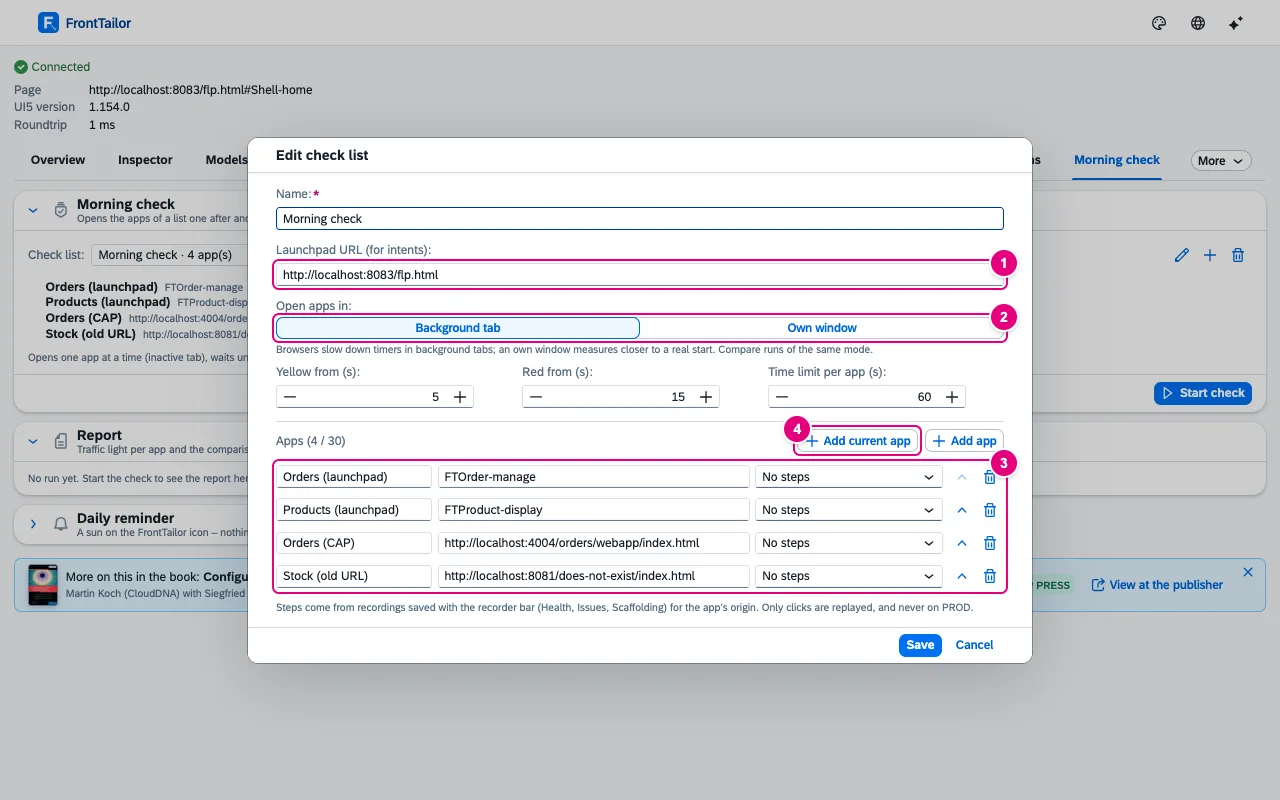
- Launchpad URL (for intents) – the check opens every intent of the list there.
- Open apps in: background tab or own window. Browsers slow down timers in background tabs; an own window measures closer to a real start. Only compare runs of the same mode.
- The list’s apps, up to 30, each with name, target and optionally the steps of a saved recording.
- Add current app. FrontTailor removes session-bound parameters such as
sap-iapp-state, and user and password in URLs when saving.
| List setting | Default |
|---|---|
| Yellow from (s) | 5 |
| Red from (s) | 15 (never below yellow) |
| Time limit per app (s) | 60 |
| Open apps in | Background tab |
Report and traffic light
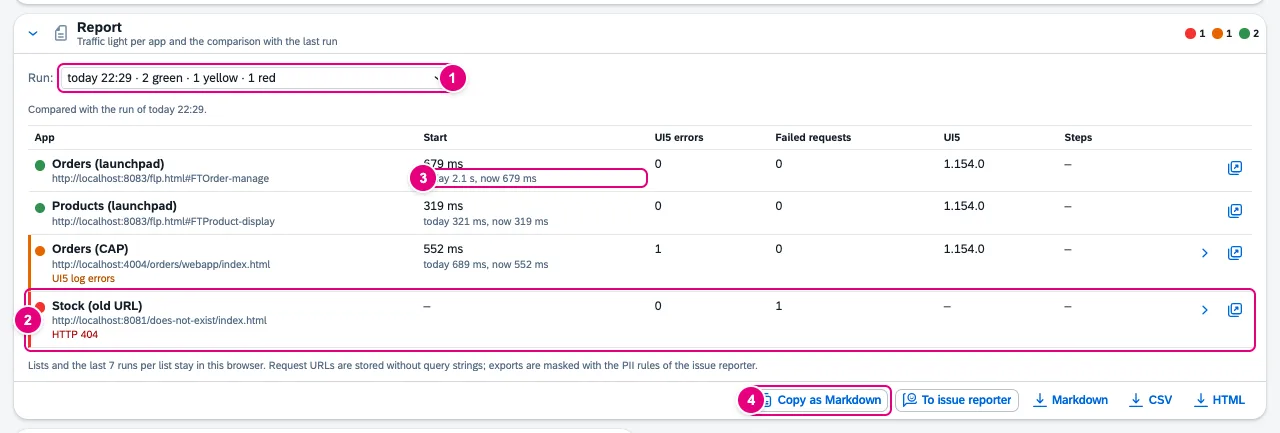
- Run: choice of earlier runs with their balance (green, yellow, red).
- A red app with its reason – here HTTP 404. Details expands failed requests and UI5 log errors, Open app opens it.
- The comparison with the last run of the same list, for example today 2.1 s, now 679 ms – two runs on the same day are compared as “today” and “now”.
- Export: Copy as Markdown, To issue reporter and files as Markdown, CSV and HTML.
| Light | When |
|---|---|
| Red | HTTP error, load error, no UI5, redirected (for example to the identity provider), timeout, steps failed, start at or above the red threshold |
| Yellow | start at or above the yellow threshold, clearly slower than in the last run (at least 1 s and 1.5 times), never quiet, errors in the UI5 log, failed requests |
| Green | otherwise |
| Grey (“not checked”) | no access, policy, licence, invalid target, stopped |
In the comparison the report counts failed requests as new or fixed. FrontTailor masks exports with the PII rules of the issue reporter; To issue reporter opens the Report a problem tab with title and description, and nothing is sent before preview and click.
Daily reminder
In the Daily reminder card, switch on Remind me every day, choose the time (05:00 to 12:00 in quarter hours) and, if you like, Monday to Friday only. At that time a sun ☀ appears on the FrontTailor icon and a note in the tab. The check does not start by itself and nothing is sent; the sun disappears with the next run.
Check lists can be shared in the team via Team sync; they then carry the Team tag. Runs are not shared. Lists and the last seven runs per list stay in the browser, request addresses without query strings.
Typical problems
| What you see | Cause and fix |
|---|---|
| “No OData requests recorded yet” | The app has not talked to its backend yet. The values appear with the first request. |
| “Timeout not visible in the browser” | The app runs without a launchpad, or the launchpad has no timeout in its client configuration. The session then only shows the last activity. |
| Synthetic check: Control not found | Often a generated id that changed after the reload. Record the step again on a control with a stable id. |
| Morning check: app stays grey | No access to the system, host locked by policy or no licence for this host. You grant access with the next Start check. |
| Morning check: red Redirected to … (login?) or No UI5 app found | The login has expired and the app lands at the identity provider. Sign in once in the browser, then start again. |
See also
- Features at a glance Features · betrieb
- Further reading Configuring SAP Business Technology Platform – The Practical Guide for Administrators (SAP PRESS)
- Help from people Fiori performance review
- Docs OData console
- Docs Backend jump
- Docs Release check
- Docs Team sync
- Sources ADR-0231 · ADR-0432 · ADR-0283