UI5 2.0
UI5 2.x drops every deprecated API: sap.ui.getCore(), jQuery.sap.*, synchronous loading, old themes and libraries. The readiness check shows which of it affects your app – from the running app, with file and line, severity and the replacement from the SAP documentation. Check and findings are free; the migration report comes with Pro.
- Edition
- Community
- Tab
- “UI5 2.0”
- Migration report
- Pro
- Surfaces
- DevTools panel and side panel
- On PROD
- allowed, the check changes nothing in the app
How the check works
Open the FrontTailor panel in DevTools (F12) or the side panel and choose the UI5 2.0 tab. Nothing runs in the page before you start. After a click on Start check, FrontTailor reads the runtime, the manifest, the bootstrap and the live controls, then watches deprecated API calls while you use the app. Afterwards every hook is removed.
SAP’s static @ui5/linter sees the source code. The readiness check adds what only shows at runtime: dynamically built calls, code from customer libraries, properties on live controls, bootstrap attributes of the delivered page and synchronously loaded modules.
Start a check
- Open the app and the UI5 2.0 tab in the panel.
- Under Watch for, choose the duration: 30 seconds, 1 minute, 3 minutes or 10 minutes.
- Click Start check. Findings from the manifest, bootstrap, libraries and controls appear right away.
- Use the app as usual: open dialogs, navigate, save. Deprecated calls appear as soon as the app makes them.
- Click Finish now or wait until the time runs out. The button then reads Check again.
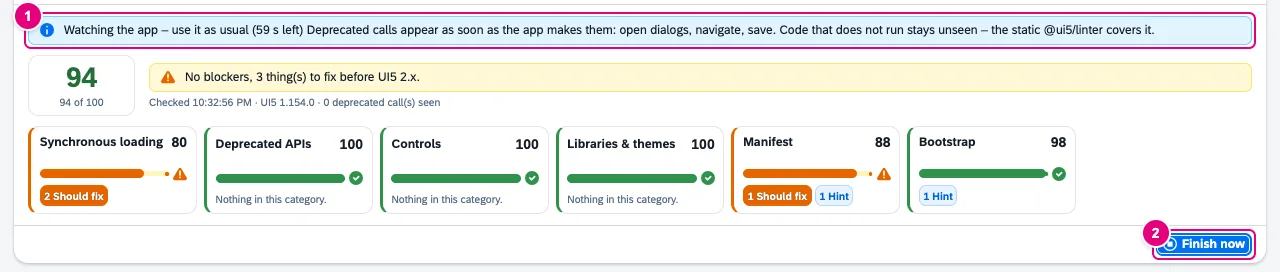
- “Watching the app – use it as usual …” with the time left.
- Finish now stops watching early.
The command palette can start the check, too. Code that does not run while watching stays unseen – only the static @ui5/linter finds it.
Score and categories

- The score from 0 to 100.
- The summary, below it the time, UI5 version and number of deprecated calls seen.
- A partial score per category with the number of findings per severity. A click filters the findings to that category.
- Watch for: duration of the next run.
- Check again.
Per category: 100 minus 30 per blocker, 10 per Should fix and 2 per Hint. The overall score is the average of the categories and is at most 49 while a blocker is open. Distinct findings count, not calls – a frequently called spot does not distort the rating.
| Category | What is checked |
|---|---|
| Synchronous loading | modules loaded by synchronous XHR, component without IAsyncContentCreation, manifest not "json", resource model without async |
| Deprecated APIs | observed calls of sap.ui.getCore() and core methods, sap.ui.requireSync, jQuery.sap.*, synchronous factories and global namespaces – from app code only |
| Controls | deprecated controls and deprecated properties, aggregations and events set on live controls |
| Libraries & themes | deprecated libraries such as sap.ui.commons and themes such as sap_belize → sap_horizon |
| Manifest | _version below 2, minUI5Version below 1.120, renamed routing entries, removed entries |
| Bootstrap | missing data-sap-ui-async, deprecated options, inline init, compatVersion |
The app is checked, not the framework: Fiori elements templates and the launchpad shell produce no findings.
Read and filter findings
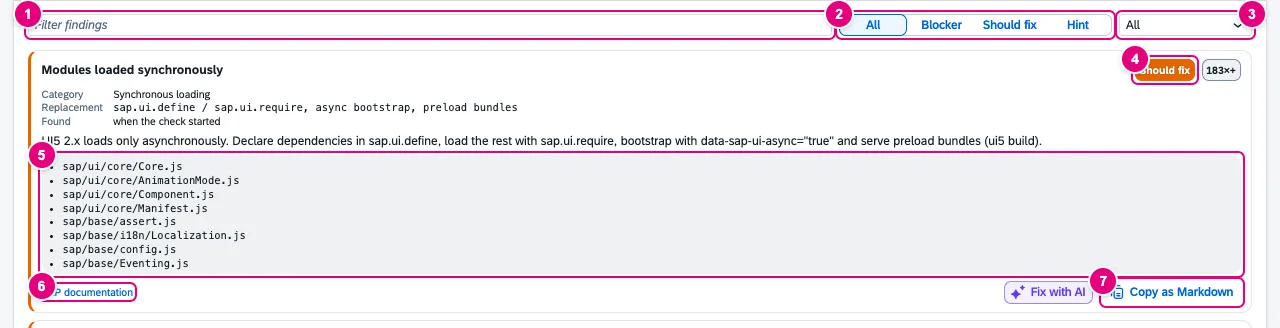
ui5 serve without preload bundles.- Filter findings: free-text search.
- Severity: All, Blocker, Should fix, Hint.
- Category.
- Severity and number of occurrences.
- Where: up to eight examples, for calls as the caller’s
file:line:column. - SAP documentation opens the matching page, for example “Best Practices for Loading Modules”.
- Copy as Markdown takes the finding with you – for a ticket, say.
| Severity | Meaning |
|---|---|
| Blocker | removed in UI5 2.x – the app breaks |
| Should fix | works, but blocks the migration or costs load time |
| Hint | should be adjusted, but breaks nothing |
Every finding names Category, Replacement and Found (when the check started or while watching the app), with the Fix below. For library findings, Analyze libraries leads to the Libraries tab. With from Pro, Fix with AI proposes a change – with your own key and only after a preview, see AI assistant.
Migration report
With from Pro you export the whole run below the findings:

- All occurrences (.csv): every occurrence as a row, for example to split the work in the team.
- Report (.md): the migration report with summary, effort per category and the comparison with the previous run of the same app.
- The effort is an estimate in hours per rule times locations and is marked as a guide value in the report.
- The comparison names what is new, resolved or changed since the last run. On an app’s first run it says “First run of this app – the next report compares with this one.”
- Without Pro the buttons show a lock; a click explains what the report contains. The check, the findings and Copy as Markdown stay free.
What is stored
Everything stays in this browser. Locations are file and line only, without origin, query or hash. For the comparison FrontTailor keeps the last ten runs per app as counts – rule, category, severity and number, no examples, no file paths, no app data. Email addresses and IBANs are masked in the exports.
Typical problems
| What you see | Cause and fix |
|---|---|
| “No connected UI5 app in this tab.” | The page has not loaded UI5 (yet), or the host is not granted – see grant the domain. |
| Deprecated APIs stays at 100 although the linter reports findings | Only calls that run while watching count. Use the affected functions of the app or choose a longer duration. |
| Many synchronously loaded modules | Typical for ui5 serve without preload bundles. Check the built app (ui5 build) with data-sap-ui-async="true". |
| “Very large app: the control scan stopped at its limit.” | The scan reads at most 5000 elements or 400 ms. Check the app’s areas one after another. |
| The tab is missing | Your administrator switched the module off by policy. |
See also
- Features at a glance Features · Quality
- Further reading SAPUI5 – The Comprehensive Guide (SAP PRESS)
- Help from people UI5 2.0: readiness and migration
- Docs Libraries
- Docs Performance
- Docs AI assistant
- Sources ADR-0271