Annotations
In Fiori elements, annotations drive the UI – and bugs show without a message: a column is missing, a label is wrong. The “Annotations” tab shows, for a field, column or section of the running app, the annotation behind it, its source and which source wins. It only reads and changes nothing.
- Edition
- from Pro
- Tab
- “Annotations”
- Views
- Control, Annotations, Manifest, Draft & ETag
- Apps
- Fiori elements V4, V2 (partly), freestyle with fallback
- On PROD
- unrestricted, the module only reads
The tab at a glance
Open the Annotations tab in the panel. At the top, choose the View: Control, Annotations, Manifest or Draft & ETag. Refresh reads the state again. Below are the service’s Sources in the order in which UI5 merges them. from Pro
The annotation documents – $metadata and annotation files – come from the log of the OData console. FrontTailor fetches nothing extra for this. Even if you open the tab after the app has loaded, everything is there as long as the console was recording.
Find the annotation behind a field
- Choose the Control view.
- Click Pick in app and then a field, column, table or section in the app. Alternatively, select a control in the Inspector; the tab takes over the selection.
- Read under Annotations of the building blocks which term creates the control, and under Properties which annotations are attached to the properties shown.
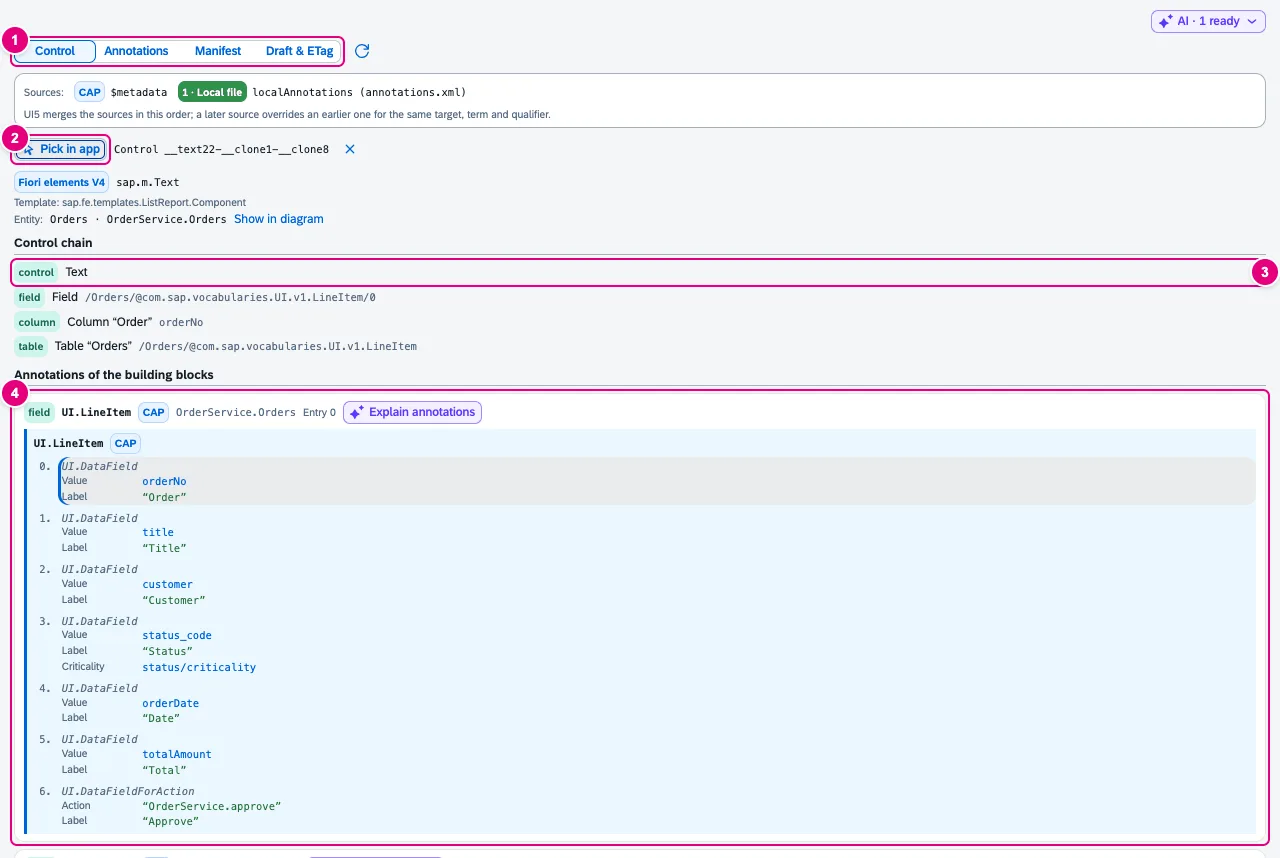
UI.LineItem, entry 0, source CAP.- The View; next to it Refresh.
- Pick in app, to the right the selected control. Below: flavour (Fiori elements V4), template and entity with Show in diagram.
- The Control chain: from the selected control via field and column up to the table, each with its meta path.
- Annotations of the building blocks: the term the control uses, with the entry in use highlighted. If a building block points on via
AnnotationPath(such as a facet toUI.FieldGroup#General), you see it under Refers to.
Further down follow Properties with all annotations of the properties the control shows and – collapsed – the Annotations of the entity, with the driving terms marked. With Pro and a configured AI assistant, Explain annotations explains the building block.
Fiori elements V2 has no meta paths. The tab then uses the entity set, the term from the template’s stable ID and the bindings; that covers field groups, tables and properties. For freestyle controls it says “No Fiori elements building block drives this control”; bound properties are still resolved against $metadata.
Sources and precedence
UI5 merges $metadata first, then the annotation files in the order of dataSources/<service>/settings/annotations in the manifest. A later source overrides an earlier one for the same target, term and qualifier. The tab computes it the same way and shows, per term, the effective value with its source and, struck through below, the overridden values.
| Source | Meaning |
|---|---|
| CAP | $metadata of a CAP service |
| $metadata | $metadata of another backend |
| Backend file | Annotation file from the server (Gateway catalogue service or below a service root) |
| Local file | The app’s own annotation file, such as annotations/annotations.xml |
| V2 attribute | A sap:* attribute from V2 metadata, mapped to a V4 term where unambiguous (for example sap:label → Common.Label). It loses against any explicit annotation. |
Search all annotations
The Annotations view lists all targets of the service, grouped by target. The search finds target, term, qualifier, value and source.
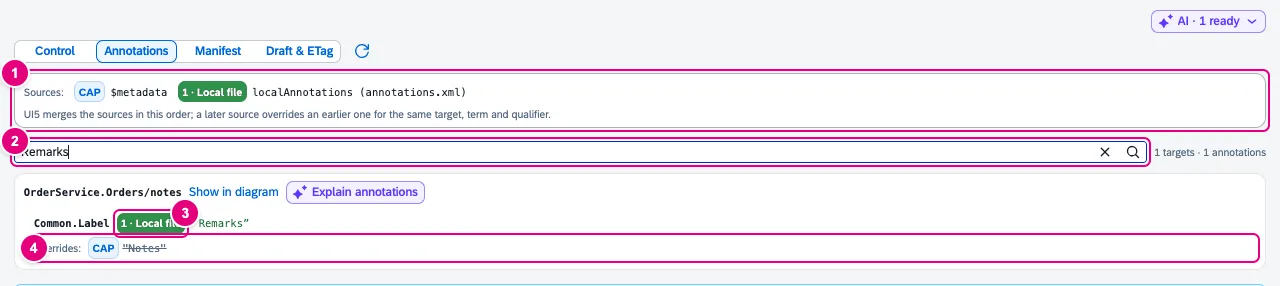
- The Sources in merge order, numbered.
- Search over target, term, qualifier, value or source; on the right the number of hits.
- The source of the effective value.
- Overrides: the displaced value with its source, struck through.
The tab first shows 60 targets, more with Show more. Show in diagram opens the type in the metadata explorer of the OData tab (see OData console); a button there leads back.
Manifest viewer
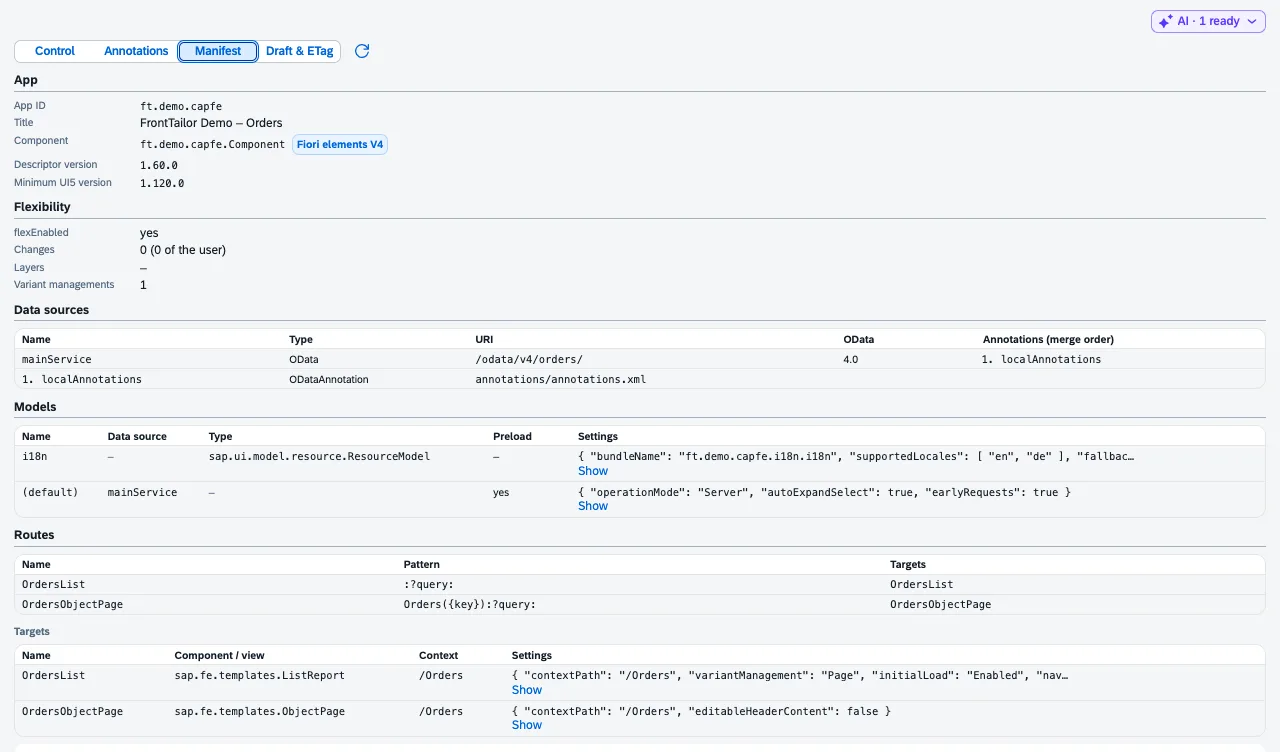
mainService with the local annotation file in position 1.The Manifest view reads the app descriptor of the running component:
- App: app ID, title, component, descriptor version, minimum UI5 version,
- Flexibility:
flexEnabled, number of changes, layers and variant managements, - Data sources with the resolved URI and the order of the annotations,
- Models with settings, Routes, Targets with the settings of the Fiori elements pages, for V2 the Pages,
- the Complete manifest (shortened for very large descriptors).
Draft state and ETag
Open an object page in the app and choose Draft & ETag. Everything is read from the app’s model cache; FrontTailor sends no request.
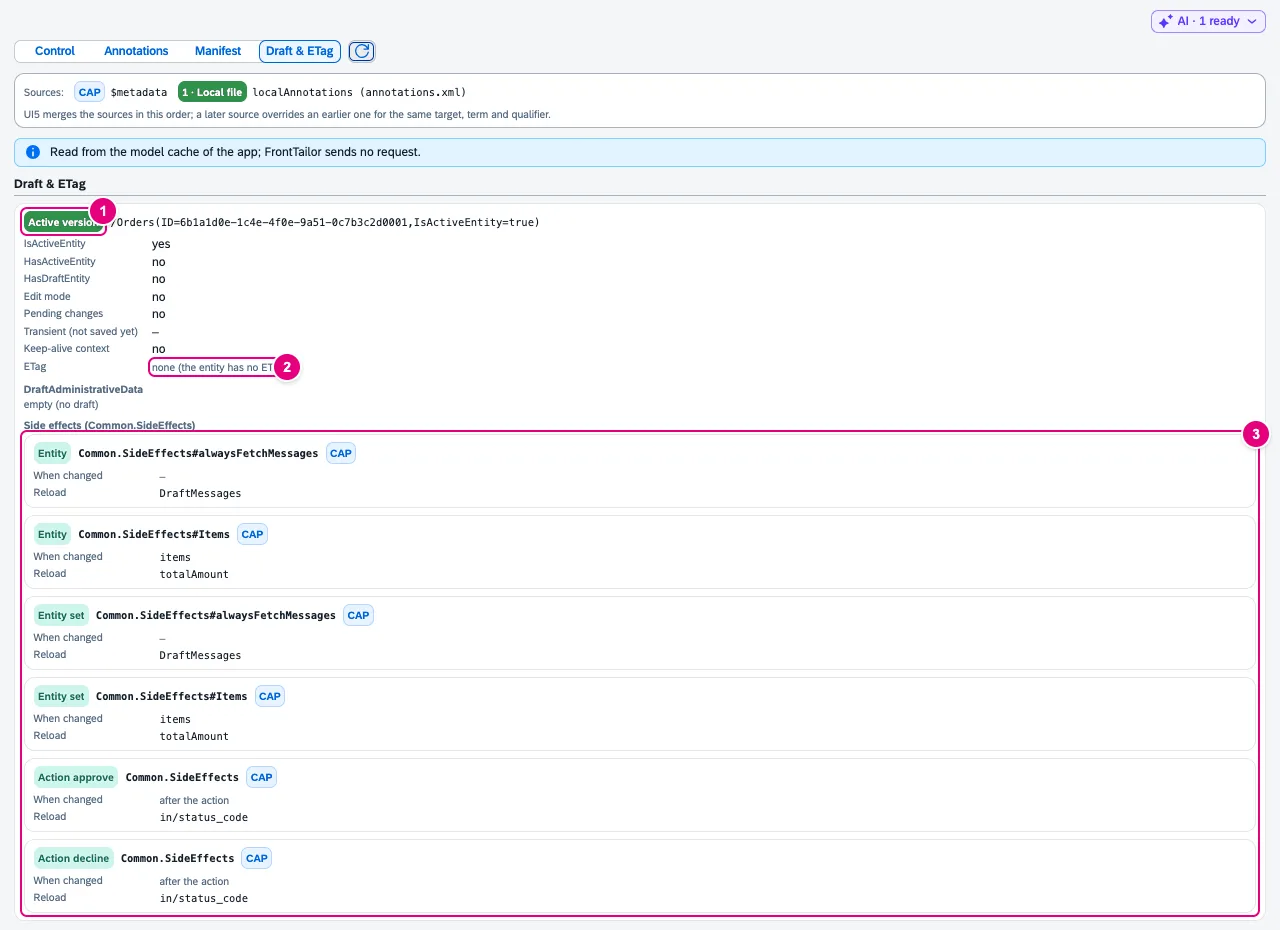
Common.SideEffects of entity, entity set and actions.- State of the page (Active version or Draft) with the bound path, below
IsActiveEntity,HasActiveEntity,HasDraftEntity, edit mode, pending changes, transient and keep-alive. - ETag from
@odata.etag(V4) or__metadata.etag(V2). - Side effects (Common.SideEffects): what is reloaded when which fields change or after which action.
DraftAdministrativeData lists the editor and timestamps of a draft. FrontTailor masks user IDs inside the page already (JDOE → J•••); the full ID never leaves the page. Whatever the app has not loaded shows as “not loaded by the app”.
Common problems
| Message or symptom | Cause and fix |
|---|---|
| “No $metadata captured for this tab yet.” | The app loaded before FrontTailor was active. Reload the app; the OData console then records $metadata and annotation files. |
| “Annotation file “…” from the manifest was not captured.” | The file is missing from the log. Reload the app. |
| “The annotation documents come from the OData console, which your administrator switched off.” | No OData console, no annotations. Control context, manifest and draft state still work. |
| “A document was larger than the console limit (1 MB)” | The document was shortened; annotations at the end are missing. |
| “Picking needs the Inspector module” | Pick in app uses the inspector’s pick mode. If it is switched off by policy, picking is not available. |
| “Meta path not found in $metadata” | The building block points to a path the captured documents do not know – often a typo in the manifest or in an annotation. |
| “No object page is open.” | Draft & ETag needs an open object page. Open an object and click Refresh. |
See also
- Features at a glance Features · Quality
- Further reading SAP Fiori Elements – Development and Extensibility (SAP PRESS)
- Further reading Full Stack Development with SAP (SAP PRESS)
- Help from people Fiori elements and annotations
- Docs OData console
- Docs Inspector
- Docs Model explorer
- Sources ADR-0191