App state bookmarks
You clicked your way to the problem, set filters, picked the right tab – and then you have to reload. Bookmarks remember exactly this state. After the reload, one click takes you back: navigation, filters, variant and tab, and recorded clicks if you like.
- Edition
- Community
- Place
- “Bookmarks” card at the top of the “Overview” tab, no tab of its own
- Palette
- “Remember state”, “Open bookmark: …”
- Storage
- up to 300 bookmarks in this browser
- Team bookmarks
- via team packages, Team edition
- On PROD
- navigation, filters and tabs yes, write steps no
Where the bookmarks are
Bookmarks have no tab of their own. The Bookmarks card sits at the very top of the Overview & system info tab – the tab the panel shows after opening, so right at the moment after the reload. Without entries it says: “No bookmarks yet. Go to the place you need (detail page, filters, tab) and click "Remember state".”
Remember state
- In the app, go to the place you need: detail page, filters, variant, tab.
- Open the Overview tab in the panel.
- In the Bookmarks card, click Remember state. It says “Remembered: "…"”.
- If you like, give it a telling name via the … menu → Rename.
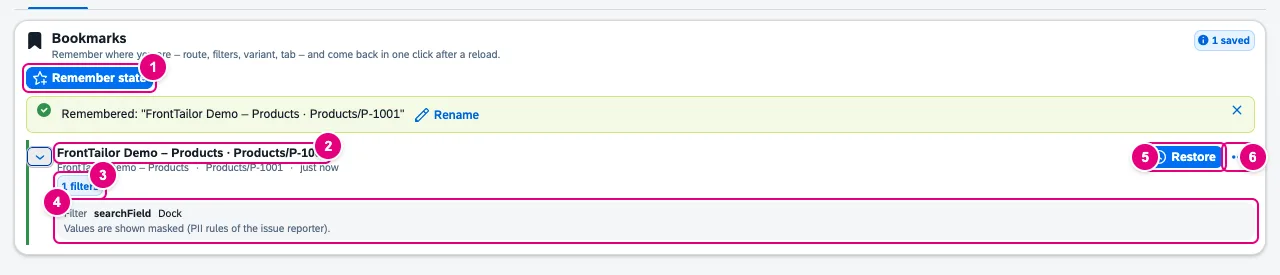
P-1001.- Remember state: saves the URL with launchpad intent and app route, filter values and variant, and the selected tab or section.
- The name: app and route at first. Below it app, route and age (just now, 5 min ago …).
- Tags: number of filters, Tab, number of steps, Changes data.
- The details (expand with the arrow on the left): filter, variant, tab or section, steps. Values are shown masked.
- Restore.
- The … menu: details, Rename, Delete.
| Control in the app | What is remembered |
|---|---|
Filter bar in Fiori elements V4 (sap.ui.mdc.FilterBar) | Conditions and variant. |
| SmartFilterBar in Fiori elements V2 | Filter data and variant. |
sap.m.SearchField outside filter bars and dialogs | Search text. |
sap.m.IconTabBar · sap.m.TabContainer | Selected tab. |
sap.uxap.ObjectPageLayout | Selected section. |
Each bookmark holds at most 10 filter bars, 10 tabs and 20 steps.
Restore
- Reload the app or open it in another tab; FrontTailor connects.
- In the Overview tab, click Restore on the bookmark.
- FrontTailor navigates to the remembered place, sets filters and tab and replays attached steps. If the tab shows another document, FrontTailor loads the remembered URL first.
- Read the result: restored or restored with gaps.

- The result: how many filter and tab states were applied – and with gaps, what was not found, skipped or locked on PROD.
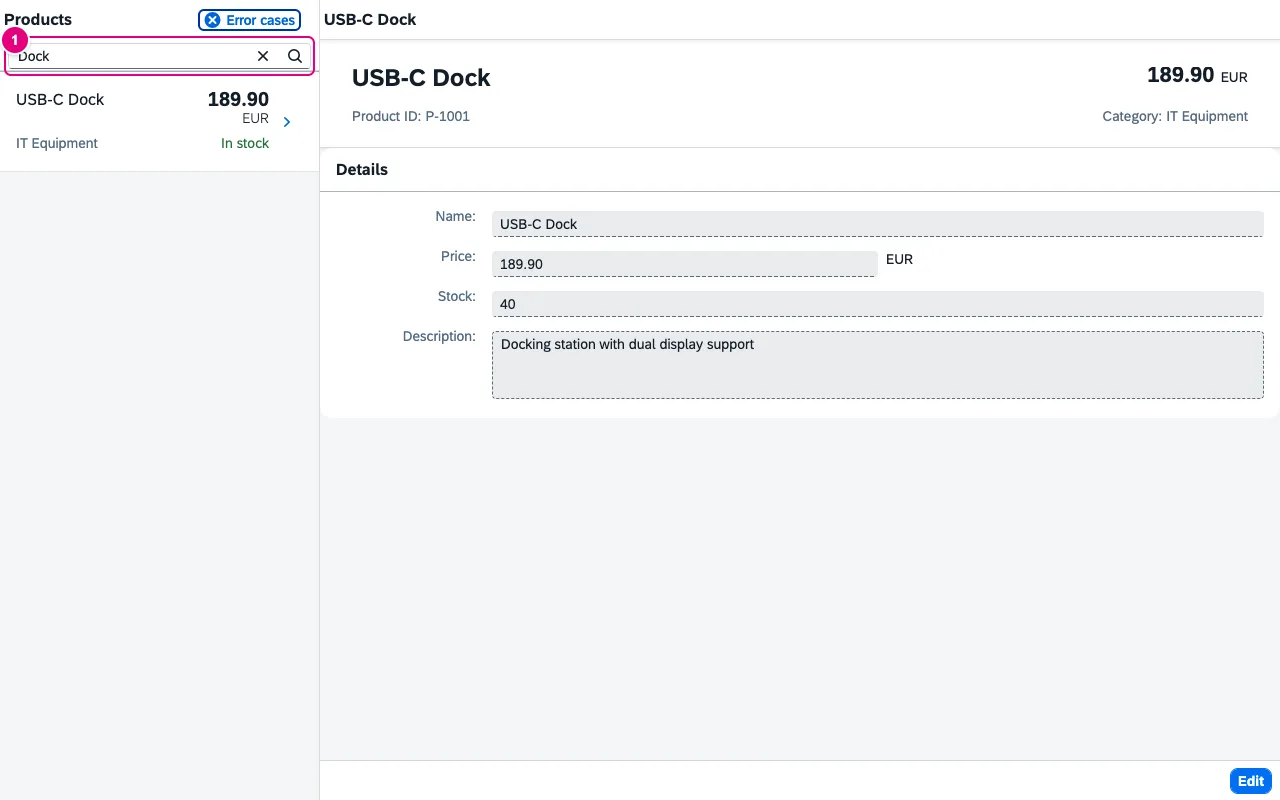
- The remembered search text is set again; the app filtered the list itself.
Filters of a filter bar that was not visible when remembering (such as the list report’s while an object page was open) are first applied on the app’s start route, then FrontTailor navigates on. It finds controls by their ID, otherwise by the view-local ID and the class – so a bookmark also works when the launchpad assigns a different prefix.
Attach recorded steps
If the panel holds a finished recording of the recorder (Report a problem), the card offers Attach the last n recorded steps (at most 20, off by default). The steps are replayed after the filters, for example to reopen a dialog. Clicks and switches are replayed; typed text and selections are skipped and counted.
Bookmarks in the command palette
The Command palette (Alt+Shift+K) offers Remember state and, per bookmark, Open bookmark: …. Both can be pinned as favourites like any command.
Team bookmarks and privacy
Your own bookmarks apply per origin and are free. With from Team, team bookmarks arrive via a team package (Team packages); they sit in the Team group and work on every system with the same app, because the path is stored relative. The card groups by This app, Other apps on this system and Team; from six entries on there is a search.
Storage is local in this browser, without sensitive URL parameters, without tokens and cookies. Values are kept as read, but shown masked (rules of the issue reporter). When exported to a team package, name, filter values, steps and path are masked; restoring skips masked filters.
All buttons
| Button | Effect |
|---|---|
| Remember state | Save the app’s current state as a bookmark. |
| Attach the last n recorded steps | Save the recorder’s steps as well (checkbox). |
| Search bookmarks | Filter the list (from six entries on). |
| Restore | Navigate, set filters and tab, replay steps. |
| Show details · Hide details | Show filters, variant, tab and steps. |
| Rename · Delete | In the … menu; bookmarks set by your administrator are read-only. |
Typical problems
| Problem | Solution |
|---|---|
| Connect a UI5 app to remember its state. | The card needs a connected app. Wait until the panel says Connected. |
| restored with gaps | A filter or tab was not found, for example because the app changed. The message says what is missing; remember the bookmark again. |
| Steps are skipped | Typed text and selections are never replayed. On PROD, steps that can change data are dropped as well. |
| Team bookmarks are missing | They appear only with team sync switched on and a from Team licence. |
See also
- Features at a glance Features · Inspector & Models
- Further reading SAP Fiori Elements – Development and Extensibility (SAP PRESS)
- Help from people Hands-on workshops on SAPUI5, Fiori elements, OData and CAP
- Docs Overview & system info
- Docs Command palette
- Docs Report a problem
- Docs Team packages
- Sources ADR-0381