AI assistant
The AI assistant answers questions with the context of the running app: failed requests, controls, metadata, manifest, FrontTailor reports. You bring your own provider and key. Every request goes directly from your browser to that provider – only after a preview and your click, with personal data masked.
- Edition
- from Pro
- Tab
- “AI”
- Providers
- Anthropic, Azure OpenAI, SAP AI Core, Google Gemini, Mistral, OpenAI-compatible
- Use cases
- 35, in the tabs and in the catalogue
- Key
- Encrypted on the device or in memory only
- On PROD
- unrestricted, the assistant changes nothing in the app
The tab at a glance
Open the AI tab in the panel. As long as no provider is set up, the top reads Not set up, with Set up the AI assistant below. from Pro
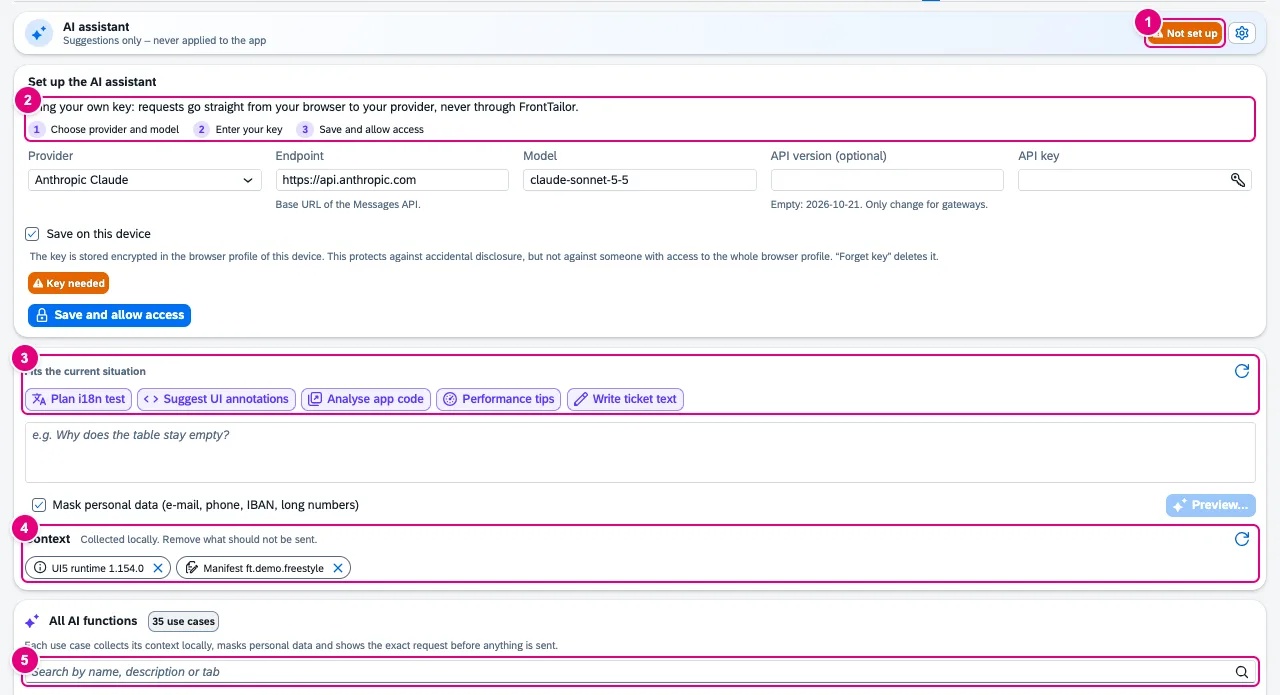
- The status: Not set up or Ready, next to it the settings.
- Set up the AI assistant: choose provider and model, enter the key, save and allow access. Requests go directly from your browser to your provider, never via FrontTailor.
- Fits the current situation: use cases that make sense now – after a failed request, for example, Explain error.
- Context: building blocks collected locally. Remove what should not be sent.
- All AI functions: the catalogue with search.
Set up provider and key
- Choose your provider under Provider.
- Check Endpoint and Model. The model field is free; the default is only a suggestion.
- Enter your API key. For SAP AI Core, paste the service key as JSON.
- Leave Save on this device on or switch it off (see below).
- Click Save and allow access. The browser asks for access to the provider’s address.
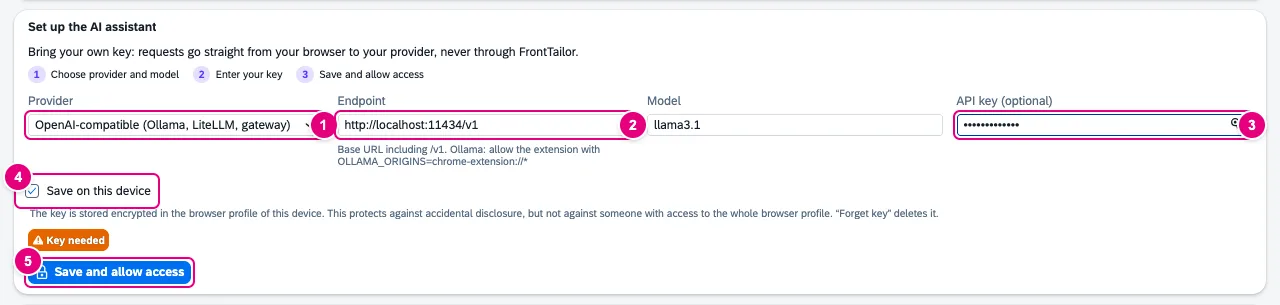
- Provider.
- Endpoint with a hint per provider.
- API key – optional for OpenAI-compatible endpoints.
- Save on this device, on by default.
- Save and allow access.
| Provider | What you need |
|---|---|
| Anthropic Claude | API key. The default is claude-sonnet-5-5. |
| Azure OpenAI | Resource URL, deployment name, API key; optionally an API version. |
| SAP AI Core (Generative AI Hub) | Service key (JSON) – it fills endpoint, token URL and client credentials –, deployment ID and resource group. FrontTailor fetches the access token before the request and keeps it in memory only. |
| Google Gemini | API key. |
| Mistral | API key. |
| OpenAI-compatible (Ollama, LiteLLM, gateway) | Base URL including /v1, key optional. Ollama must allow the extension with OLLAMA_ORIGINS=chrome-extension://*. |
Endpoints must use https. http is only allowed for localhost, 127.0.0.1 and [::1] – for local models – so that keys never travel unencrypted.
Questions and preview
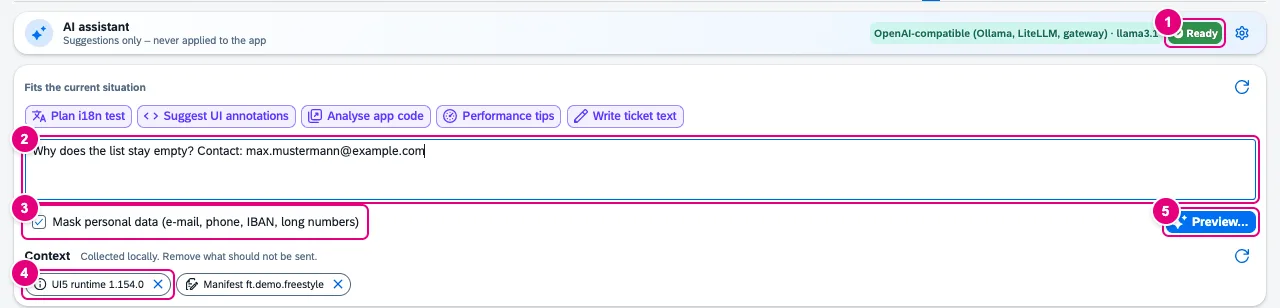
- Ready: provider and key are set up.
- Your question.
- Mask personal data (e-mail, phone, IBAN, long numbers) – on by default.
- Context building blocks, removable one by one.
- Preview… opens the preview. Nothing is sent yet.
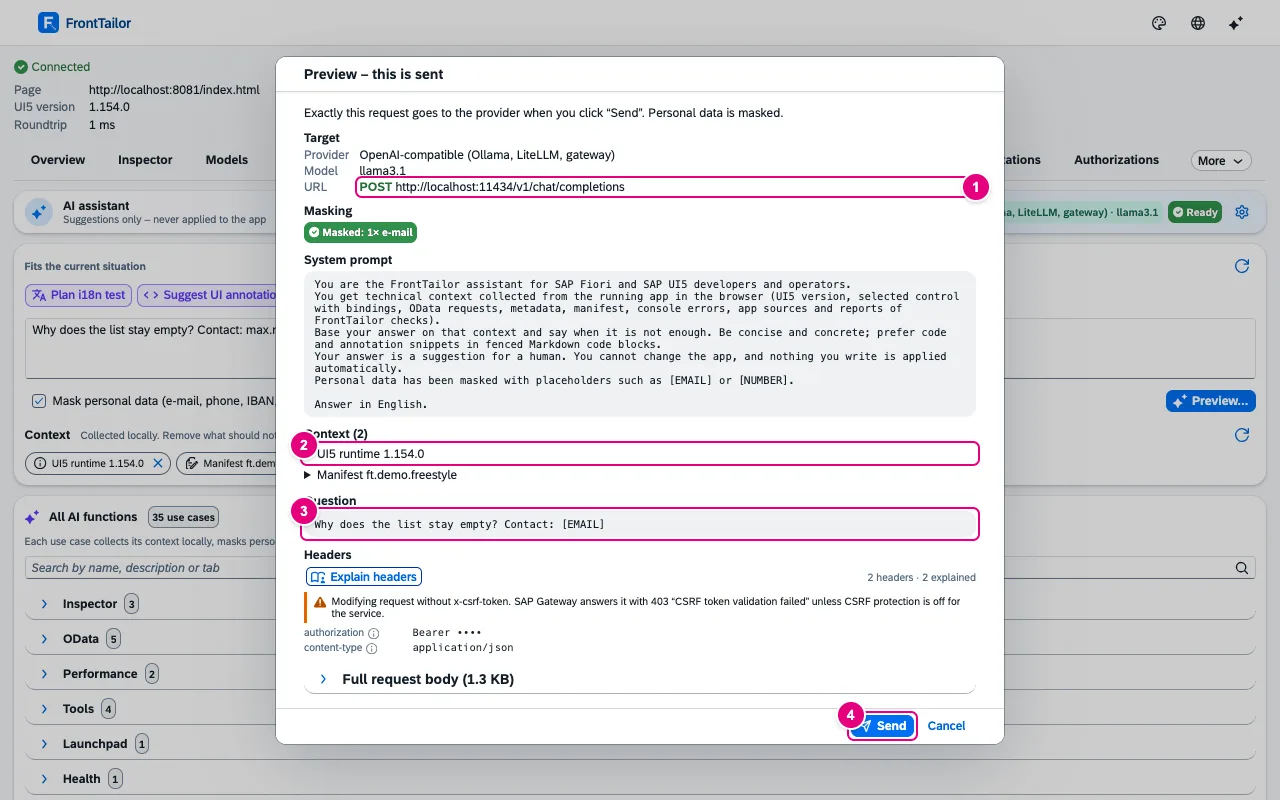
••••.- Target: provider, model, method and URL. For SAP AI Core, the token request comes first.
- Every context block, expandable.
- The question as it will be sent – here with
[EMAIL]instead of the address. - Only Send sends the request. FrontTailor then rebuilds it with the real key and aborts if it differs from what was shown.
The answer appears in the conversation, marked as a Suggestion, with Copy answer and copy buttons on code blocks. FrontTailor never applies anything automatically.
Use cases in the tabs
The All AI functions catalogue lists 35 use cases, grouped by tab – from explaining an OData error via a code review of the running app, performance tips and wdi5 tests to annotations, translations and ticket texts. The search finds name, description and tab.
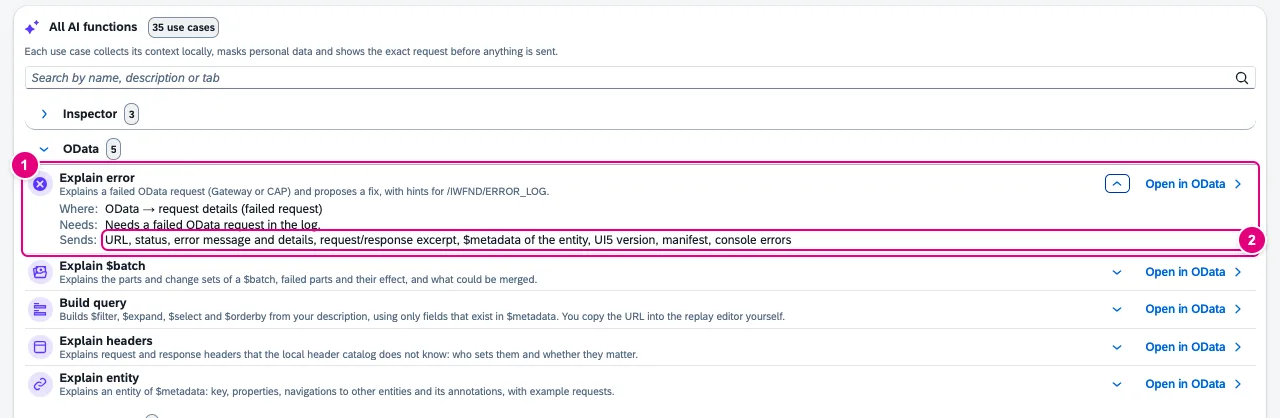
- A use case with description; Open in … jumps to the matching tab.
- Sends: which data this use case gives to the provider.
In the other tabs you find the entries in the same place: via the AI button at the top right of the tab or the AI icon in the header. An entry prepares question and context in the AI tab and opens the preview – here too, nothing is sent before your click. Without a Pro licence, the entries show what they would do.
Where your key lives
- Save on this device (default): the key is stored encrypted (AES-GCM) in this device’s browser profile. That protects against accidental disclosure, but not against someone with access to the whole browser profile. On shared computers, switch the checkbox off.
- Without the checkbox: the key stays in the extension’s memory only. When the browser ends the background after a short idle time, you enter it again.
- Never in browser sync, exports, team packages, bug reports, AI previews or logs.
- Forget key in the settings deletes it at once, together with all derived tokens.
There is no CloudDNA proxy: the request goes directly from your browser to the endpoint you entered. The provider’s terms and your contract with them govern the processing there. More under Permissions and privacy.
Your administrator’s settings
| Policy | Effect |
|---|---|
modules.ai: false | The tab and all AI entries disappear. |
aiProvider, aiAllowedProviders | Provider fixed or limited to a selection. |
aiEndpoint | Endpoint fixed (read-only in the form); empty switches the assistant off. |
aiRequirePiiMasking: true | Masking cannot be switched off. |
ai.persistKeys: false | Keys in memory only; stored keys are deleted. |
How policies are distributed: Enterprise deployment.
Common problems
| Message or symptom | Cause and fix |
|---|---|
| “Access to the provider is not allowed yet.” | Click Save and allow access or Allow access and confirm the browser prompt. |
| “The provider rejected the key” | Key wrong or expired. Enter it again. |
| “The stored key could not be decrypted and was deleted.” | The profile was partly deleted or the data is damaged. Enter the key again. |
| “The preview has expired.” | A preview is valid for 15 minutes. Open it again. |
| Ollama does not answer | Start Ollama with OLLAMA_ORIGINS=chrome-extension://*. |
| “Save on this device” checkbox locked | Your organisation does not allow storing keys (policy). The key stays in memory. |
See also
- Features at a glance Features · AI with your own key
- Further reading SAPUI5 – The Comprehensive Guide (SAP PRESS)
- Further reading Security and Authorizations for SAP Business Technology Platform (SAP PRESS)
- Help from people TailorCampus D6: AI in the SAP landscape
- Docs Permissions and privacy
- Docs Report a problem
- Docs Enterprise deployment
- Sources ADR-0181 · ADR-0182 · ADR-0173