Licence and editions
FrontTailor comes in four editions: Community is free, Pro, Team and Enterprise are unlocked by a licence key. Every new installation gets all editions for 7 days; after that Community applies until you enter a key. The key is checked offline in the browser and never leaves it.
- Where
- “Tools” tab › “Licence” card or a locked tab
- Check
- offline, Ed25519 signature
- Trial
- 7 days, all editions
- After that
- Community until a key is entered
7 days of all editions, then Community
Since version 1.0.0 the licence check is on. Every new installation gets all editions for 7 days, without a key. The Licence card shows Trial: n days left.
After that Community applies until you enter a valid key; the card says when the trial ended. Community stays free, without a key and without expiry. A valid licence always wins over the trial. Administrators can switch the trial off by policy (trial: false).
What each edition unlocks
The editions build on each other: Pro contains Community, Team contains Pro, Enterprise contains Team. Prices and licence models are on the Editions page.
| Edition | Modules |
|---|---|
| Community | Inspector, models, OData console, tools (cache, debug, language, URL profiles, flex), command palette, UI5 2.0 readiness check, library analysis, known errors, bookmarks, recorder. Free, open source under Apache 2.0. |
| from Pro | Performance profiler, annotation explorer, scaffolding, AI assistant, report a problem (issue reporter), i18n and accessibility check, Fiori guidelines check, local code, fault simulation; plus the exports of the readiness check and the library analysis. |
| from Team | Team sync with team packages and team bookmarks. |
| from Enterprise | Launchpad inspector, health, morning check, authorization diagnostics, system compare, release check, backend service with role simulator, jump to the backend, ServiceNow as a ticket target; admin policies and sideload. |
Locked modules stay visible: their tab carries a lock and the edition, for example Performance (Pro). A click shows what the module does and the field for the licence key.
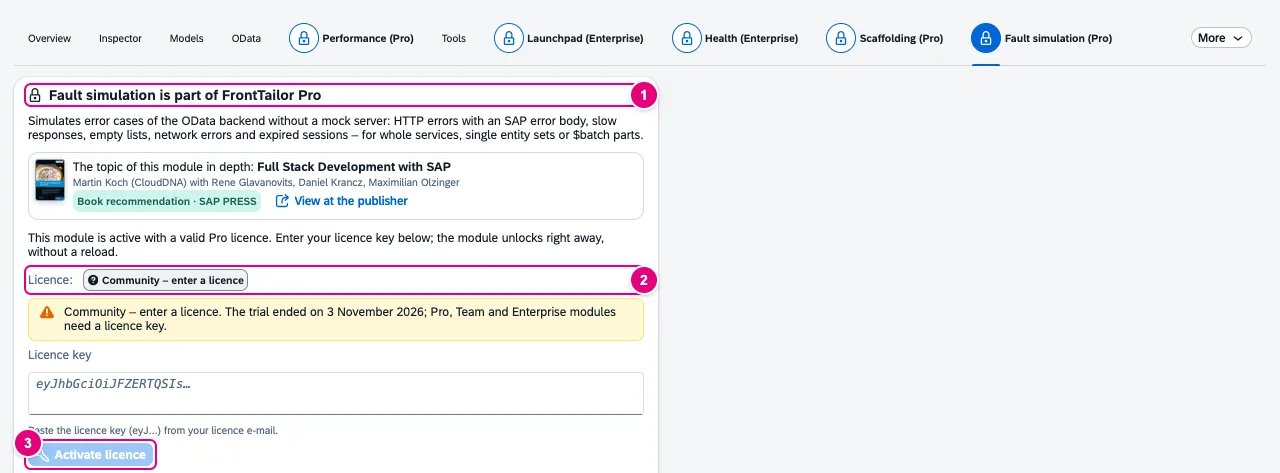
- “Fault simulation is part of FrontTailor Pro” – with a short description of the module.
- What applies right now: Community – enter a licence.
- Activate licence unlocks the module right away, without a reload.
Enter the licence key
After the online purchase of Pro or Team the key comes automatically by e-mail. Enterprise, licences per SAP system and frame contracts come from sales. The key starts with eyJ.
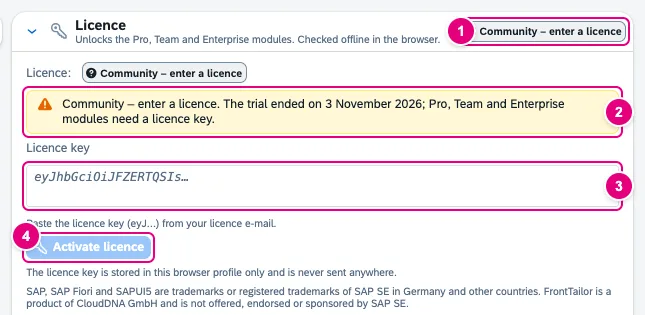
- The card’s header shows what applies: Trial: n days left, the edition or Community – enter a licence.
- Notes on the trial, the approaching end or a rejected licence.
- The Licence key field.
- Activate licence.
- In the DevTools panel or the side panel, open the Tools tab and expand the Licence card. Or click a locked tab.
- Paste the complete licence key from the licence e-mail into the Licence key field.
- Click Activate licence.
- “Licence activated for <licensee>.” appears. The edition’s modules are free right away, without a reload.
The card then shows licensee, edition, licence metric, service period, bound SAP systems or users and the expiry date. Remove licence deletes the key again.
Term, renewal and binding
| Situation | What FrontTailor shows |
|---|---|
| 30 days before the end | A tag with the days left and “The licence ends on … Please renew.” |
| After the service period | 3 days of grace: “The paid period has ended – grace period until … Please renew.” The modules stay free. |
| Expired | Community applies; the paid tabs are locked again. |
| Renewal entered before it starts | The new licence waits and replaces the old one on its first day, by itself. |
| Licence bound to SAP systems | It applies only on these hosts; elsewhere Community applies, and the locked tab names the licensed systems. |
| Licence bound to launchpad users | It applies only to these users or domains. |
If a key is rejected, the card gives the reason, for example “invalid signature (key changed or incomplete).” or “the licence was issued for another product or key (e.g. iFlow Tailor), not for FrontTailor.” More under Troubleshooting.
Licence by policy
Administrators deploy the key to all users with the licenseKey policy (Enterprise deployment). The card then shows “Deployed by your administrator. It cannot be changed here.” A module switched off by policy stays off even with a licence.
See also
- Docs Tools
- Docs Enterprise deployment
- Docs Troubleshooting
- Sources ADR-0141 · KONZEPT2 · ADR-0143 · README4