Libraries
A UI5 app has to name every library it uses in sap.ui5/dependencies/libs. If one is missing, the app often still runs – until it starts slowly, loads synchronously or breaks in the launchpad. The library analyzer shows for the running app which libraries are loaded, where they come from, whether the manifest declares them and which controls stem from them. Analysis and proposal are free; the export comes with Pro.
- Edition
- Community
- Tab
- “Libraries”
- Export
- Pro
- Surfaces
- DevTools panel and side panel
- On PROD
- allowed, the analysis only reads
Analyze
Open the FrontTailor panel in DevTools (F12) or the side panel and choose the Libraries tab. Nothing runs in the page until you click Analyze.
- Open the app and navigate to the views you want to check – dialogs, too.
- Choose the Libraries tab in the panel and click Analyze.
- Read the verdict and the findings. If a declaration is missing, the Manifest proposal adds it.
- Use Copy to take the proposal into the app’s
manifest.json. - After further steps in the app, click Analyze again.

- The verdict, for example “The manifest declares every library the app uses.”
- Counters per severity: Error, Warning, Info, Hint.
- What was checked: app, UI5 version,
minUI5Version, app controls and elements. Below it the network summary. - Note when the browser’s Resource Timing buffer is full (see network).
- Analyze again.
Only controls that exist right now are seen. Dialogs and views that were never open are missing – open them and analyze again. In the launchpad the running app counts, not the shell; Fiori elements templates belong to the framework.
Findings
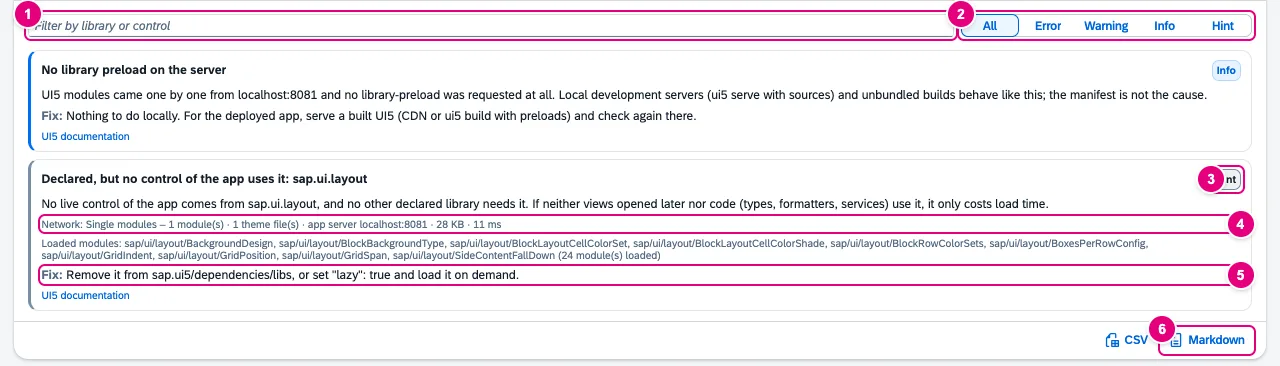
sap.ui.layout is declared but not used (yet).- Filter by library or control.
- Severity: All, Error, Warning, Info, Hint.
- Severity of the finding.
- Network: how the library came in – preload or single modules, number of modules, theme files, server, size and duration. Below it the loaded modules as evidence.
- Fix with the concrete step; below it the link to the UI5 documentation.
- Export as CSV or Markdown (see export).
| Finding | Severity | When |
|---|---|---|
| Used but not declared | Error | app controls stem from the library, and neither manifest nor bootstrap nor a declared library covers it |
| Declared only in the bootstrap | Warning | only data-sap-ui-libs loads it – the launchpad does not use that HTML page |
| Preloaded through another library | Info | not declared, but comes as a dependency of a declared library |
| Loaded but not declared | Warning, Info in Fiori elements apps and the launchpad | loaded, nothing explains it, no app control uses it |
| Declared lazy, not loaded yet | Info | declared with "lazy": true and not needed yet |
| Declared but not loaded | Warning | declared (not lazy), but not loaded |
| Declared, but no control of the app uses it | Hint | only a hint, because views and dialogs that were not opened are missing |
| Library older than its minVersion | Warning | the declaration’s minVersion is above the loaded version; plus warnings about minUI5Version |
| Library version differs from the core | Warning | framework library with another version than sap.ui.core |
| Declared, but no preload found | Warning | network: modules came one by one while other libraries had a preload |
| Loaded over the network, not declared | Warning or Info | network: requested, not declared, nothing explains it |
| No library preload on the server | Info | network: no library-preload at all – server or build, not the manifest (for example ui5 serve) |
Findings with controls name class, count and up to five examples with ID and view. Show in Inspector opens the control in the Inspector, Highlight in page frames it in the app.
Manifest proposal
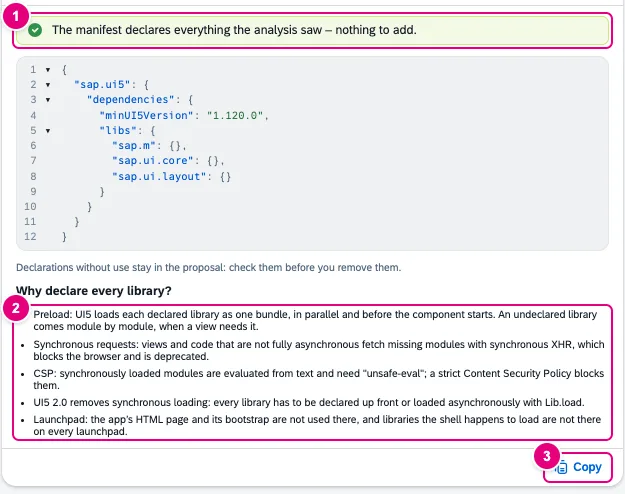
- What was added, for example “Added: sap.ui.layout” – or that nothing is missing.
- Why declare every library?: preload, synchronous requests, CSP, UI5 2.0 and launchpad.
- Copy.
The proposal contains the existing declarations and adds missing libraries. If all controls of a library live only in dialogs or popovers, it proposes the library as "lazy": true – then load it with sap/ui/core/Lib.load before use. Declarations without use stay in: check them before you remove them.
Loaded libraries and network

- Manifest: declared or not.
- Network: Preload, Single modules, Bootstrap bundle or no requests, with number of modules, synchronous loads, theme files, server or CDN, size and duration.
- Came in through: where the library comes from.
- The library’s Status; next to it the number of App controls from it.
| Came in through | Meaning |
|---|---|
| App manifest | in the app’s sap.ui5/dependencies/libs |
| Component | in the manifest of a component of the app, for example the list report |
| Bootstrap | data-sap-ui-libs or window["sap-ui-config"].libs |
| Dependency | non-lazy dependency of a loaded library |
| Lazy dependency | lazy dependency of a loaded library – explains nothing, it is not preloaded |
| Framework | the launchpad shell or its plug-ins |
| Implicit | none of these – loaded without anything visible explaining it |
The network view reads the page’s Resource Timing entries – like the DevTools network tab, but also in the side panel and without extra requests. By default the browser keeps 250 entries; later ones are missing. FrontTailor does not change the buffer size but records every UI5 request itself from the moment the tab opens. If the buffer is full, the tab says so: keep using the app and analyze again.
Export
With from Pro, Markdown and CSV export a library report over all apps you analyzed in this tab – for example apps of a launchpad opened one after another. The report contains library and class names, control IDs, view names and the URL without parameters, no app data; email addresses and IBANs in IDs are masked. The session’s analyses stay in the browser only until the tab closes. Without Pro a click on the export explains what it contains; analysis, findings and the manifest proposal stay free.
Library findings in the UI5 2.0 check lead straight to this tab with Analyze libraries.
Typical problems
| What you see | Cause and fix |
|---|---|
| “No app component found in this frame (launchpad home?) …” | The home page has no app. Open an app and analyze again. |
| Declared, but no control of the app uses it, although the library is needed | The controls live in a view or dialog that was not open yet. Open it and analyze again – or declare the library lazy. |
| No library preload on the server | Typical for local development servers with sources. Nothing to do locally; check the delivered app with built UI5. |
| Note about a full Resource Timing buffer | Requests between the overflow and opening the tab are missing. From now on FrontTailor records every UI5 request: use the app and analyze again. |
See also
- Features at a glance Features · Quality
- Further reading SAPUI5 – The Comprehensive Guide (SAP PRESS)
- Help from people UI5 2.0: readiness and migration
- Docs UI5 2.0
- Docs Performance
- Docs Inspector
- Sources ADR-0341