FrontTailor 1.0.0 (10 November 2026): inspector, OData, performance, UI5 2.0, AI and operations for SAP Fiori® and UI5 apps – in one panel. What’s inside → +43 664 1964199Contact →
Editions and prices · version 1.0.0

Start free. Pay when it saves time.

Four editions, each includes the ones below. Community is free and stays free. You buy Pro and Team right here, for yourself or your team. Enterprise is for operations and corporate IT and comes with a quote. All prices net plus VAT.

7-day trial Every new installation gets all editions for 7 days, without a key. After that Community applies until you enter a licence key.

Community

Free. For every developer.

€0forever, no account

For: Individual developers, key users and everyone who wants to understand UI5

  • Control inspector with pick mode and “copy as”
  • Model explorer with snapshot, diff and i18n lookup
  • OData console: $batch split, errors readable, export
  • Cache reset, debug switches, command palette, bookmarks
  • UI5 2.0 readiness check and library analyzer
  • Own known errors with the fix at the error

Install for free Video on this edition ↓

ProMost popular

For everyone who ships Fiori apps.

€29per user and month, or €288 per user and year, excl. VAT

For: Freelancers, project developers, consultancies

  • Everything in Community
  • Performance profiler with traffic light and budgets per app
  • i18n and accessibility check, guidelines validator
  • AI assistant with your own key
  • Report a problem, tickets, prepare an SAP incident
  • Scaffolding, fault simulation, local code in the launchpad
  • Annotation explorer and UI5 2.0 migration report

Buy: Pro Video on this edition ↓

TeamEverything in Pro, plus

Everything in Pro, plus shared standards.

€39per user and month, or €384 per user and year, excl. VAT

For: Development teams and consultancies with shared standards

  • Everything in Pro
  • Team sync without a server: team packages via file or HTTPS
  • Profiles, snippets, filters, replays, budgets and bookmarks for the team
  • Known errors with the fix for everyone
  • Diff before every change, optionally signed

Buy: Team Video on this edition ↓

EnterpriseEverything in Team, plus

Everything in Team, plus operations and corporate IT.

from €39 per user and month, minimum 25 users, or an annual licence per system

For: Basis and operations teams, large SAP customers, hosting partners

  • Everything in Team
  • Launchpad inspector and authorization diagnosis
  • DEV/QA/PROD system comparison, release check after transport
  • Morning check, health and synthetic check
  • Jump to the backend, ServiceNow, optional backend service
  • Admin policies, sideloading, SSO, support SLA

Request a quote Video on this edition ↓

Compared

Every feature, every edition.

A dot means included; a half dot means the basic feature is there and an extension comes in a higher edition. Locked modules stay visible in the extension with a padlock. Click a feature to jump to its description.

● included · ◐ basic feature, extended in a higher edition · – not included. All prices net plus VAT.
FeatureCommunityProTeamEnterprise
Inspector & models
System info & traffic-light badgeincludedincludedincludedincluded
Control inspectorincludedincludedincludedincluded
Model explorerincludedincludedincludedincluded
App state bookmarksBasic feature; extended from TeamBasic feature; extended from Teamincludedincluded
Tools & developer comfortincludedincludedincludedincluded
Command palette with favouritesBasic feature; extended from TeamBasic feature; extended from Teamincludedincluded
Switch the app languageincludedincludedincludedincluded
Flex check & personalisation resetincludedincludedincludedincluded
UI5 version from the SAP CDNincludedincludedincludedincluded
OData
OData consoleincludedincludedincludedincluded
Export & replayincludedincludedincludedincluded
Metadata explorerincludedincludedincludedincluded
From request to controlincludedincludedincludedincluded
Fault simulationnot includedincludedincludedincluded
Performance
Performance profilernot includedincludedincludedincluded
Performance budgetsnot includedBasic feature; extended from Teamincludedincluded
Deployment check & cache busterincludedincludedincludedincluded
Quality: UI5 2.0, libraries, a11y & i18n, guidelines
UI5 2.0 readiness checkBasic feature; extended from Proincludedincludedincluded
Library analyzerBasic feature; extended from Proincludedincludedincluded
i18n & accessibility checknot includedincludedincludedincluded
Fiori design guidelines validatornot includedincludedincludedincluded
Annotation explorernot includedincludedincludedincluded
Test & report
Shared recorderincludedincludedincludedincluded
Scaffolding & snippetsnot includedincludedincludedincluded
Local code in the real launchpadnot includedincludedincludedincluded
Report a problemnot includedincludedincludedincluded
Tickets & SAP incidentnot includedBasic feature; extended from EnterpriseBasic feature; extended from Enterpriseincluded
Known errorsBasic feature; extended from TeamBasic feature; extended from Teamincludedincluded
AI with your own key
AI assistant (BYOK)not includedincludedincludedincluded
Your provider, your keynot includedincludedincludedincluded
Preview & maskingnot includedincludedincludedincluded
Launchpad & operations
Launchpad inspectornot includednot includednot includedincluded
Authorization diagnosisnot includednot includednot includedincluded
DEV/QA/PROD system comparisonnot includednot includednot includedincluded
Release check after transportnot includednot includednot includedincluded
Morning checknot includednot includednot includedincluded
Health & synthetic checknot includednot includednot includedincluded
Jump to the backendnot includednot includednot includedincluded
Backend service & role simulator (optional)not includednot includednot includedincluded
Team
Team syncnot includednot includedincludedincluded
Diff before every changenot includednot includedincludedincluded
Admin policies & sideloadingnot includednot includednot includedincluded
Price€0€29per user and month, or €288 per user and year, excl. VAT€39per user and month, or €384 per user and year, excl. VATfrom €39 per user and month, minimum 25 users, or an annual licence per system
BuyInstall for freeBuy: ProBuy: TeamRequest a quote
In detail

What each feature does – edition by edition.

For every feature: which problem it solves, how it is typically used, where it sits in the panel and which docs page explains it step by step. Each edition includes everything in the editions before it.

Community Free. For every developer.

  • Inspector & models

    System info & traffic-light badge

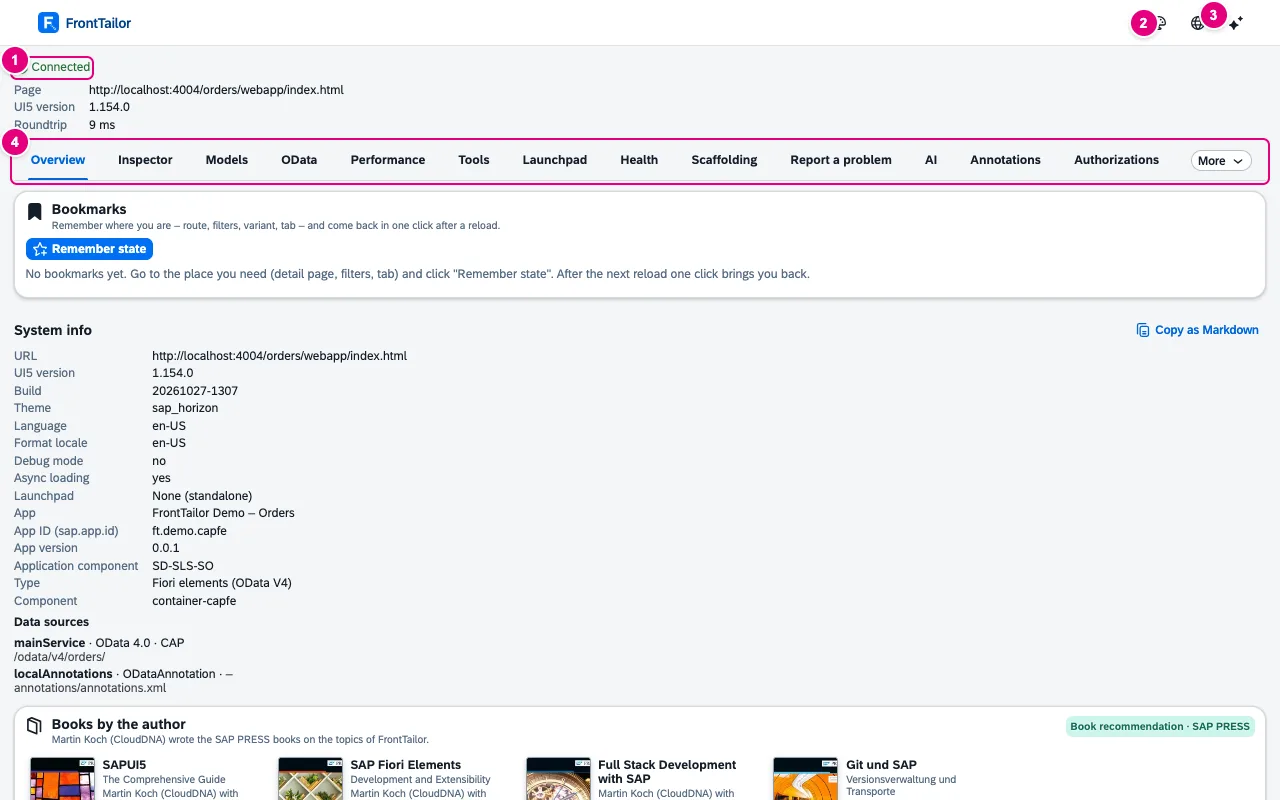
    Answers the first questions of every support case as soon as you open the panel – which UI5 version, which system, which data sources – without the console and without asking back. The colour of the icon warns you as soon as you work on a PROD system.

    UI5 version, theme, language, launchpad flavour, app type and data sources with backend type, without setup. The icon shows green, yellow with an error count or red for PROD.

    In the panel: OverviewDocs: Overview & system info →

    Overview tab on the Fiori elements demo app: status Connected, UI5 version 1.154.0, tab strip, Bookmarks card and system info
  • Inspector & models

    Control inspector

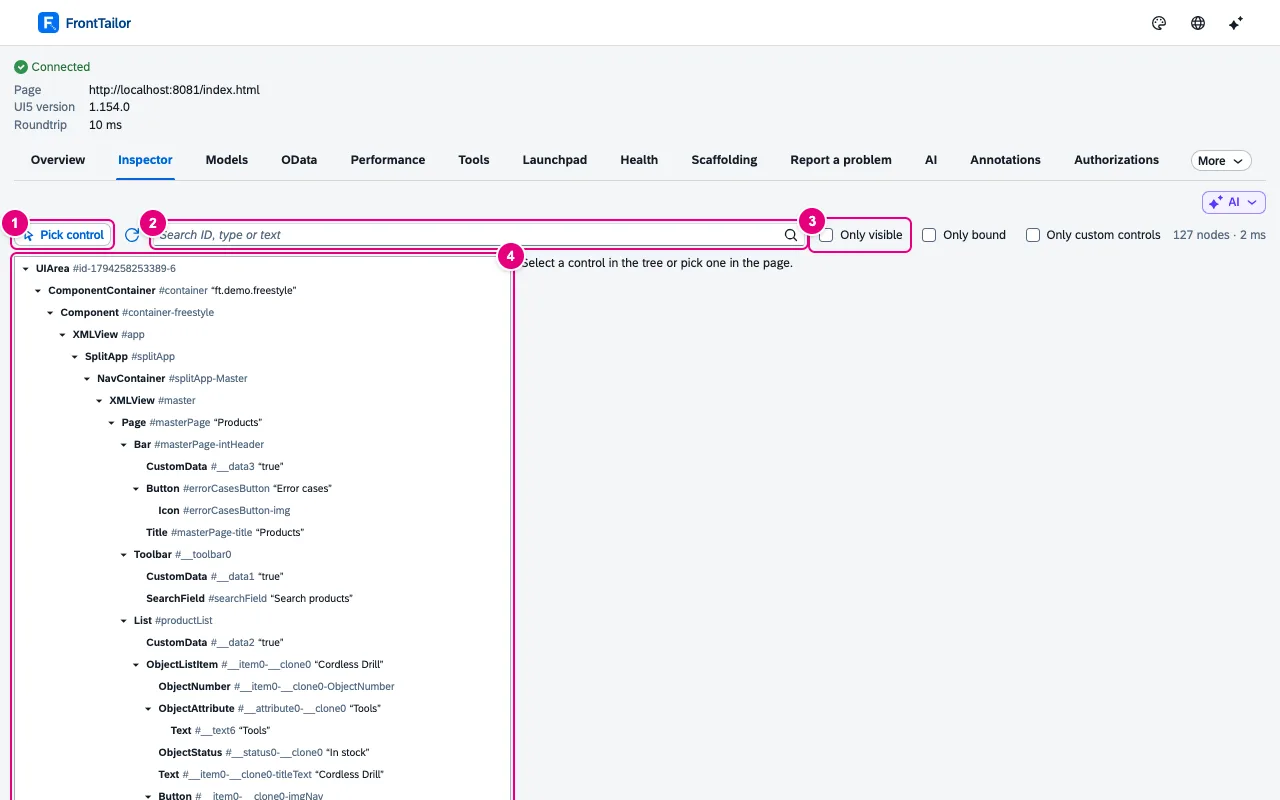
    Shows the control behind every pixel of the running app, with properties, bindings and context. Typical use: click a field, see where its value comes from and copy a stable selector for the test.

    Pick mode with Alt+Shift+F, tree, properties, bindings and contexts. “Copy as” ID, OPA5, wdi5, Playwright or XML; change properties live, locked on PROD.

    In the panel: Inspector › Pick controlDocs: Inspector →

    Inspector tab with the control tree of the freestyle demo app, search field and filters
  • Inspector & models

    Model explorer

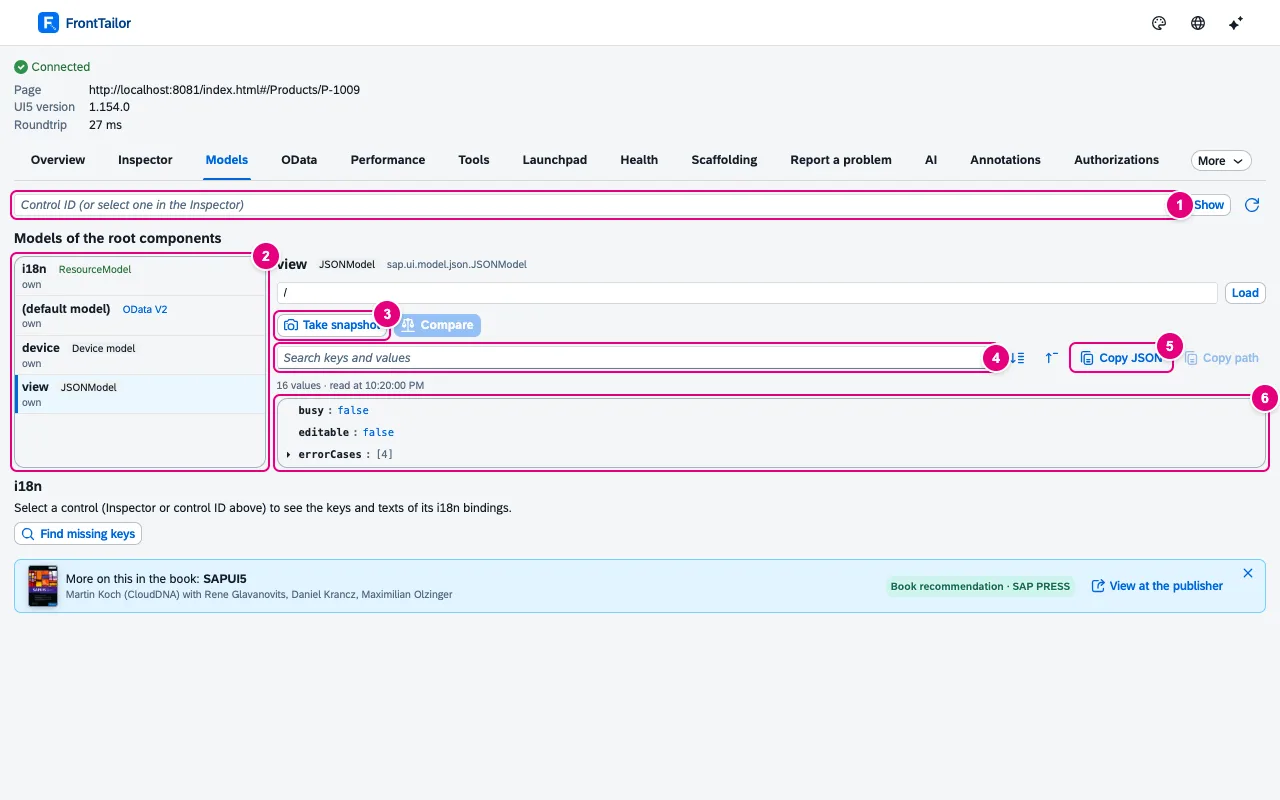
    Shows which data really sits in the app’s models instead of hunting for it in the debugger. Typical use: take a snapshot, run an action and compare what changed – or check why a text is missing in one language.

    JSON, OData V2/V4, resource and device models as a tree, before/after snapshot and diff, i18n lookup with all languages.

    In the panel: ModelsDocs: Model explorer →

    Models tab on the freestyle demo app: list with i18n, default model OData V2, device and view, the JSON tree of the view model on the right
  • Inspector & models

    App state bookmarks

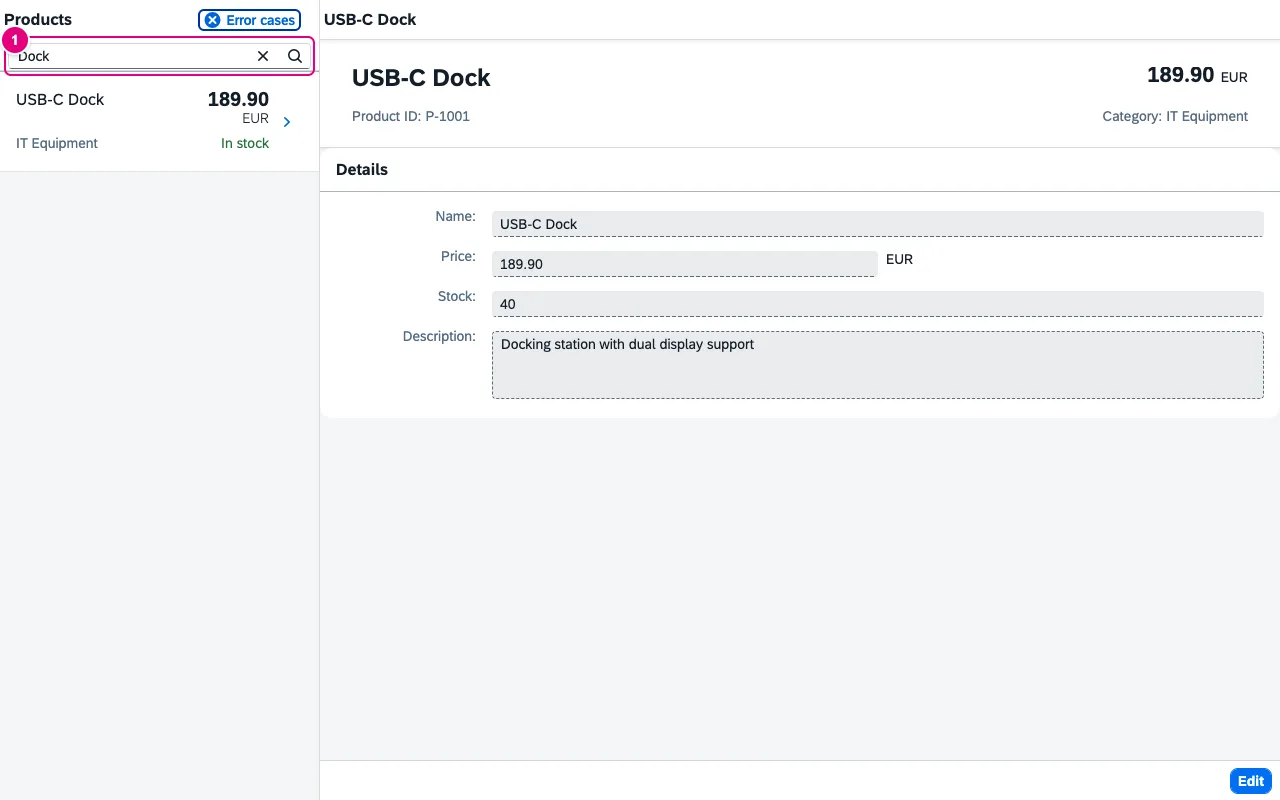
    Saves you clicking your way back to the bug after every reload. A bookmark remembers more than a browser favourite: filter values, variant and the selected section, too.

    Remember route, filters, variant and tab; after a reload one click takes you back to the bug. Team bookmarks in Team.

    Team Team bookmarks: bookmarks reach everyone in the team via a team package.

    In the panel: Overview › BookmarksDocs: App state bookmarks →

    Freestyle demo app after restoring: search Dock, one hit USB-C Dock and its detail page
  • Inspector & models

    Tools & developer comfort

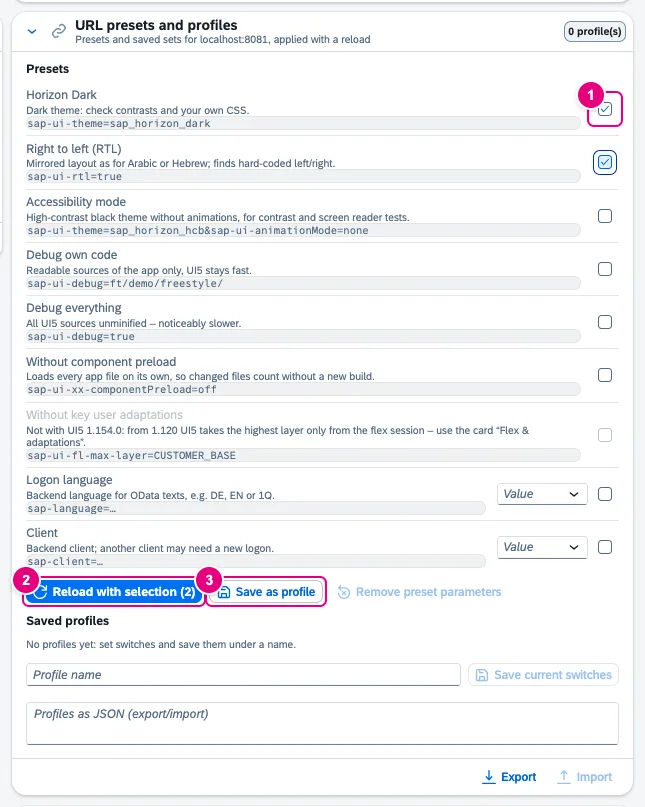
    Bundles the chores that cost UI5 developers time every day: clear caches, set debug parameters, debug only your own code in readable form and jump from the control to its source file.

    Cache reset, debug switches, URL presets, “debug own code only” and “open in editor”.

    In the panel: ToolsDocs: Tools →

    Card URL presets and profiles with the presets Horizon Dark and Right to left ticked, the buttons Reload with selection and Save as profile, and Saved profiles below
  • Inspector & models

    Command palette with favourites

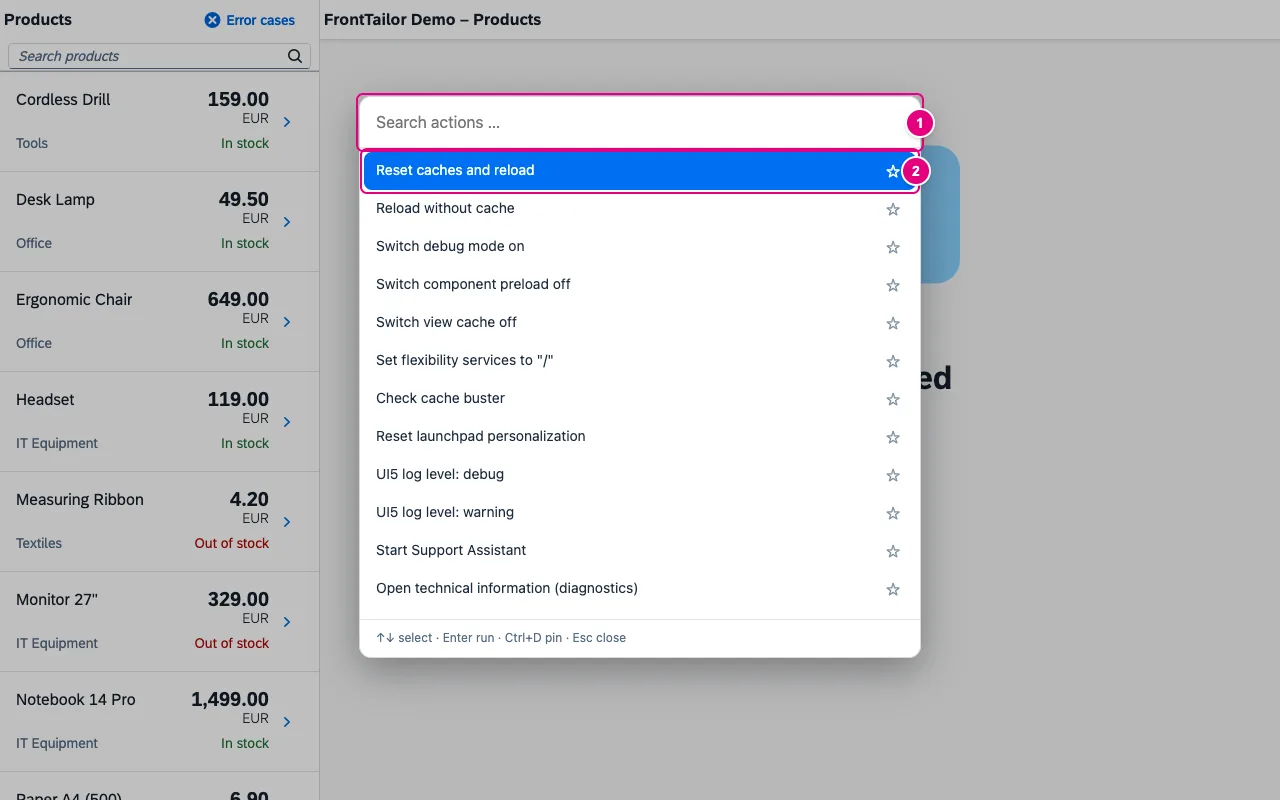
    Runs commands from the keyboard without looking for the right tab first. Commands you use often stay at the top as favourites.

    Alt+Shift+K opens a search across all commands, with favourites and the last ten commands.

    Team Palette favourites reach everyone in the team via a team package.

    In the panel: Tools › Command paletteDocs: Command palette →

    Open command palette over the freestyle demo app with the search field Search actions and the list of actions
  • Inspector & models

    Switch the app language

    Tests the app’s i18n texts in another language without changing the logon language or the URL by hand. Typical use: check whether a text is missing in one language or the layout breaks with right-to-left script.

    The app’s languages, more SAP languages and the SAP test languages, RTL included. Reloading with a language also works on PROD; switching without a reload is locked there.

    In the panel: Tools › LanguageDocs: Tools →

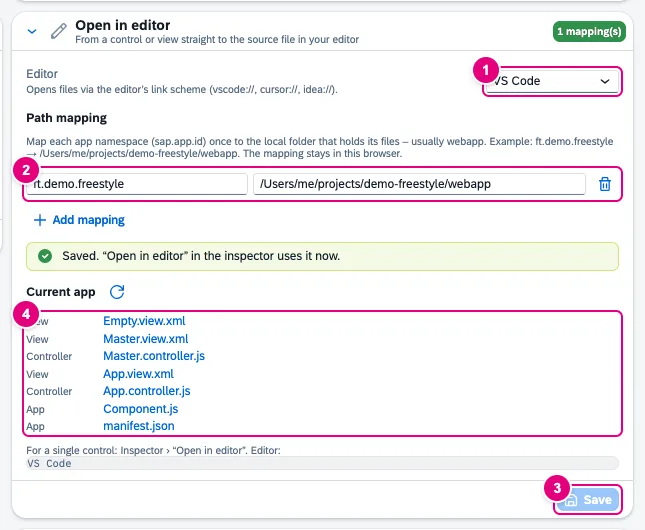
    Card Open in editor with editor VS Code, the path mapping ft.demo.freestyle to a local webapp folder, the confirmation Saved and the Current app list with views, controllers, Component.js and manifest.json
  • Inspector & models

    Flex check & personalisation reset

    Clarifies in operations whether a behaviour comes from personalisation, a key-user adaptation or the app itself. Typical use: get rid of your own personalisation without touching the key users’ adaptations.

    See changes per layer, reset only your own USER layer – with double confirmation, locked on PROD.

    In the panel: Tools › Flex & adaptationsDocs: Tools →

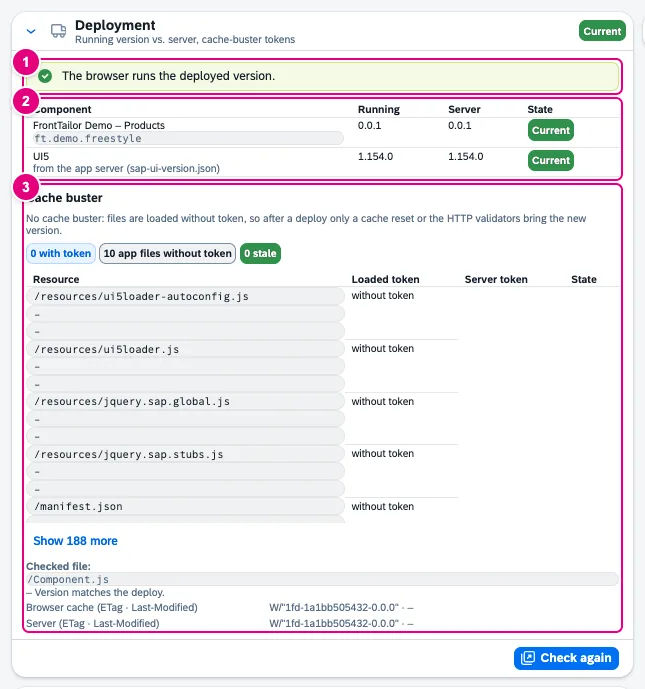
    Card Deployment with the verdict The browser runs the deployed version, a table with app and UI5 per Running and Server, and the Cache buster section with counters and resource list
  • Inspector & models

    UI5 version from the SAP CDN

    Shows before an upgrade whether the app runs with another UI5 version – without a deployment and without changing the app’s code. The redirect applies only to the UI5 files and ends with the tab.

    Test the app with another UI5 version in exactly one tab, without a deployment. Locked on PROD.

    In the panel: Tools › UI5 version (CDN)Docs: Tools →

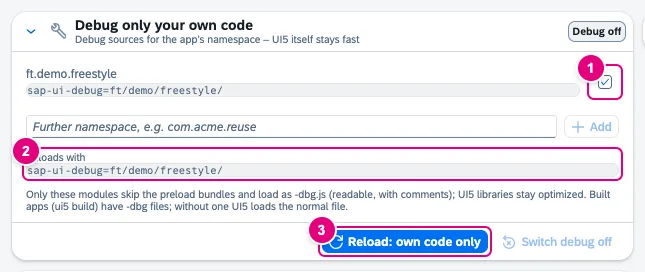
    Card Debug only your own code with the detected namespace ft.demo.freestyle, a field for further namespaces, the parameter sap-ui-debug=ft/demo/freestyle/ and the button Reload: own code only
  • OData

    OData console

    Shows every OData request of the app with headers, body and timing and makes the backend’s error message readable. Typical use: find out which part of a $batch failed and why.

    V2 and V4, $batch split into its parts, error text from Gateway, RAP and CAP readable, link to /IWFND/ERROR_LOG, 76 headers explained.

    In the panel: ODataDocs: OData console →

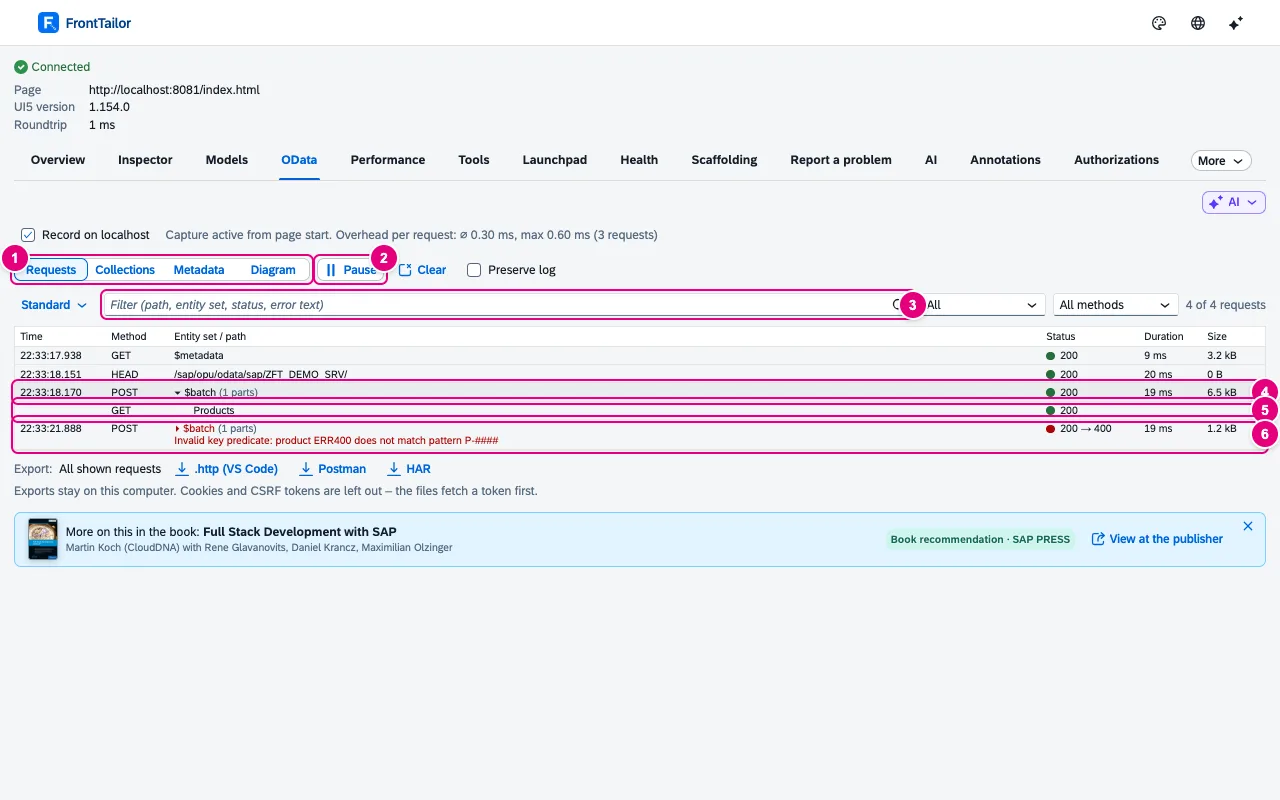
    OData tab in the requests view: $metadata, service document, an expanded $batch with the part GET Products and a failed $batch with status 200 → 400 and error text
  • OData

    Export & replay

    Passes a request on so that colleagues or the backend team can reproduce it, or sends it again after editing. Typical use: copy the failing request into the ticket as cURL or resend it with a changed filter.

    Export as cURL, .http, Postman or HAR, without tokens. Replay after a preview, saved filters and collections – display only on PROD.

    In the panel: OData › Export · Edit and send againDocs: OData console →

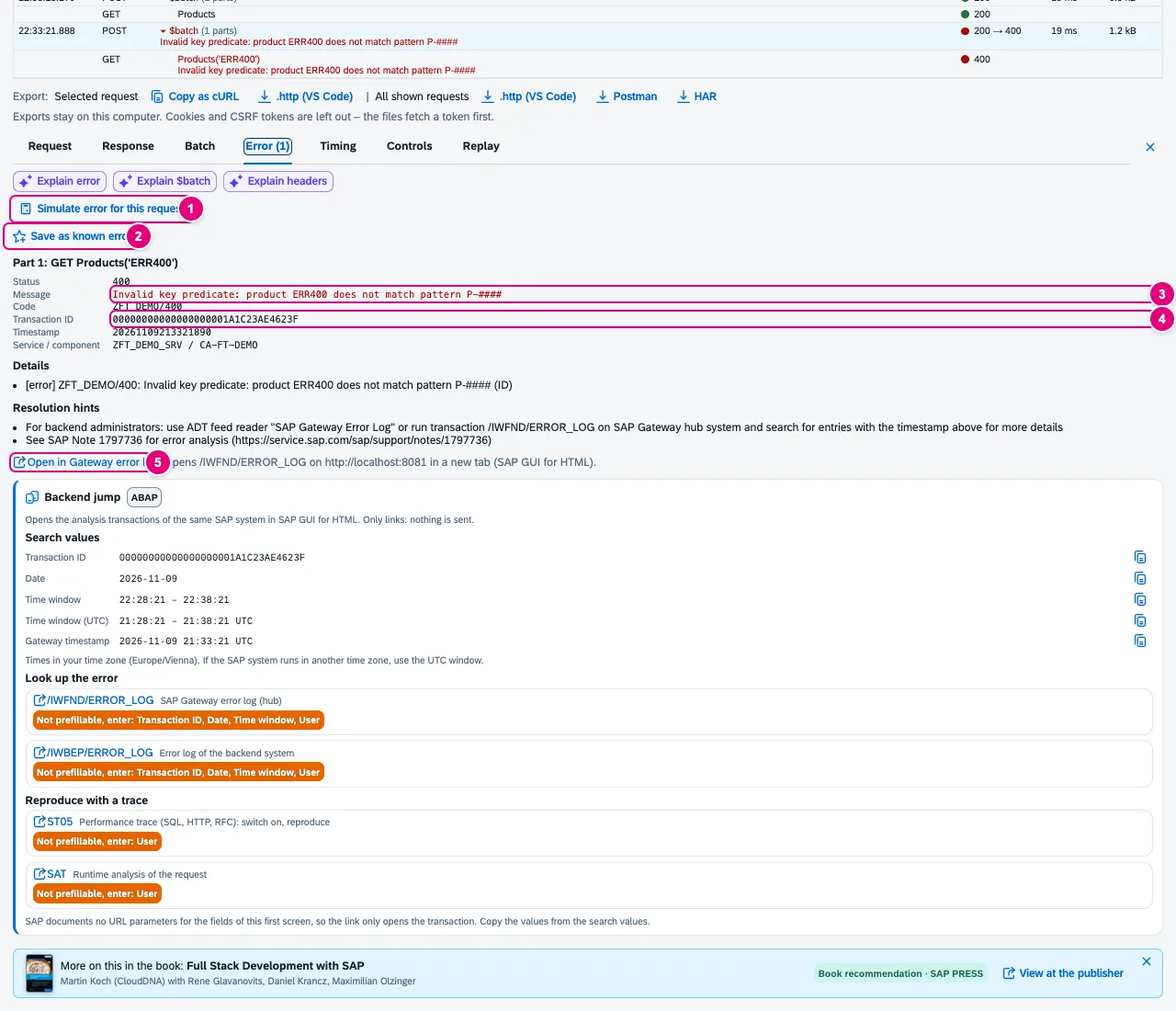
    Details of a failed batch part, Error tab: message Invalid key predicate, code ZFT_DEMO/400, transaction ID, timestamp and service
  • OData

    Metadata explorer

    Makes large services understandable as a picture instead of XML. Typical use: find out which navigations lead from the item to the status text and take over the path for $expand.

    Entities as a diagram with navigations, path finder for $expand, export as SVG, PNG or Mermaid.

    In the panel: OData › MetadataDocs: OData console →

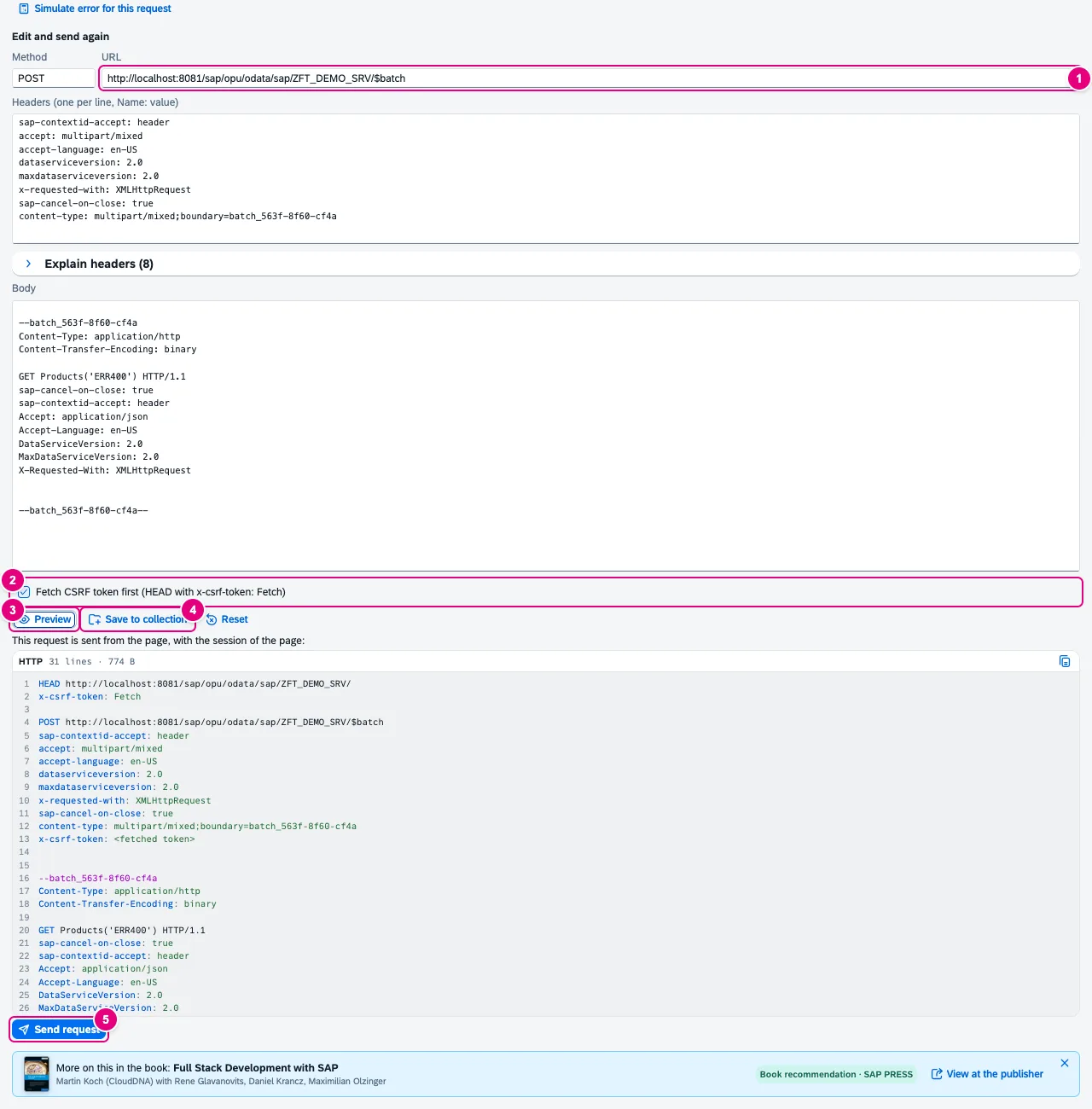
    Replay editor with method POST, URL of the $batch, headers, body, checkbox Fetch CSRF token first, Preview and Send request
  • OData

    From request to control

    Connects data and UI: which control of the page shows the value of this request or property? Typical use: go from a suspicious response straight to the affected field.

    One click from the request or property to the bound control in the page.

    In the panel: OData › ControlsDocs: OData console →

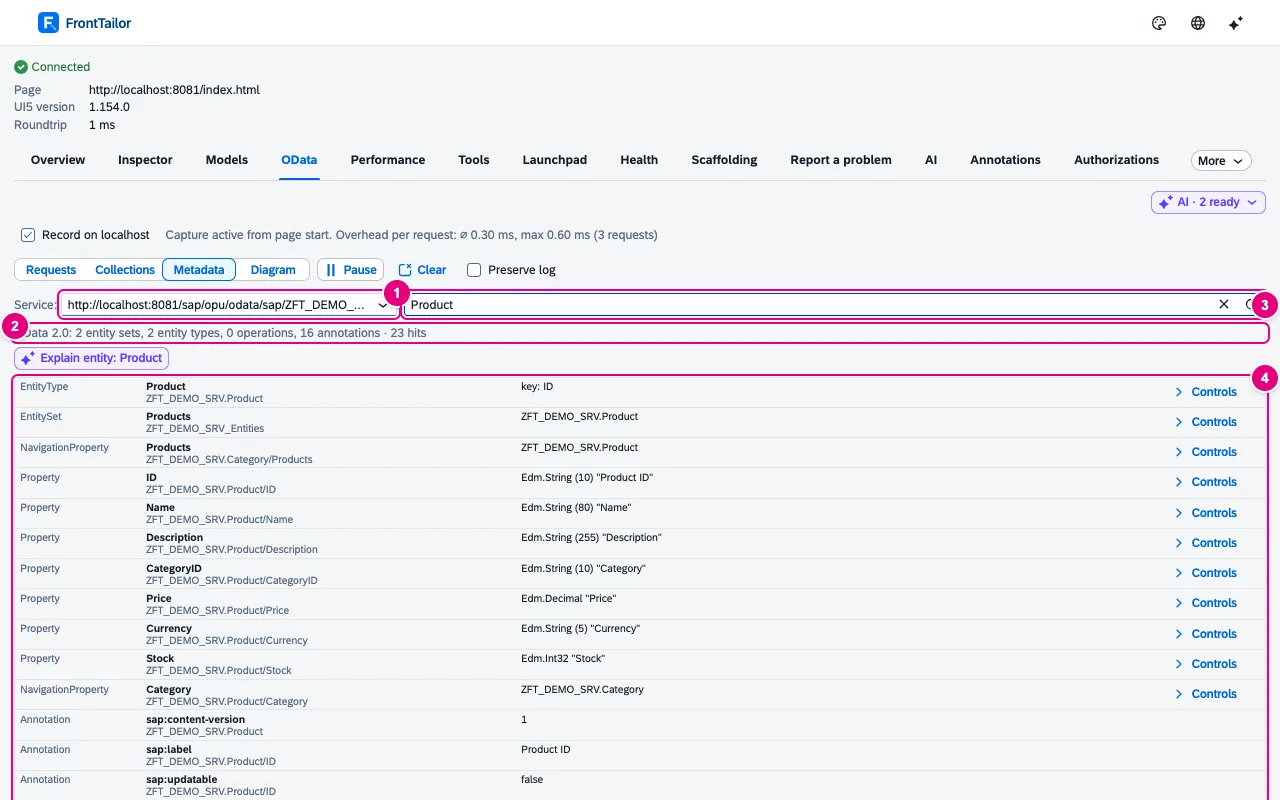
    Metadata view with service selection, summary OData 2.0 with 2 entity sets and 23 matches for Product
  • Performance

    Deployment check & cache buster

    Answers the question “why do users still see the old version?” for the current system. Typical use: after a deployment, check whether browser and server have the same version and clear stale caches with one click.

    Is the browser running the deployed version? Stale ~token~ paths, a verdict and a one-click reset.

    In the panel: Tools › Deployment · Cache busterDocs: Tools →

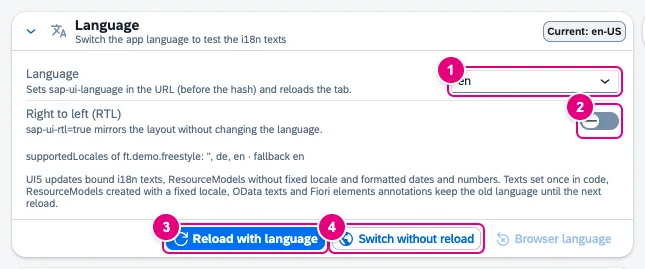
    Card Language with the selection en, the switch Right to left, the app’s supported locales and the buttons Reload with language, Switch without reload and Browser language
  • Quality: UI5 2.0, libraries, a11y & i18n, guidelines

    UI5 2.0 readiness check

    Shows what your own app has to change before UI5 2.0 – measured at runtime, so including dynamic calls a static linter does not see. Typical use: work through an app’s blockers by file and line.

    Synchronous loading, sap.ui.getCore(), jQuery.sap, deprecated controls and themes – with file, line, replacement and score. Migration report with effort in Pro.

    Pro Migration report as Markdown or CSV, with effort and comparison with the previous run.

    In the panel: UI5 2.0Docs: UI5 2.0 →

  • Quality: UI5 2.0, libraries, a11y & i18n, guidelines

    Library analyzer

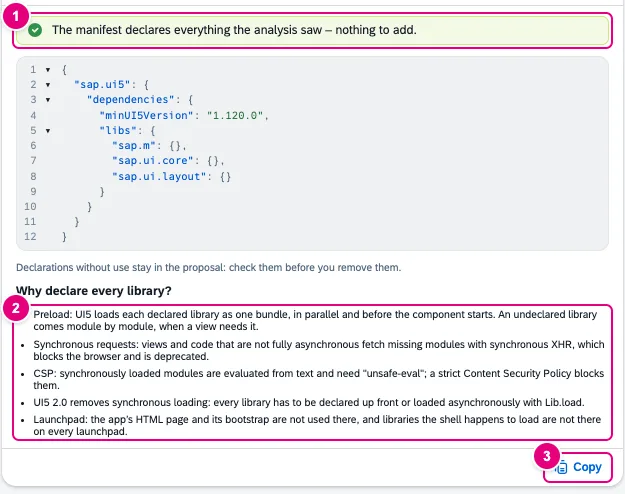
    Finds libraries the app uses but does not name in its manifest – they often only work because another library brings them along. Typical use: copy the sap.ui5/dependencies proposal into the manifest.

    Loaded libraries against the manifest, undeclared controls, network view and a copyable sap.ui5/dependencies proposal. Export in Pro.

    Pro Export of the analysis across all apps of the session as Markdown or CSV.

    In the panel: LibrariesDocs: Libraries →

    Manifest proposal card with the note nothing to add, JSON excerpt sap.ui5/dependencies with minUI5Version and libs, the explanation Why declare every library and the Copy button
  • Test & report

    Shared recorder

    Click through the app once instead of three times: the same recording serves as steps in the bug report, as a journey test or as a synthetic check. Which use is available depends on the edition of the module that uses it.

    Record once, use many times: as steps in the report, as a journey or as a synthetic check. Typed values not recorded by default.

    In the panel: Recorder › RecordDocs: Scaffolding & recorder →

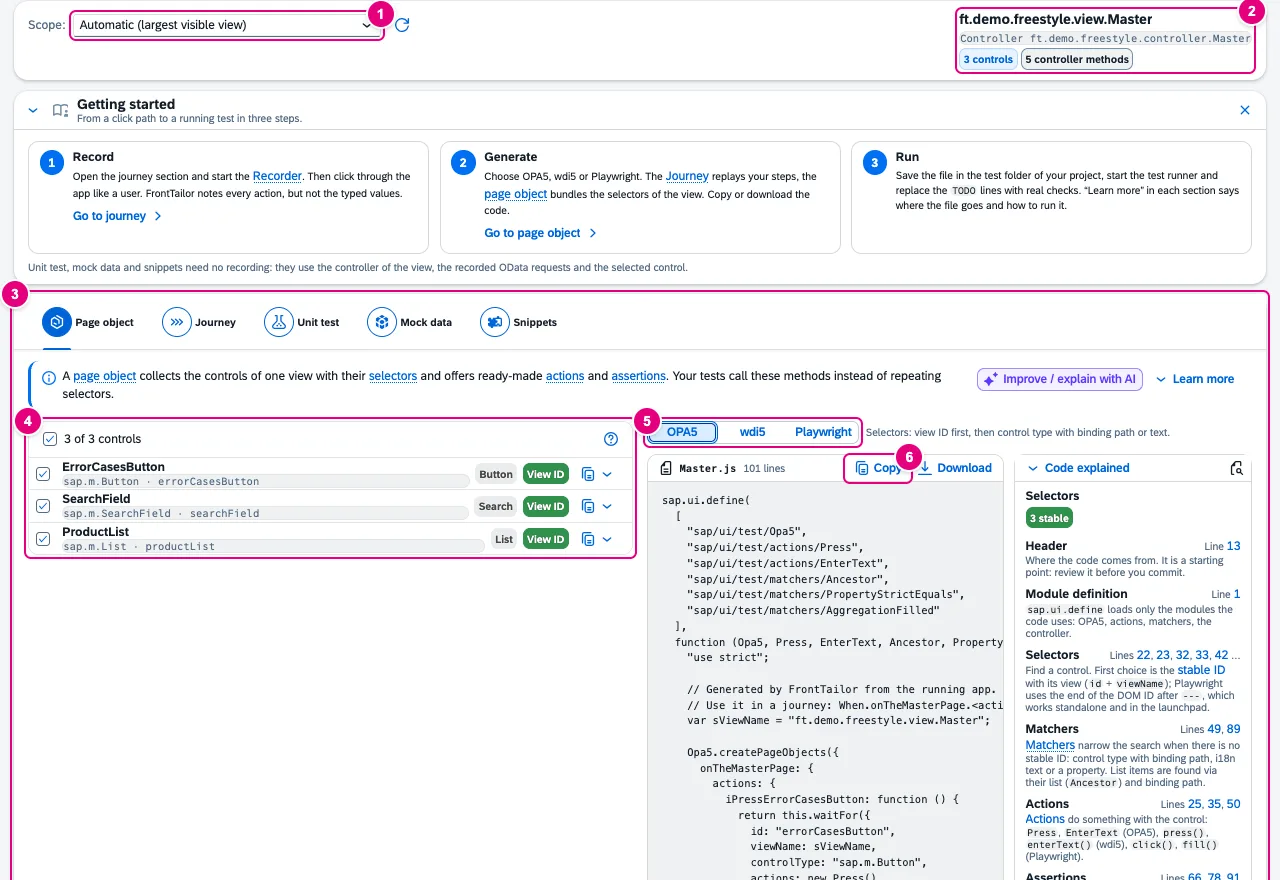
    Scaffolding tab with the scope selection, the detected view ft.demo.freestyle.view.Master, the Getting started card, the Page object section with three controls, the framework choice OPA5, wdi5, Playwright and the generated code
  • Test & report

    Known errors

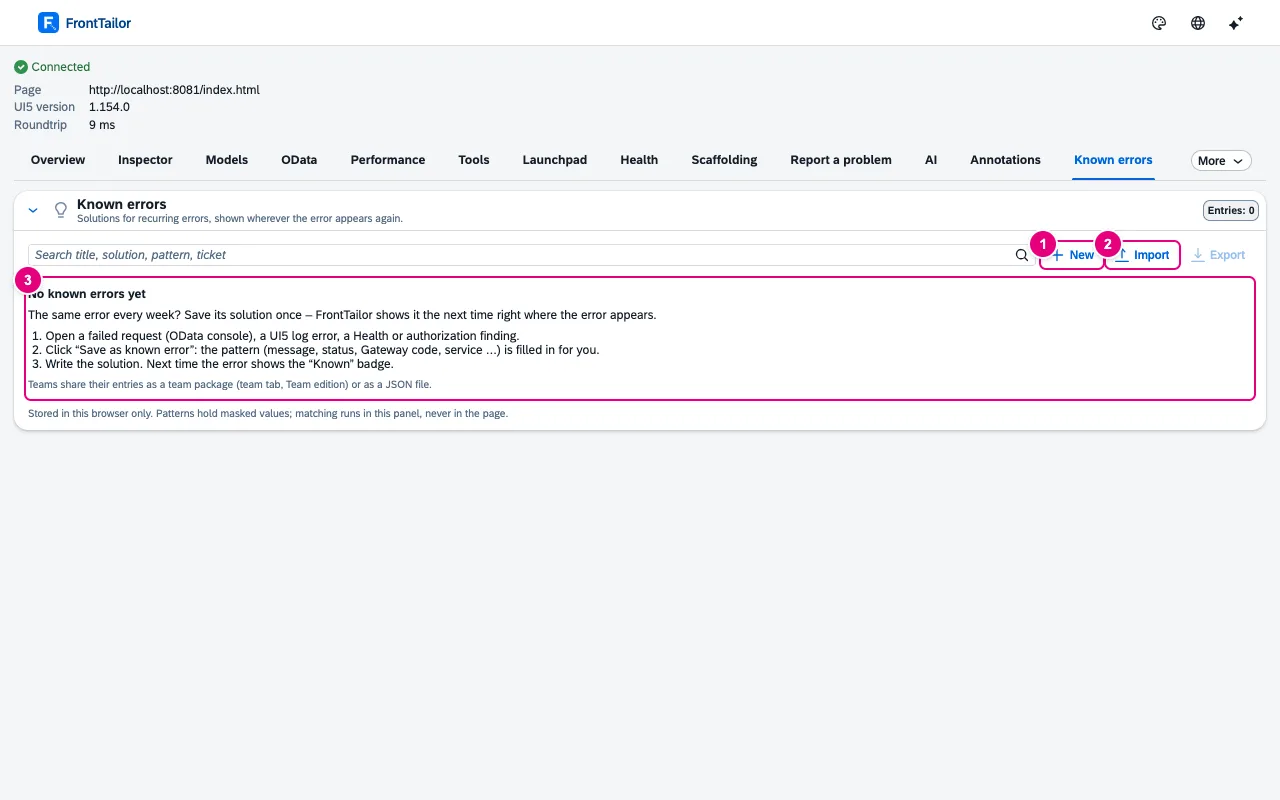
    Puts the fix where the error shows up: in the OData console, UI5 log, health, authorization diagnosis and bug report. Typical use: record a recurring message once with its fix instead of searching the wiki for it every week.

    The fix for the error that comes back every week, right at the error. For the whole team in Team.

    Team Known errors reach the whole team via a team package.

    In the panel: Known errorsDocs: Known errors →

    Empty Known errors tab with search field, New, Import, Export and the explanation in three steps

Pro For everyone who ships Fiori apps.

  • OData

    Fault simulation

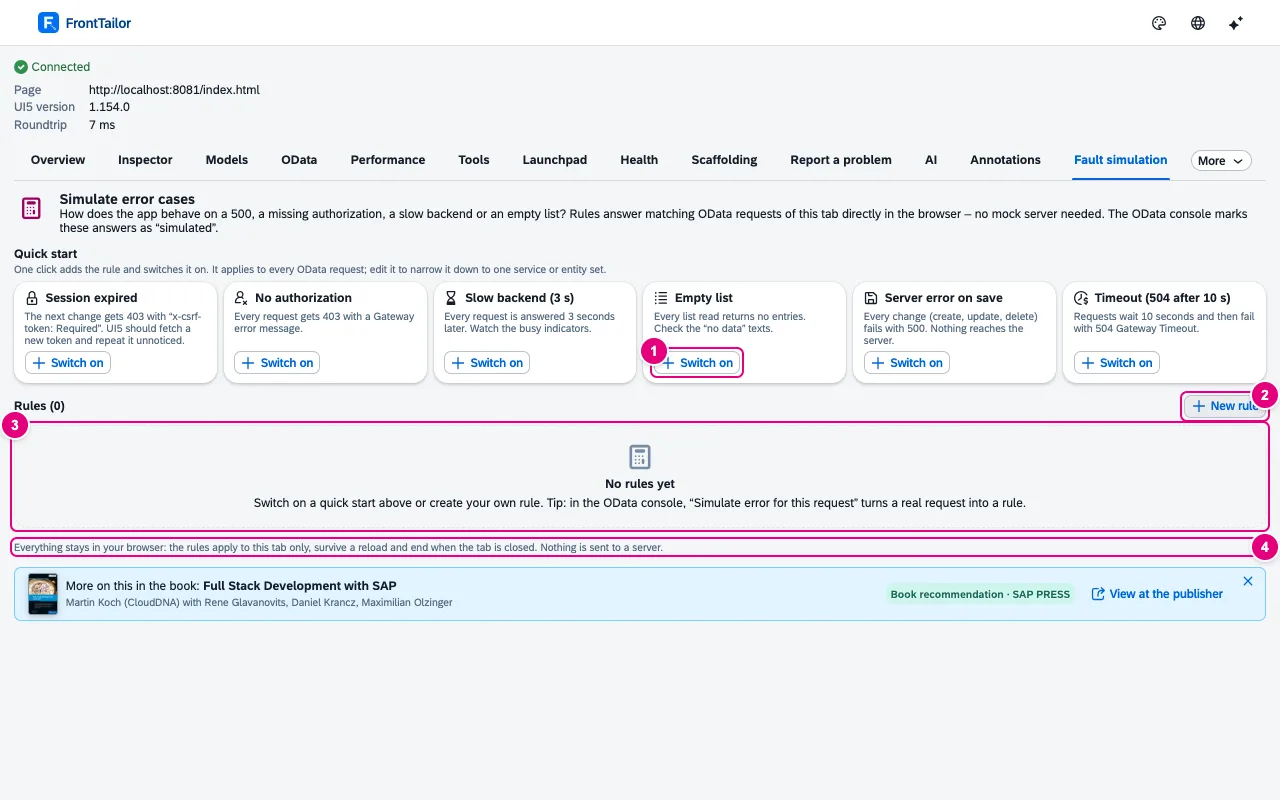
    Makes it testable how the app handles backend errors that rarely occur on the development system and never on demand. Typical use: check whether the app shows an understandable message on a 403 or an empty list.

    500, 403, slow backend, empty list or expired CSRF token – without a mock server, with a banner in the page, locked on PROD.

    In the panel: Fault simulationDocs: Fault simulation →

    Fault simulation tab with six quick starts, an empty rule list and the note Everything stays in your browser
  • Performance

    Performance profiler

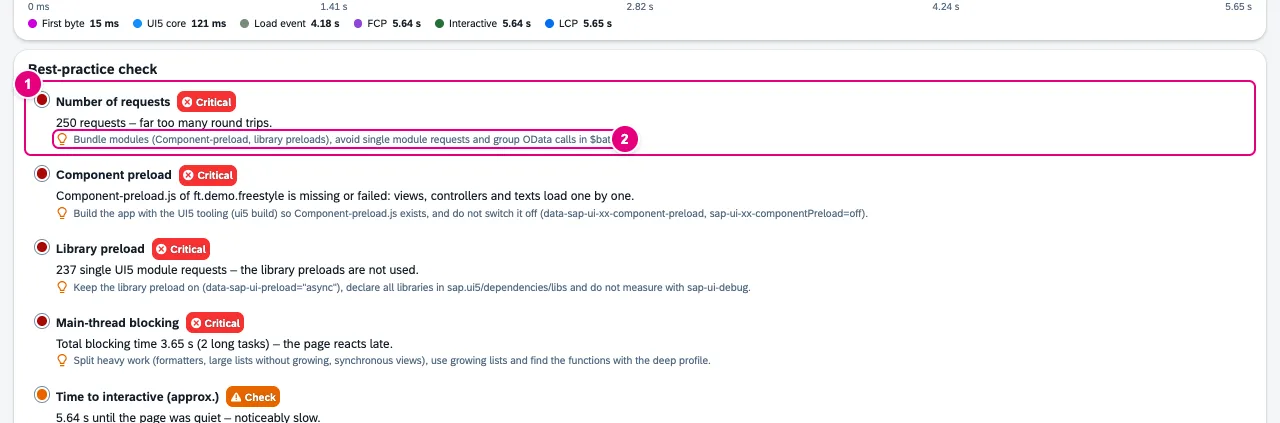
    Measures load time and rendering of a UI5 app and rates them against Fiori best practices. Typical use: find out why the start takes so long and begin with the concrete recommendation.

    Start time, requests, bundles, preload, async, theme cache, slow OData calls and long tasks – with traffic light and a concrete recommendation.

    In the panel: Performance › Start measurementDocs: Performance →

    Best-practice check with the critical findings time to interactive, number of requests, component preload and library preload, each with a recommendation
  • Performance

    Performance budgets

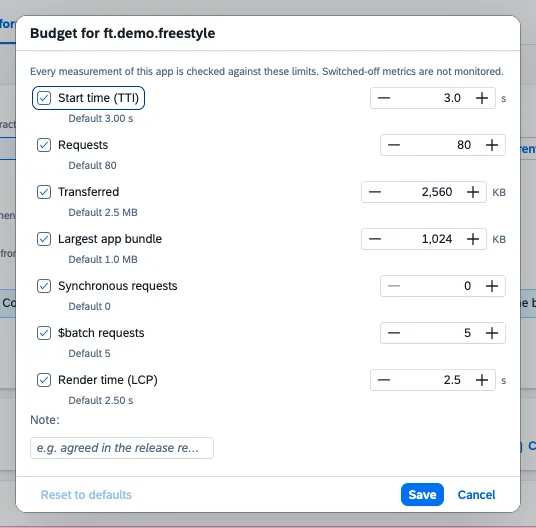
    Notices when an app gets slower from release to release – before users complain. Every measurement is checked against the app’s target and stored in the history across versions.

    Limits per app for seven metrics, verdict at the top of the report, history across versions, export as JSON. Team budgets in Team.

    Team Team budgets: budgets reach everyone in the team via a team package.

    In the panel: Performance › Performance budgetDocs: Performance →

    Dialog Budget for ft.demo.freestyle with seven metrics, each with a check box, limit and default value, a note field and the buttons Reset to defaults, Save and Cancel
  • Quality: UI5 2.0, libraries, a11y & i18n, guidelines

    i18n & accessibility check

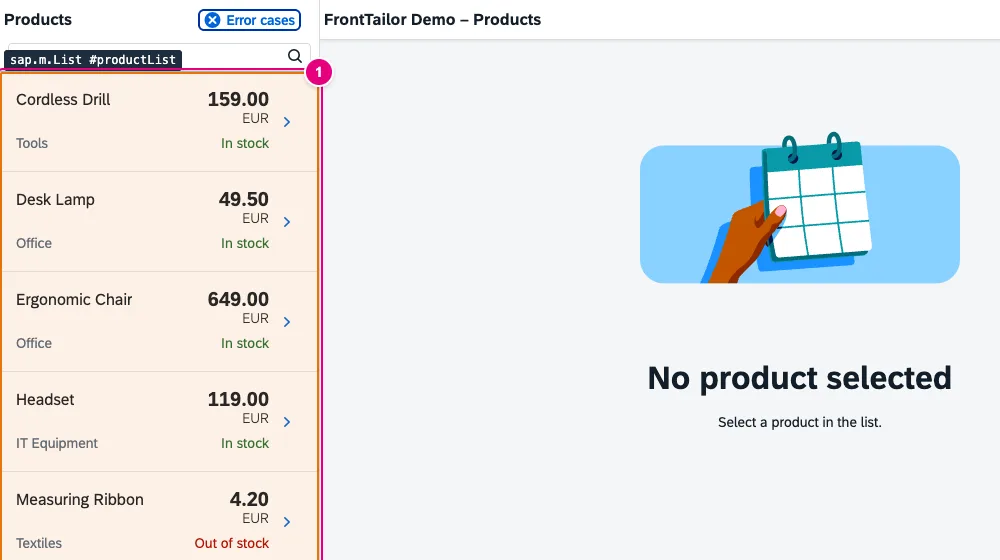
    Finds before review and acceptance what Fiori apps are often flagged for there: missing translations, hard-coded texts, icon buttons without a name, weak contrast – with reference to the app’s resource bundles and languages.

    Missing keys and translations, hard-coded texts, controls without a label, contrast per WCAG 2.2 – with a jump to the inspector.

    In the panel: QualityDocs: Quality: i18n & accessibility →

    Demo app with an orange frame around the product list and the label sap.m.List productList
  • Quality: UI5 2.0, libraries, a11y & i18n, guidelines

    Fiori design guidelines validator

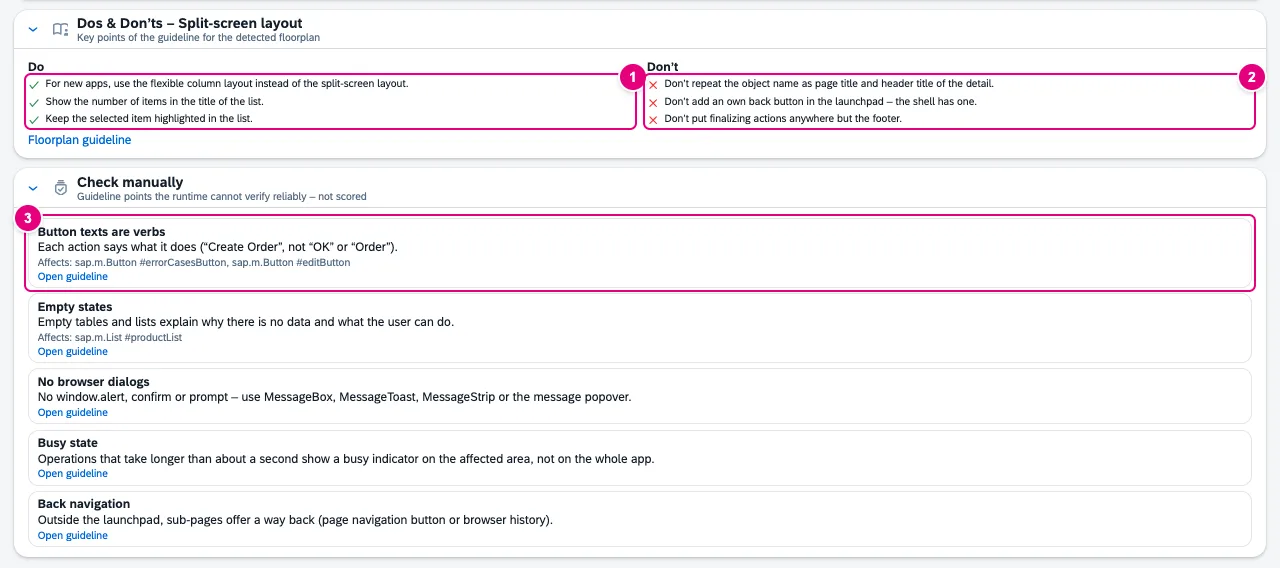
    Takes part of the manual design review off your hands: are the finalising actions in the footer, is there only one emphasised action, does the table show its count? Read from the control tree of the running app.

    Floorplan detected, 32 rules, score per category, improvement with example and dos & don’ts.

    In the panel: Fiori GuidelinesDocs: Fiori Guidelines →

    Card Dos and don’ts for the split-screen layout with three points each and Floorplan guideline, below it the checklist Check manually with Button texts are verbs, Empty states, No browser dialogs, Busy state and Back navigation
  • Quality: UI5 2.0, libraries, a11y & i18n, guidelines

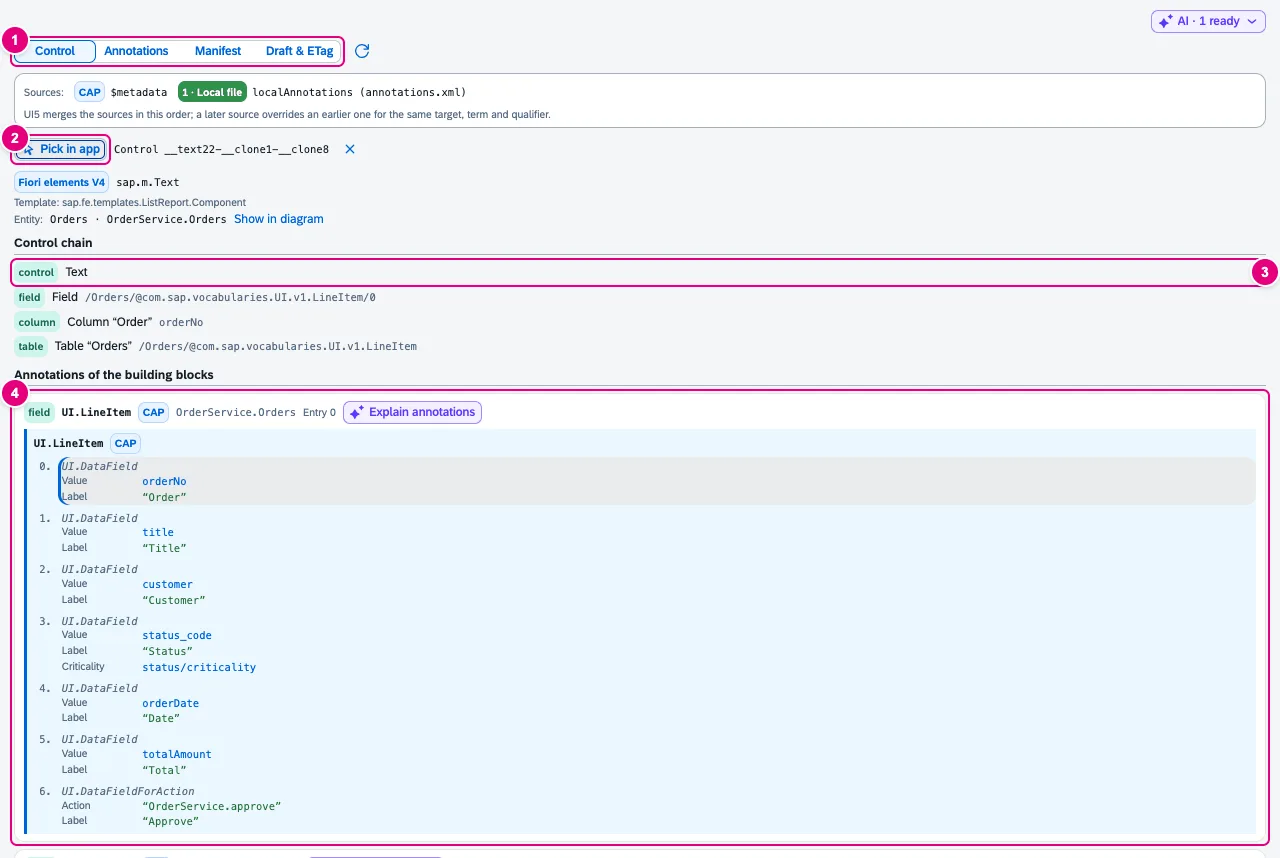
    Annotation explorer

    Helps with Fiori elements bugs that come without an error message: a column is missing, a label is wrong, a value help does not appear. It shows the annotation behind the element and which source wins.

    Which annotation drives this field in Fiori elements – and from which source? Plus manifest viewer and draft/ETag inspector.

    In the panel: AnnotationsDocs: Annotations →

    Control view for a table cell of the Fiori elements demo app: control chain from text via field and column to the table, below UI.LineItem with entry 0 highlighted, source CAP
  • Test & report

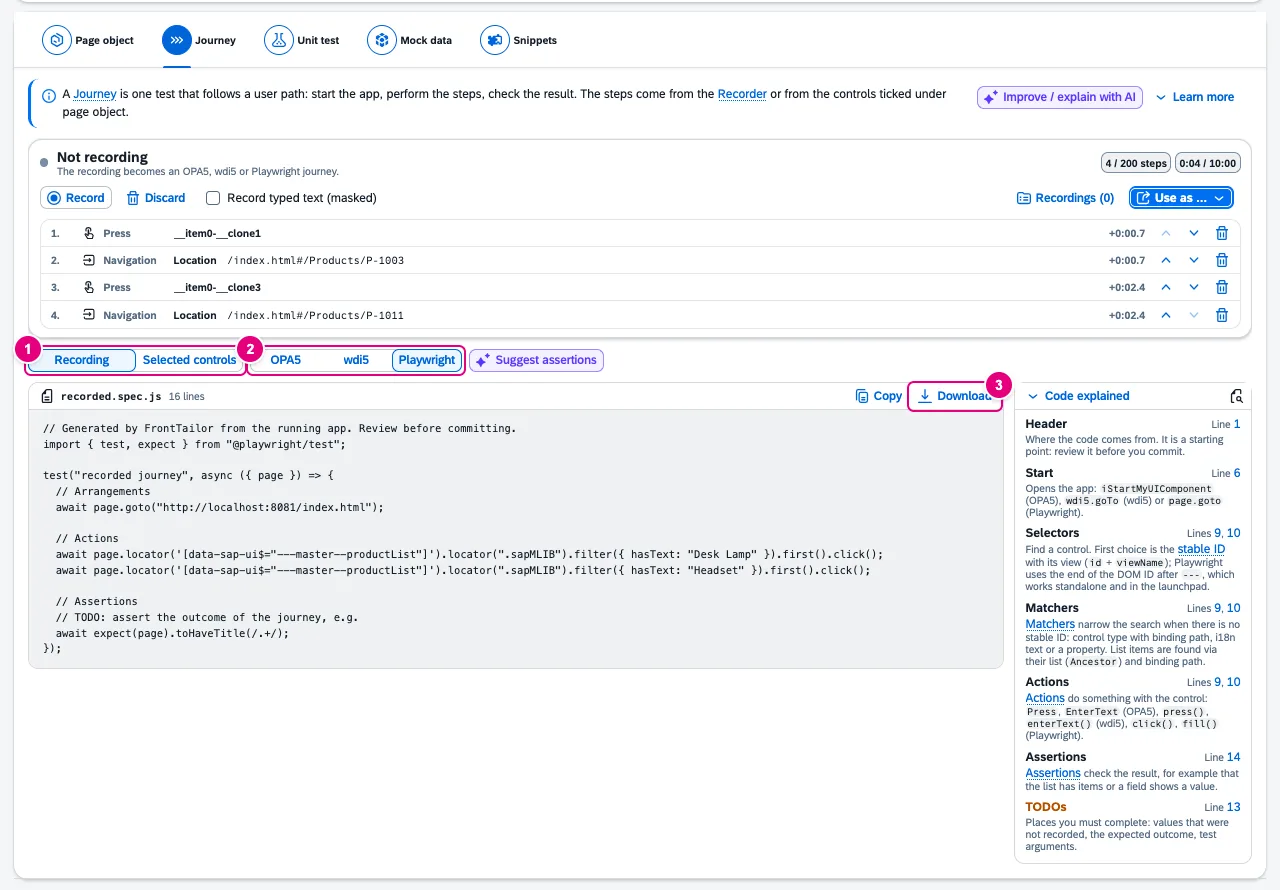
    Scaffolding & snippets

    Generates test skeletons and mock data from the running app instead of deriving them from the source by hand. Typical use: take a page object for the open page or turn a recording into a journey test.

    Page objects for OPA5, wdi5 and Playwright, QUnit skeleton and mock data from the running app.

    In the panel: ScaffoldingDocs: Scaffolding & recorder →

    Journey section with the recording bar, source Recording, framework Playwright and the generated test recorded.spec.js
  • Test & report

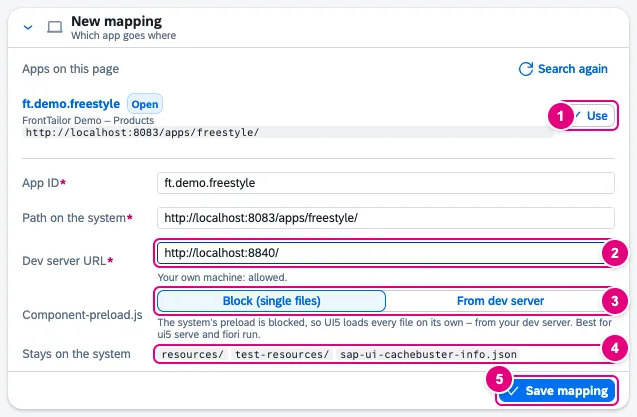
    Local code in the real launchpad

    Saves the deployment to a DEV system just to see your own state in the real launchpad. One app’s resources come from your local dev server; tile, roles, plug-ins and data stay real.

    Test your local state with the real tile, real roles and real data, without a deployment. Locked on PROD.

    In the panel: Local codeDocs: Local code →

    New mapping card with the detected app ft.demo.freestyle, app ID, path on the system, dev server URL, Component-preload.js and the paths that stay on the system
  • Test & report

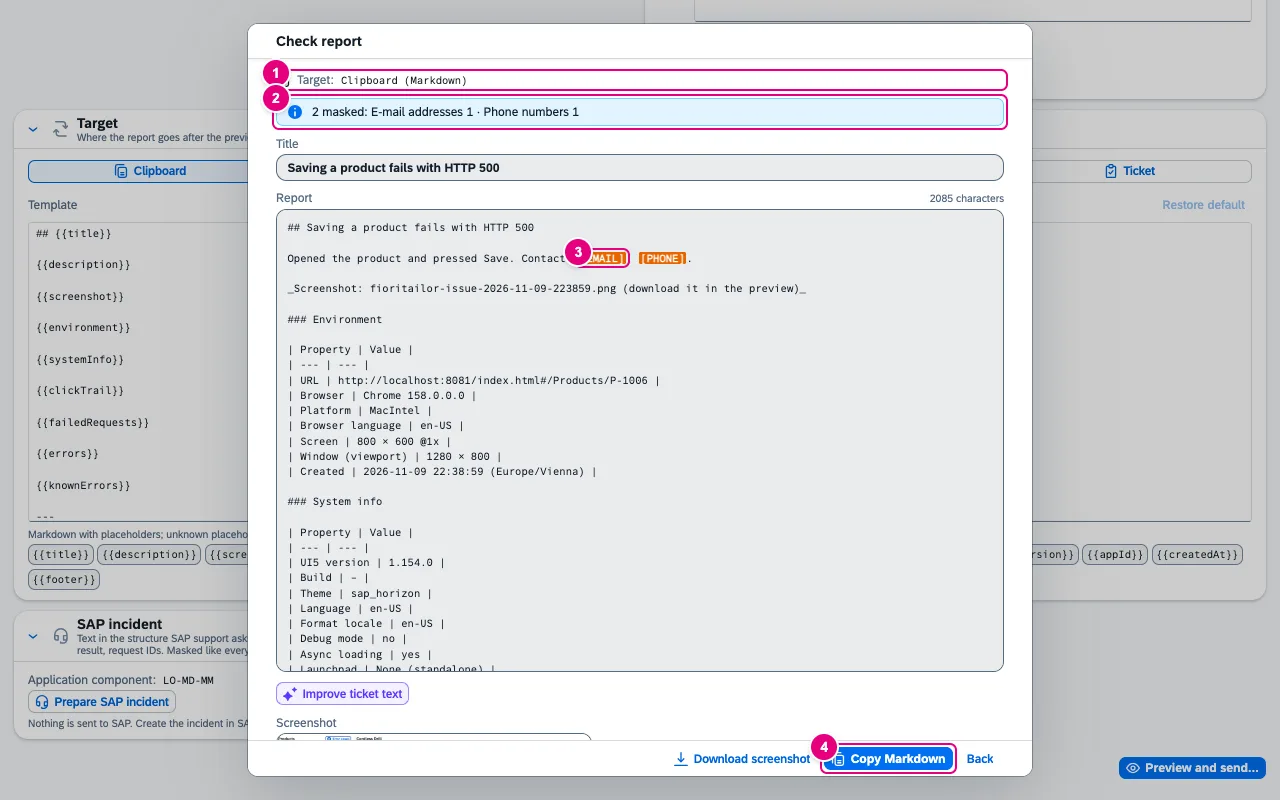
    Report a problem

    Prepares a complete report from a bug instead of collecting screenshot, steps, UI5 version and failed requests one by one. Masking happens before sending, and you see exactly what leaves the panel.

    Screenshot with markup, click trail, failed requests and system info – masked, with a preview.

    In the panel: Report a problemDocs: Report a problem →

    Check report dialog with target Clipboard, notice 2 masked with e-mail addresses and phone numbers, title, report with highlighted replacements and the Copy Markdown button
  • Test & report

    Tickets & SAP incident

    Creates the report as a ticket in the team’s tool instead of copying it by hand and losing screenshot and structure. For SAP support it prepares the incident details.

    Jira, GitHub, GitLab and Azure DevOps in Pro, ServiceNow in Enterprise. Plus a prepared SAP incident with component and request IDs.

    Enterprise ServiceNow as a ticket target, also for findings of the authorization diagnosis.

    In the panel: Report a problem › Create ticket · Prepare SAP incidentDocs: Report a problem →

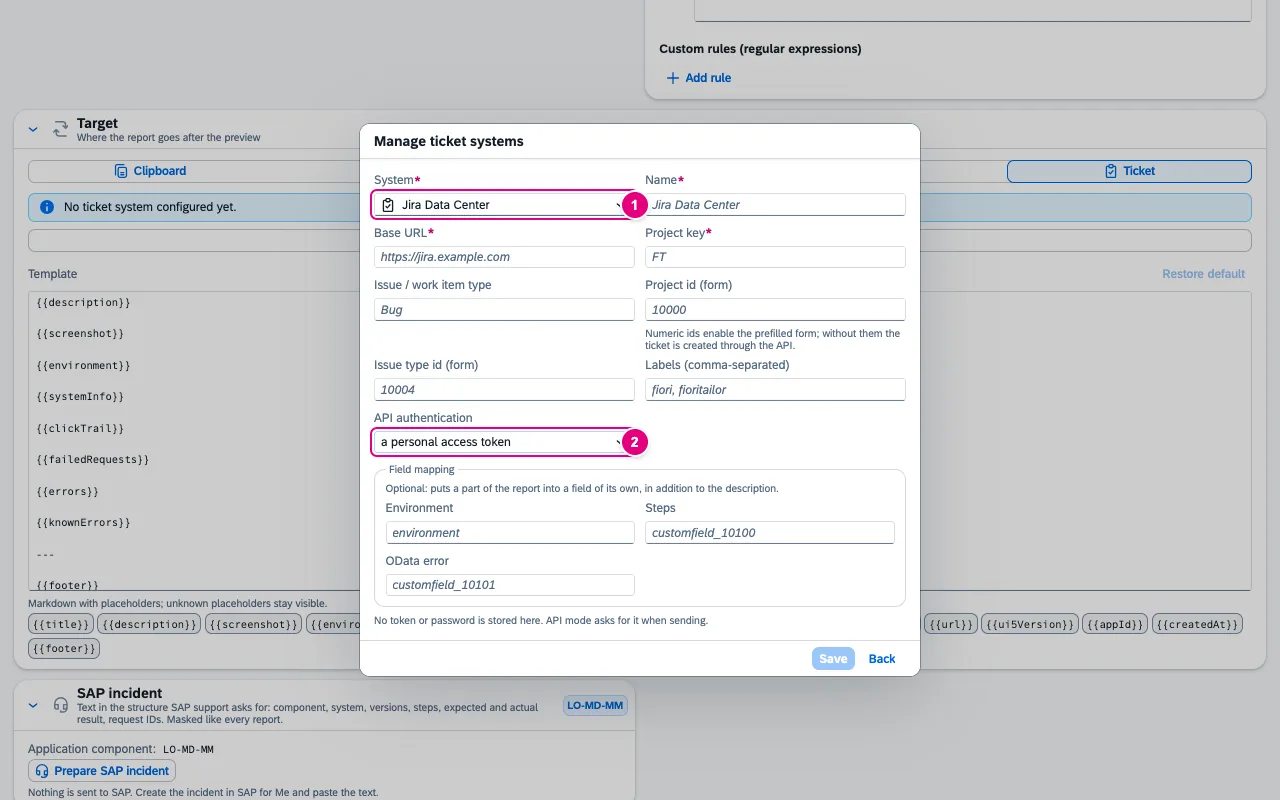
    Manage ticket systems dialog with the form for a new target: system Jira Data Center, name, base URL, project key, issue type, form IDs, labels, API authentication and field mapping
  • AI with your own key

    AI assistant (BYOK)

    Explains, reviews and writes with the context the panel already knows, instead of you copying error message, manifest and code into a chat by hand. The AI bar sits in every module tab, the catalogue in the “AI” tab.

    35 use cases with the page’s context: explain errors, code review of the running app, performance tips, wdi5 tests, annotations, translations, ticket texts.

    In the panel: AIDocs: AI assistant →

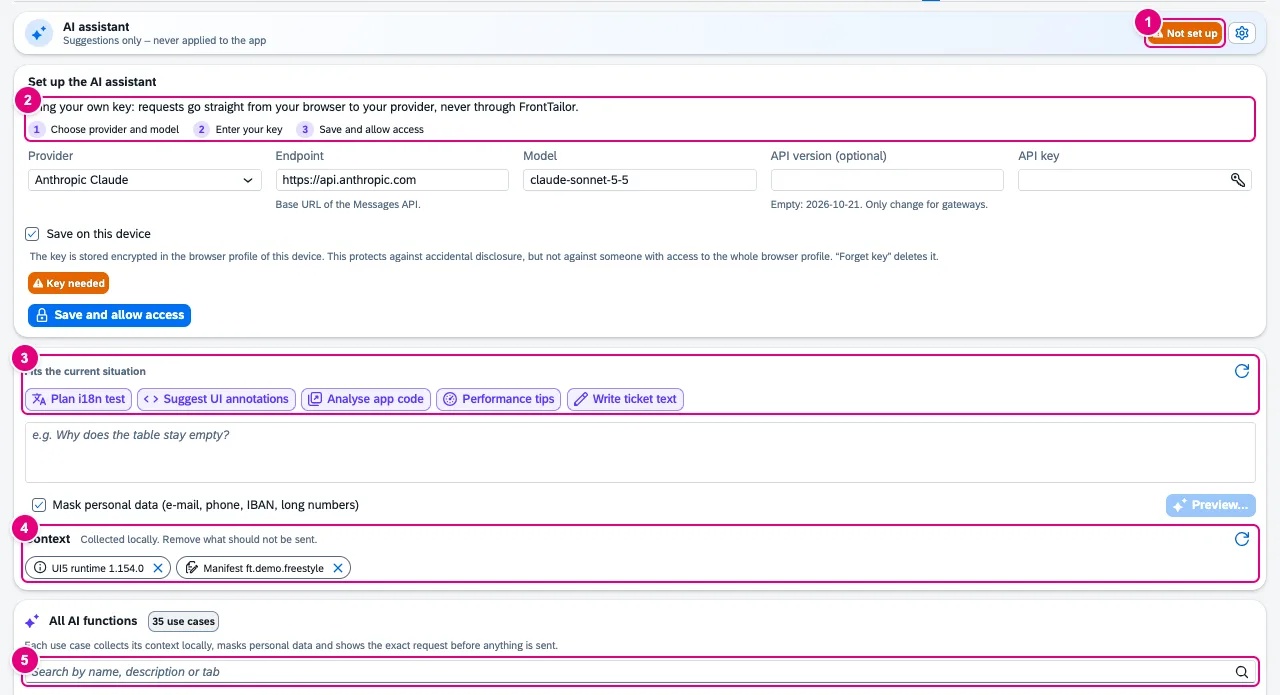
    AI tab before setup: status Not set up, setup with provider, endpoint, model and API key, suggestions for the current situation, question, context and the catalogue of all AI functions
  • AI with your own key

    Your provider, your key

    Uses the AI provider your company has already approved instead of introducing another service. Requests go straight from the browser to the provider.

    Anthropic, Azure OpenAI, SAP AI Core, Google Gemini, Mistral or OpenAI-compatible (e.g. Ollama). No CloudDNA proxy; the key stays encrypted on the device.

    In the panel: AI › Provider settingsDocs: AI assistant →

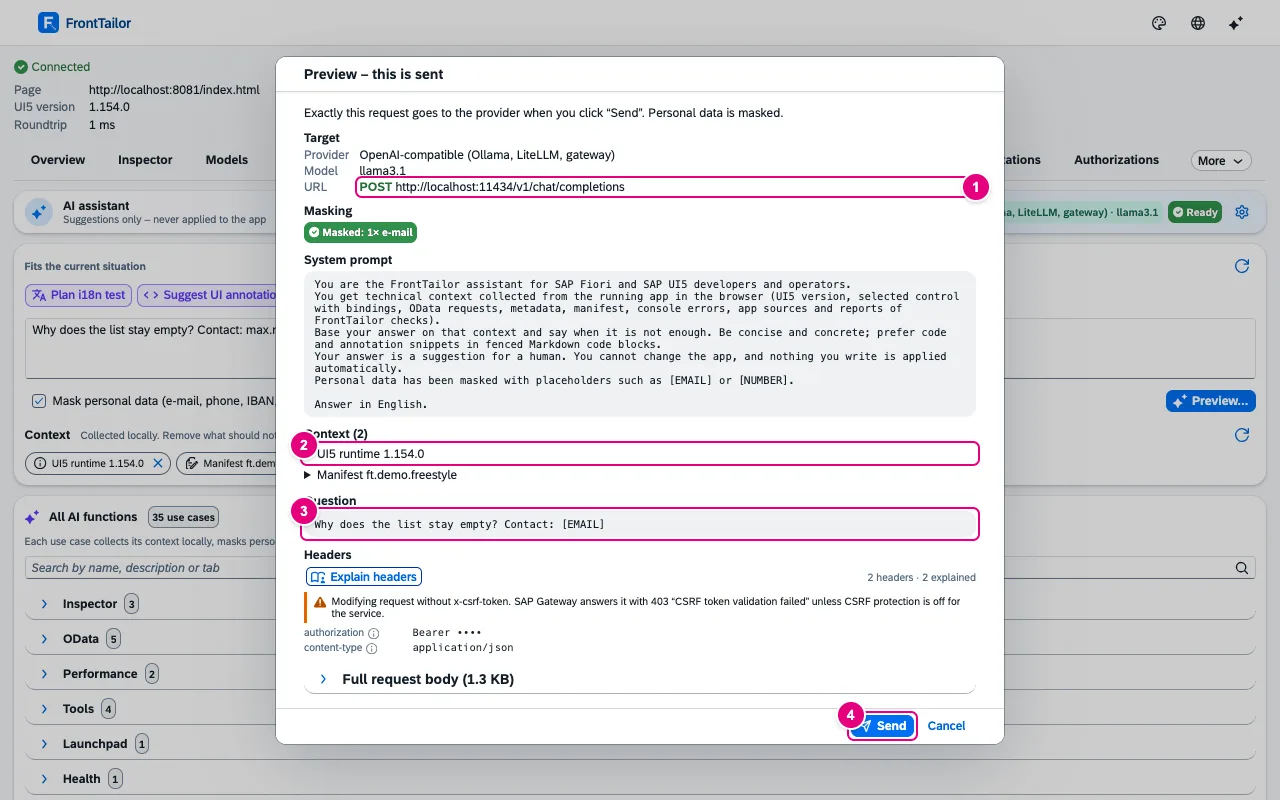
    Preview – this is sent dialog with provider, model, URL, masking, system prompt, two context blocks, masked question, headers with hidden key and Send
  • AI with your own key

    Preview & masking

    Prevents personal data from ending up in a request unnoticed. You see every request in full before you send it.

    Every request only after a full preview and a click; e-mail, phone, IBAN and long digit strings masked. Enforceable or switchable off by policy.

    In the panel: AI › Preview – this is sentDocs: AI assistant →

    AI tab before setup: status Not set up, setup with provider, endpoint, model and API key, suggestions for the current situation, question, context and the catalogue of all AI functions

Extensions in Pro

  • UI5 2.0 readiness check (Community): Migration report as Markdown or CSV, with effort and comparison with the previous run.
  • Library analyzer (Community): Export of the analysis across all apps of the session as Markdown or CSV.

Team Everything in Pro, plus shared standards.

  • Team

    Team sync

    Gives the whole team the same profiles, filters and fixes, without a server and without a CloudDNA service in the data flow. The package is a file or sits at an HTTPS address you choose yourselves.

    Team packages with host profiles, URL profiles, OData filters, replays, snippets, PII rules, favourites, budgets and known errors – via file or HTTPS.

    In the panel: TeamDocs: Team sync →

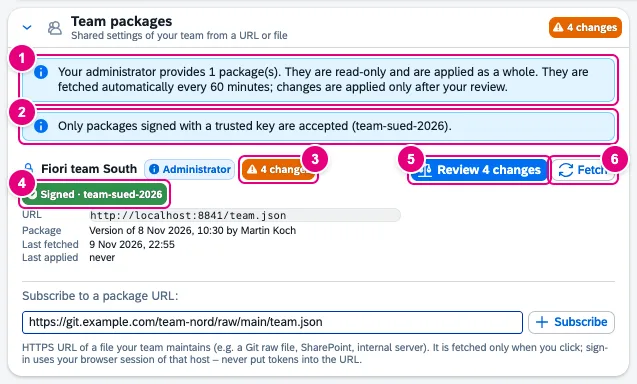
    Team packages card with the administrator notes, the package Fiori team South with the state 4 changes, a Signed tag, the buttons Review 4 changes and Fetch and the field Subscribe to a package URL
  • Team

    Diff before every change

    Makes sure a team package overwrites nothing you have not seen. You choose per entry what to apply.

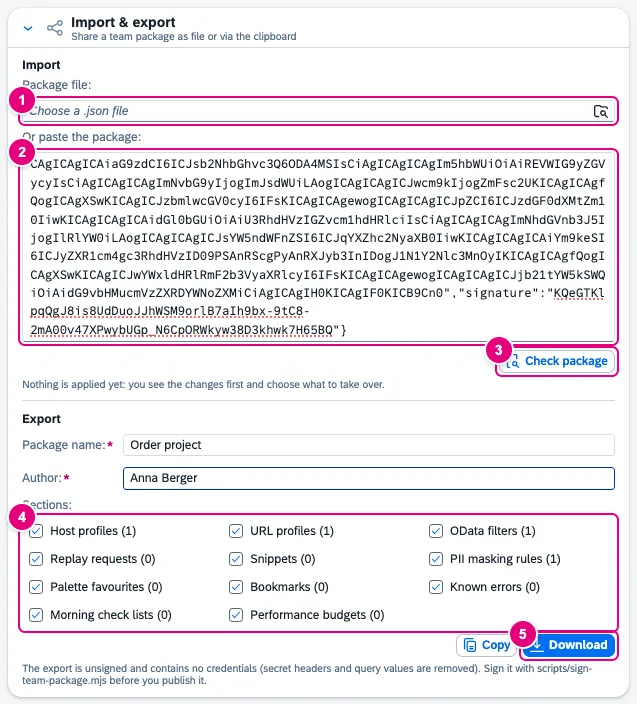
    Nothing is applied silently. Changes that would remove PROD protection are never preselected. Optionally signed with Ed25519.

    In the panel: Team › Review changesDocs: Team sync →

    Import and export card with the Package file field, a pasted signed package, the Check package button, package name and author, the sections with their counts and the Copy and Download buttons

Extensions in Team

Enterprise Everything in Team, plus operations and corporate IT.

  • Launchpad & operations

    Launchpad inspector

    Saves switching between launchpad administration, catalogue maintenance and the browser console when you check a tile. Typical use: clarify which target mapping and which catalogue are behind a tile.

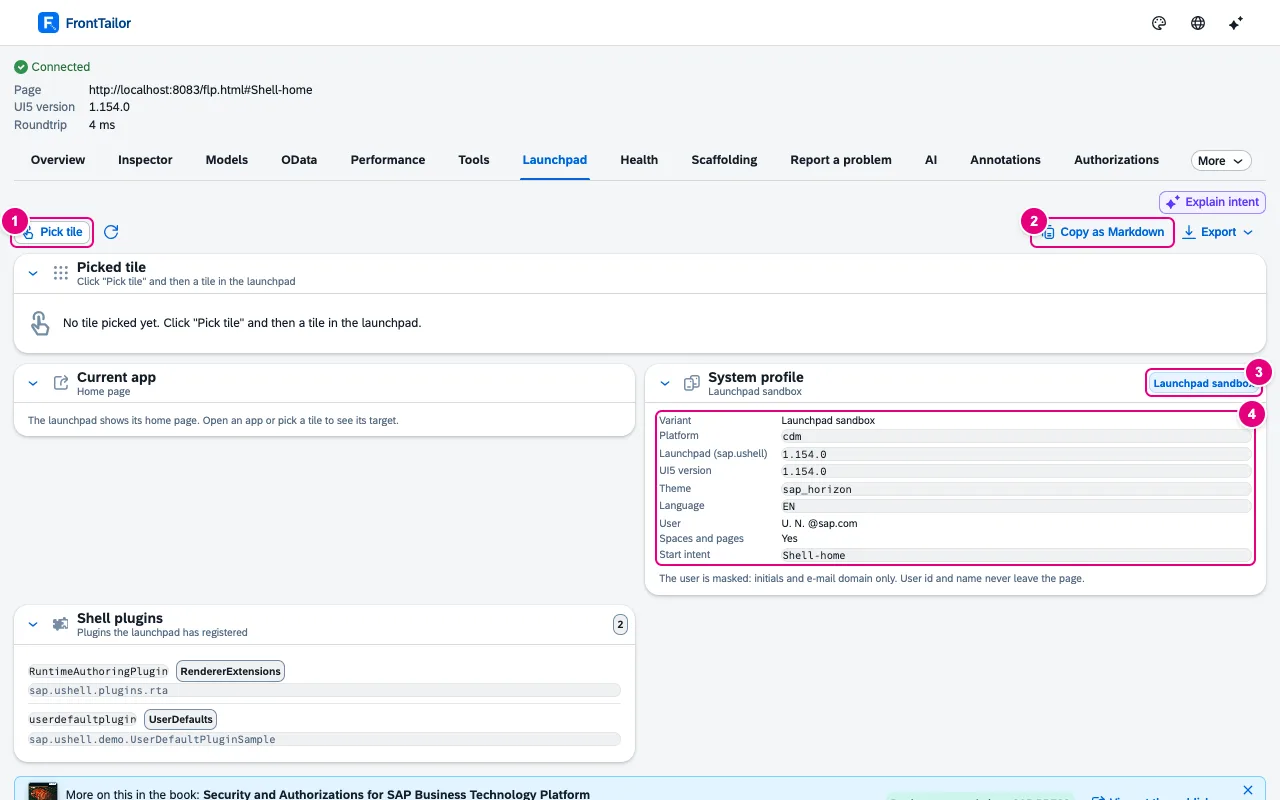
    Pick a tile: app ID, semantic object, target mapping, space, page, catalogue and plugins – without opening the app.

    In the panel: LaunchpadDocs: Launchpad inspector →

    Launchpad tab on the demo launchpad with empty tile selection, current app, system profile and shell plugins
  • Launchpad & operations

    Authorization diagnosis

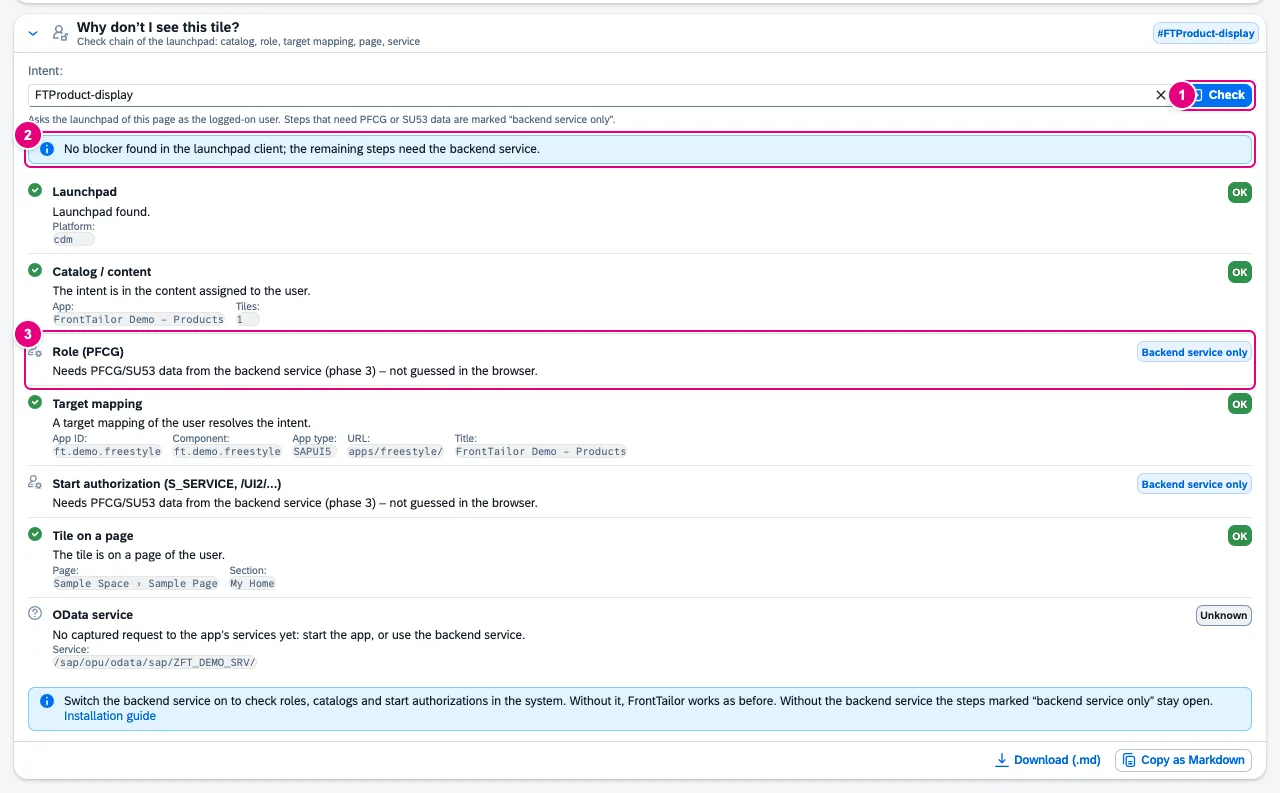
    Answers “why can’t I see this tile?” as a check chain from catalogue via role and target mapping to the OData service. Typical use: map a 403 to the missing authorization object and hand the finding to Basis.

    401/403 readable with the authorization object, check chain for “tile missing” with a traffic light per stage, links to SU53 and the error log.

    In the panel: AuthorizationsDocs: Roles and authorizations →

    Check chain for FTProduct-display with the stages launchpad, catalog, role, target mapping, start authorization, tile on a page and OData service
  • Launchpad & operations

    DEV/QA/PROD system comparison

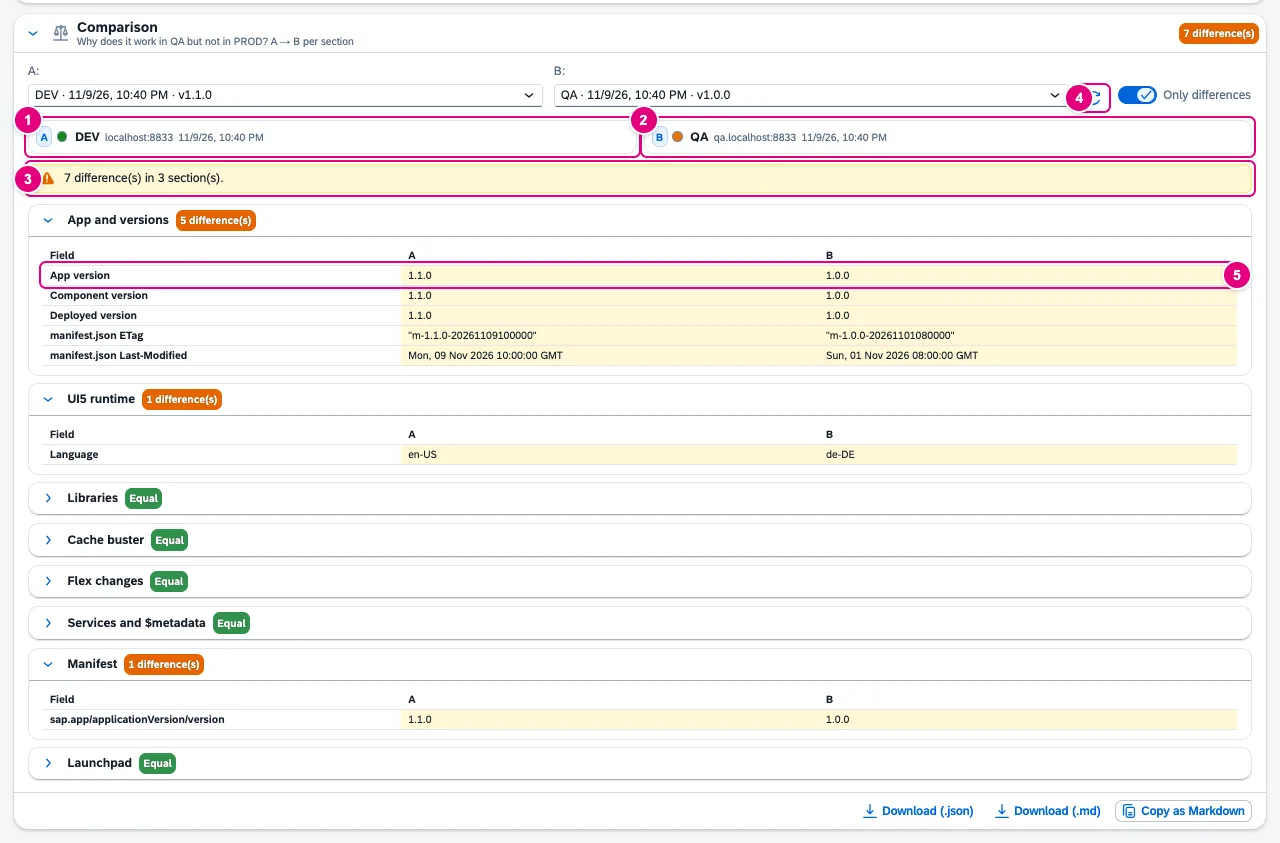
    Answers the frequent operations question “why does it work in QA but not in PROD?”. Differences in app and UI5 version, libraries, cache buster, flex changes, $metadata and target mapping appear side by side.

    Snapshots from metadata per system and a diff – no business data, no background crawling.

    In the panel: CompareDocs: System compare →

    Comparison card with DEV as A and QA as B, summary of differences and expanded sections App and versions and Manifest
  • Launchpad & operations

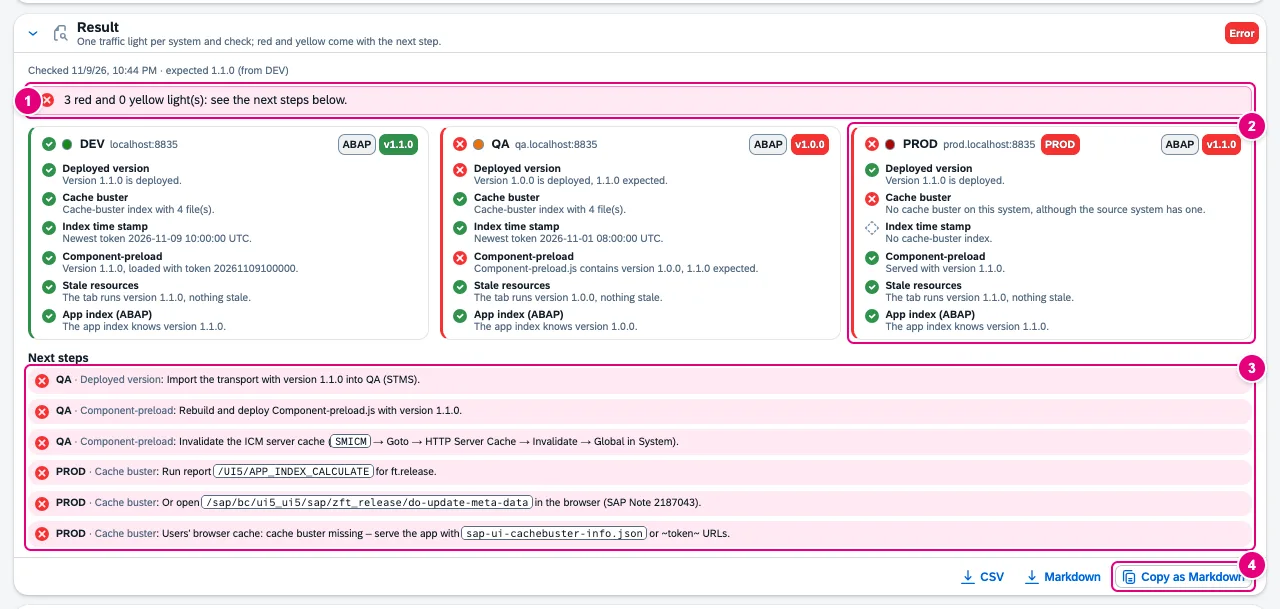
    Release check after transport

    Clarifies after a transport whether the new version is really active on DEV, QA and PROD and why users may still see the old one – instead of checking manifest, cache buster index and app index one by one.

    Traffic light per system for version, cache buster, preload and app index – and the next step for every red finding.

    In the panel: ReleaseDocs: Release check →

    Result with three system cards: DEV green, QA red with old version 1.0.0, PROD red without cache buster, and six next steps
  • Launchpad & operations

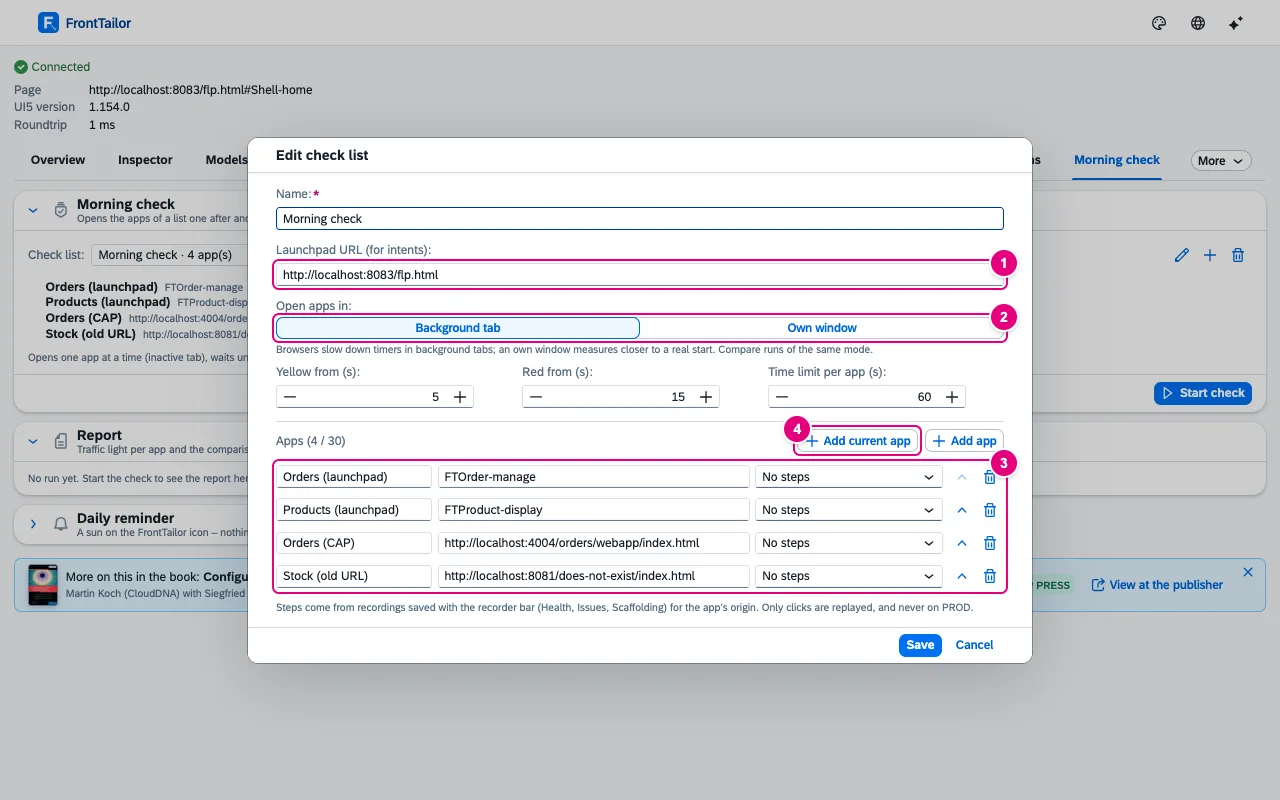
    Morning check

    Replaces opening your key apps by hand after a transport, a patch weekend or every morning. You see at a glance which app does not start and what changed since the last run.

    Open your key apps one after another on click, traffic light per app, comparison with the last run. No background monitoring.

    In the panel: Morning checkDocs: Health and morning check →

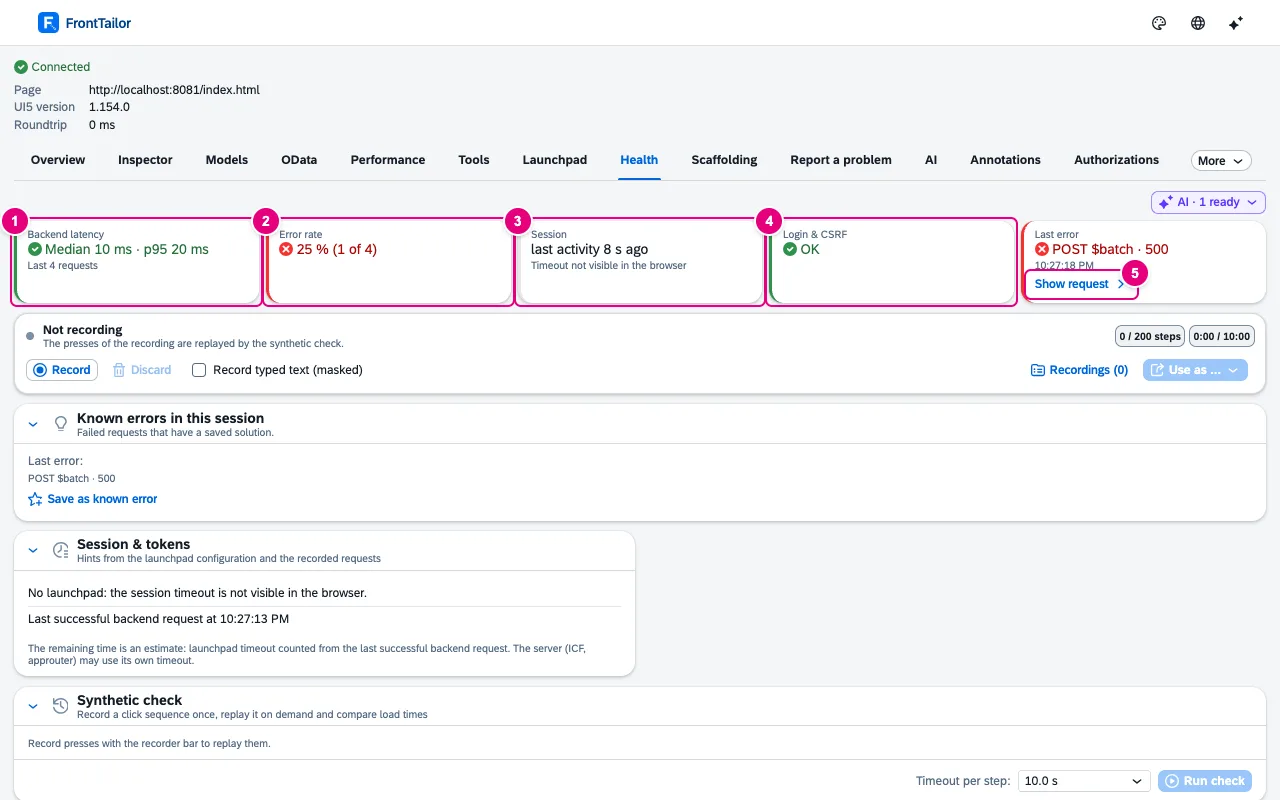
    Health tab of the freestyle demo app with the figures backend latency, error rate, session, login and CSRF and last error after an HTTP 500
  • Launchpad & operations

    Health & synthetic check

    Shows operations and key users whether an app is healthy right now, without diving into the OData console: how fast does the backend answer, how many requests fail, is the session about to expire?

    Latency, error rate and session time left from the OData log; replay recorded click paths as a check, locked on PROD.

    In the panel: HealthDocs: Health and morning check →

    Edit check list dialog with name, launchpad URL, open mode, thresholds and four apps
  • Launchpad & operations

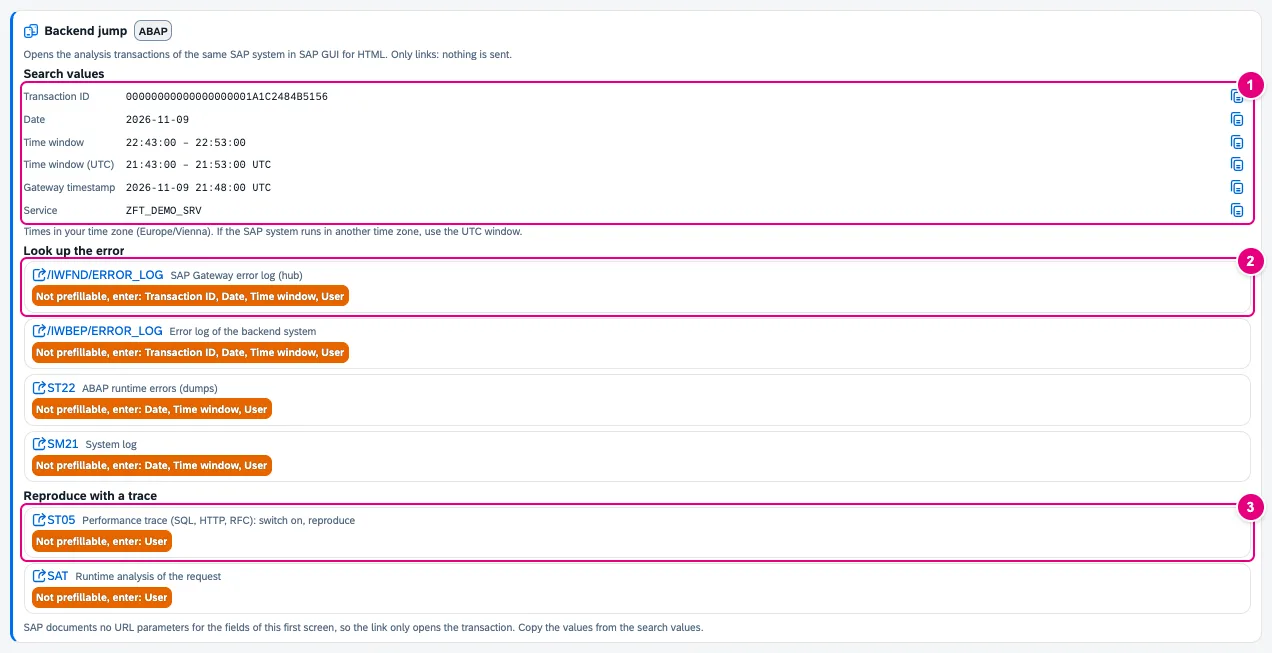
    Jump to the backend

    Saves the detour via SAP GUI, transaction and typing in time range, user and transaction ID after a failed request. For CAP and BTP apps it shows where the logs are instead.

    From the failed request straight to /IWFND/ERROR_LOG, ST22, SU53 and more on the same system; hints for CAP and BTP.

    In the panel: Backend jumpDocs: Backend jump →

    Backend jump card for an HTTP 500 with search values and links to /IWFND/ERROR_LOG, /IWBEP/ERROR_LOG, ST22, SM21, ST05 and SAT
  • Launchpad & operations

    Backend service & role simulator (optional)

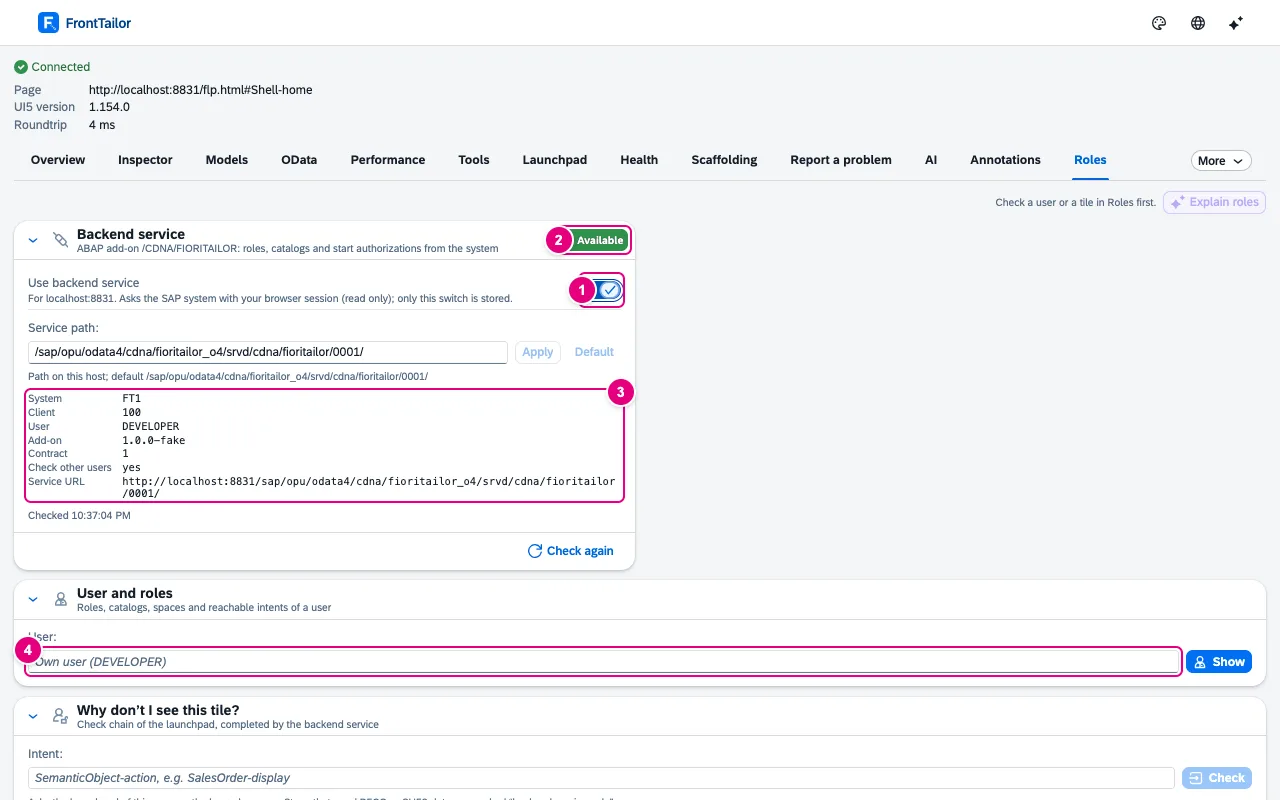
    Answers what the browser cannot see: which PFCG roles a user has, which catalogue would bring a tile and whether a start authorization is missing – for another user, too.

    Read-only ABAP add-on for the role and start authorization stages. Not yet tested on a real SAP system.

    In the panel: RolesDocs: Roles and authorizations →

    Roles tab with the backend service switched on, state Available, system FT1, client 100 and service URL
  • Team

    Admin policies & sideloading

    Lets IT decide centrally on which systems and with which modules the extension works, instead of setting up every browser individually. A switched-off module is neither visible nor active.

    Prescribe allowed hosts, PROD hosts, modules, AI endpoint, licence and team packages centrally – via group policy, Intune or Jamf.

    Docs: Enterprise deployment →

Extensions in Enterprise

  • Tickets & SAP incident (Pro): ServiceNow as a ticket target, also for findings of the authorization diagnosis.
Videos

Each edition in a minute and a half or less.

Shown on the demo apps from the extension’s repository, with made-up data.

FrontTailor Community – free · 1:17 min
Chapters and transcript

Chapters

  1. Inspector and models
  2. OData and known errors
  3. Tools
  4. Analysis
  5. Bookmarks

What is said in the video

FrontTailor Community is free – one panel right next to the running app. The Inspector shows the type, properties and bindings of every control. The Model Explorer compares snapshots, so you see exactly what changed in the model.

The OData console records every request, inside $batch calls too, and turns errors into plain text. For known errors, you store the solution once. Next time, it shows up right at the error.

Tools switch debug mode, cache and own-code debugging with one click – and the app language even without a reload. The command palette puts every function on the keyboard, favourites first. The UI5 2.0 check shows what to fix before moving to UI5 2.0.

Library analysis compares the loaded libraries with the manifest. And bookmarks remember route, filters and tab – after a reload, one click brings you back. FrontTailor Community is free – a product of CloudDNA.

More at fronttailor.com.

FrontTailor Pro – for developers · 1:21 min
Chapters and transcript

Chapters

  1. Measure and understand
  2. Report and check
  3. Local code in the launchpad

What is said in the video

FrontTailor Pro is for developers who go deeper. The profiler measures start-up, requests and bundles and checks them against budgets. The Annotation Explorer shows which annotation creates a field – and where it comes from.

Scaffolding generates page objects, tests and mock data from the running app. The AI assistant uses your own key. Before sending, you see what goes out – personal data masked.

The issue reporter collects context and steps and prepares the SAP incident. The UI5 2.0 check becomes a migration report with effort. Plus checks for accessibility, translations and the design guidelines.

Fault simulation tests empty lists, delays and HTTP errors – without touching the backend. And local code runs in the real launchpad: FrontTailor redirects the app to your dev server – no deployment. FrontTailor Pro – a product of CloudDNA.

More at fronttailor.com.

FrontTailor Team – shared standards · 1:06 min
Chapters and transcript

Chapters

  1. Package by policy
  2. In daily work

What is said in the video

FrontTailor Team gets everyone on the same page: one signed team package instead of wiki pages and word of mouth. The administrator distributes the package by policy. FrontTailor checks the signature before anything is applied.

The preview shows every change: profiles, snippets, rules for personal data, OData filters, replay collections, bookmarks, known errors and performance budgets. One click applies it all – entries given by the administrator stay read-only. In daily work, it is simply there: the team filter and the replay collection in the OData console …

… and when a known error shows up, the team’s solution is right next to it. FrontTailor Team – a product of CloudDNA, the SAP and AI experts from Austria. More at fronttailor.com.

FrontTailor Enterprise – for operations · 1:20 min
Chapters and transcript

Chapters

  1. Launchpad and roles
  2. Health and errors
  3. Morning check
  4. Admin policies

What is said in the video

FrontTailor Enterprise is for operations – so you know about problems before the phone rings. The launchpad inspector shows the intent, target mapping, app and space behind every tile. The role simulator shows a user’s roles – and where the chain to the app breaks.

Health shows latency and error rate live. One click jumps to the error – with links to ST22 and /IWFND/ERROR_LOG. When an authorization is missing, the diagnosis names object, activity and the next steps, down to SU53.

The morning check starts all key apps and reports with a traffic light what fails. System compare shows what differs between DEV, QA and PROD. After a transport, the release check tests every system – with the next steps.

And administrators control it all by policy: licence, modules, AI endpoint and PROD lock. FrontTailor Enterprise – a product of CloudDNA. More at fronttailor.com.

Licence

Bought on the website. Checked in the browser.

The purchase runs through the checkout of the Tailor-Plattform. The extension itself calls nothing for it.

  1. Edition, billing, quantity. Monthly or annually, for one or more users, paid in the platform’s checkout.
  2. By e-mail. The platform sends the licence key to the address from the purchase. This website never shows it.
  3. In the licence view of the extension. Checked offline, without a network call; the key stays only in the local browser storage.
  4. Or centrally. IT sets the key via the licenseKey policy for all users of a browser.
Keep learning

The books behind the editions.

What Community and Pro show on the app is explained in the SAP PRESS books on SAPUI5, SAP Fiori elements and full-stack development with SAP. What Enterprise checks after a transport and in operations is covered in Git und SAP and in the book on security and authorizations for SAP BTP. All books by topic →

Book recommendation A recommendation in our own interest: Martin Koch, founder of CloudDNA, is author or co-author of these books.

Buy directly

FrontTailor

Total, net , excl. VAT

You pay on Stripe. The invoice uses reverse charge if you enter a VAT ID. We send you the licence key by e-mail after payment.

Our terms and licence terms apply.

Sources on this page

The superscript numbers in the text point here. Tap one to see the source right where it is used; all sources of this website are listed on one page.

  1. 1

    Four editions and their modules ↑Product · FrontTailor product documentation, KONZEPT.md, section business model, and ADR-014 · checked on 2026-11-09

  2. 2

    Edition prices ↑Vendor · Decision of the CloudDNA product owner of 9 November 2026 · checked on 2026-11-09

  3. 3

    Licence check on: 7-day trial, then Community ↑Product · FrontTailor product documentation, ADR-014 “Module registry and licence” · checked on 2026-11-10

  4. 4

    System info without setup ↑Product · FrontTailor product documentation, README and store text (docs/store-listing.md) · checked on 2026-11-09

  5. 5

    Control inspector with pick mode and “copy as” ↑Product · FrontTailor product documentation, ADR-005 “Control inspector” · checked on 2026-11-09

  6. 6

    Model explorer with snapshot, diff and i18n lookup ↑Product · FrontTailor product documentation, ADR-006 “Model explorer” · checked on 2026-11-09

  7. 7

    App state bookmarks ↑Product · FrontTailor product documentation, ADR-038 “App state bookmarks” · checked on 2026-11-09

  8. 8

    Cache reset, debug switches and command palette ↑Product · FrontTailor product documentation, ADR-008 “Tools: cache, debug, palette” · checked on 2026-11-09

  9. 9

    i18n and accessibility check ↑Product · FrontTailor product documentation, ADR-033 “i18n and accessibility” · checked on 2026-11-09

  10. 10

    Flex check and targeted personalisation reset ↑Product · FrontTailor product documentation, ADR-011 “Flex personalisation” · checked on 2026-11-09

  11. 11

    Test another UI5 version from the SAP CDN ↑Product · FrontTailor product documentation, ADR-012 “UI5 version override” · checked on 2026-11-09

  12. 12

    OData console for V2 and V4 ↑Product · FrontTailor product documentation, ADR-007 “OData console” · checked on 2026-11-09

  13. 13

    Saved filters and replay collections ↑Product · FrontTailor product documentation, ADR-029 “Saved filters, replays, favourites” · checked on 2026-11-09

  14. 14

    Graphical metadata explorer ↑Product · FrontTailor product documentation, ADR-015 “Metadata explorer” · checked on 2026-11-09

  15. 15

    Jump from the request to the control ↑Product · FrontTailor product documentation, ADR-010 “Jump to control” · checked on 2026-11-09

  16. 16

    Deployment check and cache-buster check ↑Product · FrontTailor product documentation, ADR-024 “Deployment check and cache buster” · checked on 2026-11-09

  17. 17

    UI5 2.0 readiness check ↑Product · FrontTailor product documentation, ADR-027 “UI5 2.0 readiness” · checked on 2026-11-09

  18. 18

    Library analyzer ↑Product · FrontTailor product documentation, ADR-034 “Library analyzer” · checked on 2026-11-09

  19. 19

    Shared recorder ↑Product · FrontTailor product documentation, ADR-028 “Shared recorder” · checked on 2026-11-09

  20. 20

    Known errors with the fix at the error ↑Product · FrontTailor product documentation, ADR-040 “Known errors” · checked on 2026-11-09

  21. 21

    OData fault simulation ↑Product · FrontTailor product documentation, ADR-037 “Fault simulation” · checked on 2026-11-09

  22. 22

    Performance profiler with traffic light ↑Product · FrontTailor product documentation, ADR-016 “Performance profiler” · checked on 2026-11-09

  23. 23

    Performance budgets per app ↑Product · FrontTailor product documentation, ADR-044 “Performance budgets” · checked on 2026-11-09

  24. 24

    Fiori design guidelines validator ↑Product · FrontTailor product documentation, ADR-035 “Fiori guidelines validator” · checked on 2026-11-09

  25. 25

    Annotation explorer for Fiori elements ↑Product · FrontTailor product documentation, ADR-019 “Annotation explorer” · checked on 2026-11-09

  26. 26

    Scaffolding from the running app ↑Product · FrontTailor product documentation, ADR-020 “Scaffolding and snippets” · checked on 2026-11-09

  27. 27

    Local code in the real launchpad ↑Product · FrontTailor product documentation, ADR-036 “Local code in the launchpad” · checked on 2026-11-09

  28. 28

    Report a problem with a masked report ↑Product · FrontTailor product documentation, ADR-017 “Issue reporter” · checked on 2026-11-09

  29. 29

    Tickets in Jira, GitHub, GitLab, Azure DevOps and ServiceNow ↑Product · FrontTailor product documentation, ADR-031 “Ticket integrations” · checked on 2026-11-09

  30. 30

    AI assistant with your own key ↑Product · FrontTailor product documentation, ADR-018 “AI assistant (BYOK)” · checked on 2026-11-09

  31. 31

    AI key only local and encrypted ↑Product · FrontTailor product documentation, ADR-018 “AI assistant (BYOK), addendum” · checked on 2026-11-09

  32. 32

    Masking of personal data before sending ↑Product · FrontTailor product documentation, store text (docs/store-listing.md) and ADR-018 · checked on 2026-11-09

  33. 33

    Team sync without a server ↑Product · FrontTailor product documentation, ADR-021 “Team sync” · checked on 2026-11-09

  34. 34

    Launchpad inspector ↑Product · FrontTailor product documentation, ADR-022 “Launchpad inspector” · checked on 2026-11-09

  35. 35

    Authorization diagnosis and tile check chain ↑Product · FrontTailor product documentation, ADR-025 “Authorization diagnosis” · checked on 2026-11-09

  36. 36

    System comparison DEV/QA/PROD ↑Product · FrontTailor product documentation, ADR-030 “System comparison” · checked on 2026-11-09

  37. 37

    Release check after transport ↑Product · FrontTailor product documentation, ADR-042 “Release check after transport” · checked on 2026-11-09

  38. 38

    Morning check across several apps ↑Product · FrontTailor product documentation, ADR-043 “Morning check” · checked on 2026-11-09

  39. 39

    Health and synthetic check ↑Product · FrontTailor product documentation, ADR-023 “Health monitoring” · checked on 2026-11-09

  40. 40

    Jump to the backend and SAP incident ↑Product · FrontTailor product documentation, ADR-041 “Backend jump and SAP incident” · checked on 2026-11-09

  41. 41

    Optional backend service (ABAP add-on) ↑Product · FrontTailor product documentation, ADR-032 “Backend service and role simulator” · checked on 2026-11-09

  42. 42

    Admin policies via managed storage ↑Product · FrontTailor product documentation, policy schema (apps/extension/public/managed-schema.json) and ADR-013 · checked on 2026-11-09

  43. 43

    Images with made-up data ↑Product · FrontTailor product documentation, README, demo apps · checked on 2026-11-09

  44. 44

    Licence checked offline, key only local ↑Product · FrontTailor product documentation, ADR-014 “Module registry and licence” · checked on 2026-11-09
Frequently asked

Questions on editions and buying.

How much does FrontTailor Pro cost?
Pro costs €29 per user and month, or €288 per user and year, excl. VAT On the annual plan that equals €24 a month. You buy Pro directly on this page for one or more users.
What is the difference between Pro and Team?
Team includes everything in Pro plus team sync: host profiles, URL profiles, OData filters, replays, snippets, PII rules, budgets, bookmarks and known errors are shared as a team package – via file or HTTPS address, without a server and with a diff before every change. Team costs €39 per user and month, or €384 per user and year, excl. VAT
What does Enterprise include?
Everything in Team plus the tools for operations: launchpad inspector, authorization diagnosis, DEV/QA/PROD comparison, release check after transport, morning check, health and synthetic check, jump to the backend, ServiceNow, the optional backend service, admin policies and sideloading. Enterprise is available from €39 per user and month, minimum 25 users, or an annual licence per system; we agree the price in a quote.
Do I need a licence?
Not for Community: it is free, forever and without a key. Pro, Team and Enterprise need a licence key. Every new installation gets all editions for 7 days to try them, without a key. After that Community applies until you enter a key. You buy Pro and Team here, the key comes by e-mail; Enterprise comes from sales.
How does the licence get into the extension?
After payment, the licence key arrives by e-mail. You paste it into the licence view of the extension. The key is a signed token that the extension checks offline; it stays only in your local browser storage. In companies, IT can set it for everyone by policy. This website never shows a licence key.
Are the prices net?
Yes. All prices are net plus statutory VAT. Payment runs through the checkout of the Tailor platform; the checkout shows invoice and tax.
Can I cancel monthly?
The monthly plan runs monthly, the annual plan annually. The cancellation terms are in the terms and the licence terms, which you confirm before buying.
What stays free?
Community: system info and traffic light, control inspector, model explorer, OData console with export and replay, metadata explorer, tools and command palette, bookmarks, deployment check, UI5 2.0 readiness check, library analyzer, recorder and your own known errors. The community edition is licensed under Apache 2.0.
Where can I read how each feature works?
On this page every feature has a short description with its label in the panel; every row of the comparison table leads there. From the description you go on to the FrontTailor product documentation: one page per module with how to use it, screenshots from the demo apps and the behaviour on PROD systems.

Your question isn’t here? Talk to me: +43 664 1964199 office@clouddna.at Get in touch

Contact

Ten tabs too many? Talk to us.

You buy Pro and Team right here. For Enterprise, sideloading, policies, a workshop or a stubborn bug in your Fiori landscape: write to me. I reply within one working day, personally.

Martin KochManaging Director, CloudDNAI read every request myself and reply personally.