Backend jump
A request of the SAP Fiori® app fails – what now? The backend jump opens the matching analysis transactions of the same SAP system in SAP GUI for HTML and puts the search values next to them: transaction ID, date, time window, user. For CAP and SAP BTP it shows where the logs are instead. It has no tab of its own and is part of the Enterprise edition.
- Edition
- from Enterprise
- Where
- OData console (error tab), Health, Authorizations
- Target
- SAP GUI for HTML of the same system
- Network
- none – only links you click
- On PROD
- allowed – only opens transactions
Where the jump appears
The Backend jump card sits where the error is:
- in the OData console in the error tab of a failed request,
- in Health and morning check as a card for the last error,
- in the authorization diagnosis (Authorizations), collapsible in every finding.
Without an Enterprise licence these places show a line with a short description. The OData console’s free link Open in Gateway error log stays as it is; it only opens /IWFND/ERROR_LOG without values.
From the request into the error log
- In the OData console, select the failed request (red) and its Error tab – or click Show request at the last error in Health.
- Copy the transaction ID or the time window under Search values.
- Click the transaction, such as /IWFND/ERROR_LOG. It opens in a new tab with your SAP session.
- Enter the values the link cannot pre-fill and search.
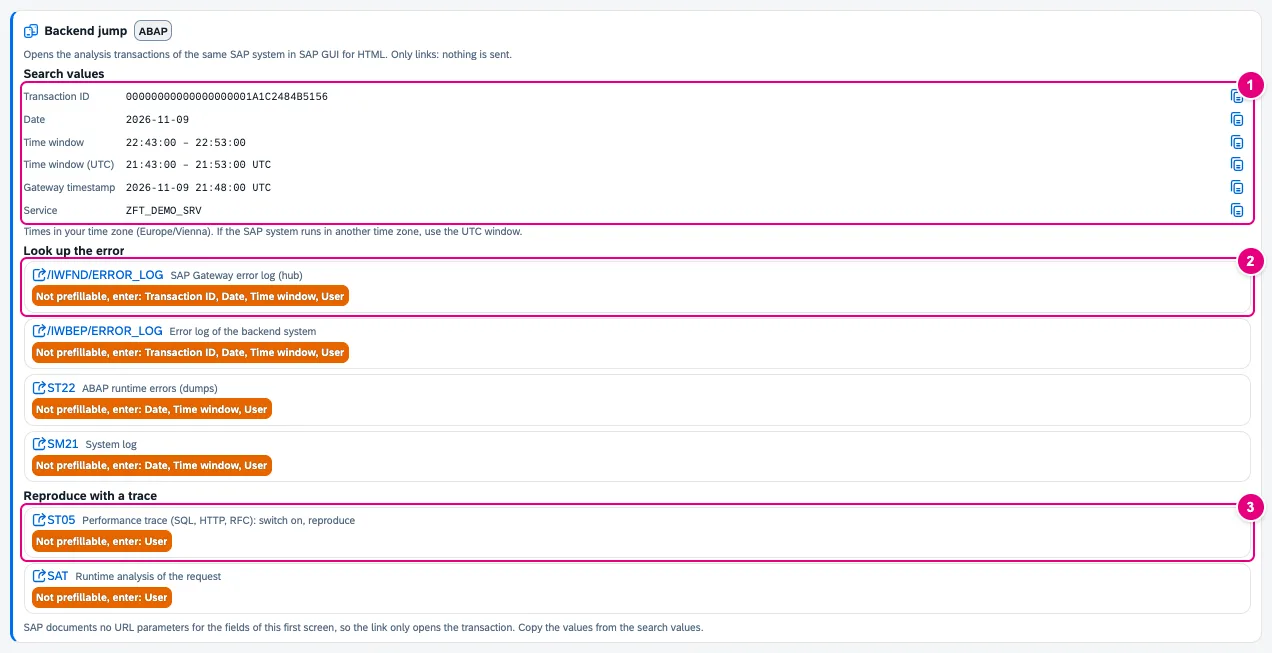
- Search values with a copy button: transaction ID, date, time window (±5 minutes around the request, local and UTC), Gateway timestamp, service – depending on the error also user, client, correlation ID and SAP message.
- Look up the error: error logs, dumps and system log. Each link says what is pre-filled and what is not: “Not prefillable, enter: …”
- Reproduce with a trace: switch on the trace, repeat the error, evaluate.
| Error | Transactions |
|---|---|
Gateway service (/sap/opu/odata…), except 401 | /IWFND/ERROR_LOG, /IWBEP/ERROR_LOG |
| HTTP 5xx or network error | ST22, SM21 |
| HTTP 403 | SU53 (uses the logged-on user), STAUTHTRACE |
| HTTP 401 or 403 | SU01, pre-filled with the user if known |
| other errors, except 401 | ST05, SAT |
FrontTailor appends the client if it is known from the request or the launchpad. The first screens of ST22, SM21, the error logs and traces cannot be pre-filled, because SAP documents no URL parameters for them – hence the search values to copy. If the SAP system runs in another time zone, use the UTC time window.
In Health and in the authorization diagnosis
In Health the card belongs to the session’s last error; the subtitle names the request. In a finding of the authorization diagnosis it is collapsed and, for a 403, brings SU53, SU01 and the authorization trace STAUTHTRACE.
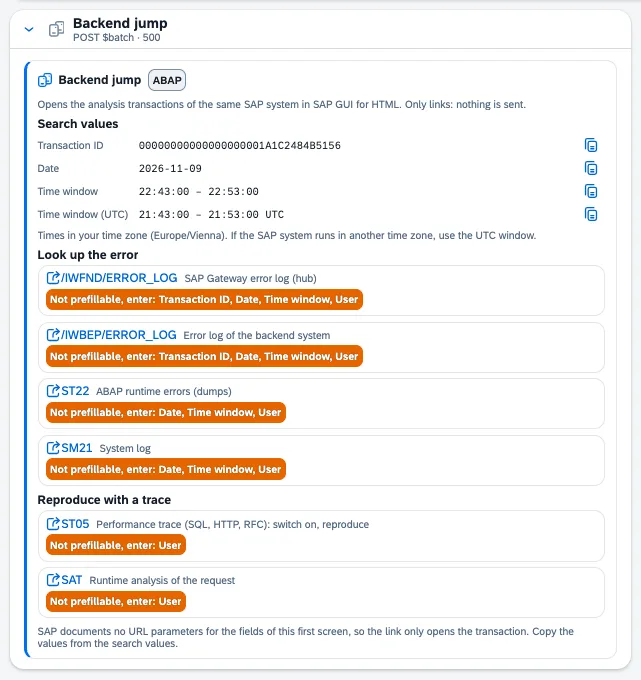
$batch with status 500.CAP, SAP BTP and proxies
Links into SAP GUI only appear if the request hits an ABAP backend on the same origin. Otherwise the card shows hints:

cds watch console and the correlation ID.- Search values – for CAP with the correlation ID.
- The hint where the logs are.
| Backend (card tag) | Hint |
|---|---|
| ABAP | links into SAP GUI for HTML of the same system |
| ABAP via proxy | The request went through an App Router, Work Zone or a destination: the transactions run in the ABAP backend, not on this host. |
| ABAP Cloud | no SAP GUI: open the “SAP Gateway Error Log” feed in the ABAP Development Tools |
| CAP | locally the cds watch console; otherwise cf logs <app> --recent (copyable), SAP Cloud Logging, BTP cockpit |
| Backend unknown | search your own server’s logs for the search values |
Prepare an SAP incident
If the error has to go to SAP, Prepare SAP incident in the Report a problem tab builds a text in the structure SAP support expects – with the application component from the manifest, versions, steps and request IDs, masked like every report. This is part of the issue reporter (from Pro); FrontTailor sends nothing to SAP.
Typical problems
| What you see | Cause and fix |
|---|---|
| No links, only hints | The backend is not ABAP on the same origin (CAP, proxy, ABAP Cloud). Search the named log with the search values. |
| The transaction opens empty | That is intended: the first screens cannot be pre-filled. Copy the values from the search values. |
| No entry in the time window | The SAP system runs in another time zone. Use the UTC time window. |
| A “Backend jump (Enterprise)” line instead of the card | The licence does not include the module. See Licence and editions. |
See also
- Features at a glance Features · betrieb
- Further reading Full Stack Development with SAP (SAP PRESS)
- Help from people SAP BTP: security and administration
- Docs OData console
- Docs Health and morning check
- Docs Roles and authorizations
- Docs Report a problem
- Sources ADR-0411