Fault simulation
Fault simulation answers matching OData requests of your tab right in the browser: with an SAP error text, delayed, empty or as an expired session. That is how you test error dialogs, busy indicators and “no data” texts, without a backend and without a mock server. Other users and the system notice nothing.
- Edition
- from Pro
- Tab
- “Fault simulation”
- Surfaces
- DevTools panel and side panel
- Scope
- this tab only, until it is closed
- Limits
- up to 30 rules per tab
- On PROD
- locked, switching off always possible
The tab at a glance
The Fault simulation tab is in the DevTools panel and the side panel, with many tabs under More. The quick starts are at the top, your rules below.
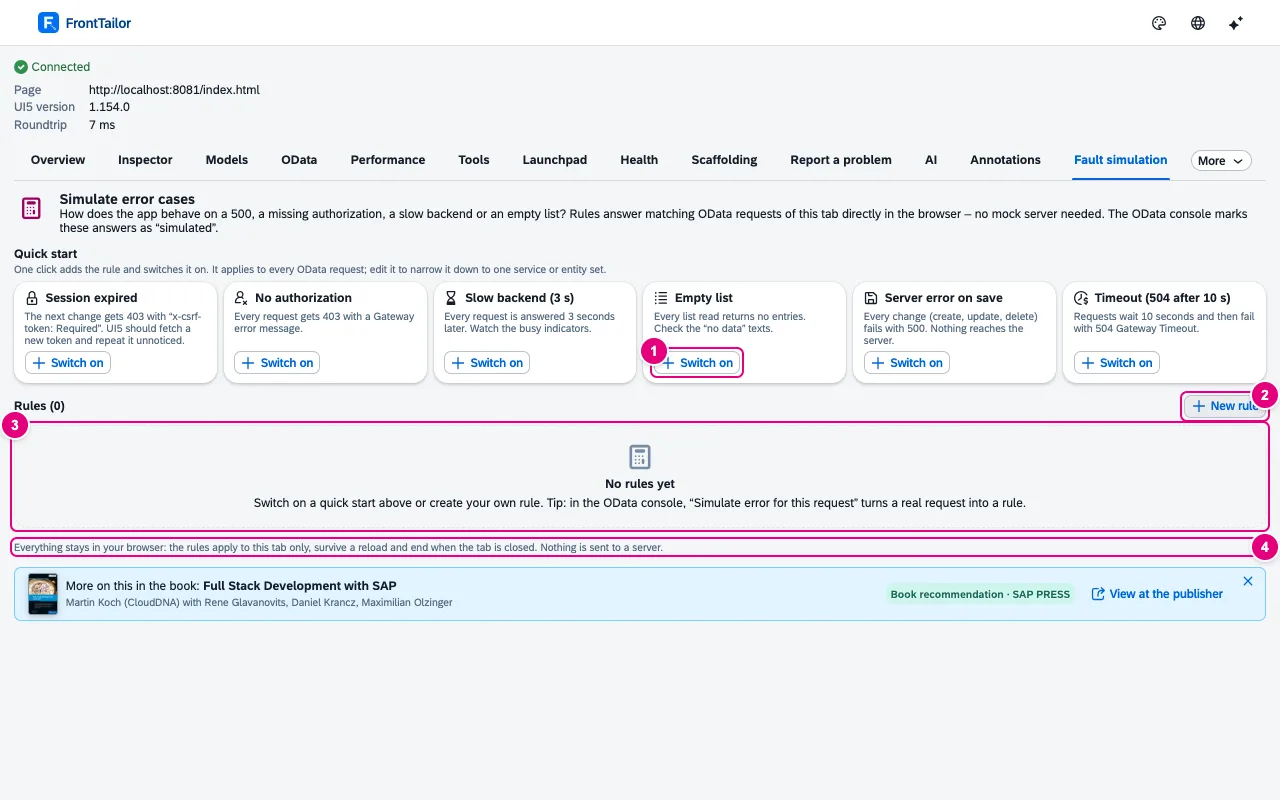
- Switch on on a quick start adds the rule and activates it right away.
- New rule opens the editor for a rule of your own.
- The rule list – still empty here.
- “Everything stays in your browser: the rules apply to this tab only, survive a reload and end when the tab is closed.”
| Quick start | Effect |
|---|---|
| Session expired | The next change gets 403 with x-csrf-token: Required. UI5 should fetch a new token and repeat it unnoticed. |
| No authorization | Every request gets 403 with a Gateway error message. |
| Slow backend (3 s) | Every request is answered 3 seconds later. |
| Empty list | Every list read returns no entries. |
| Server error on save | Every change fails with 500. Nothing reaches the server. |
| Timeout (504 after 10 s) | Requests wait 10 seconds and then fail with 504. |
A quick start applies to every OData request. Edit it to narrow it down to one service or entity set.
What happens in the app
As long as a rule is active, the app shows the banner Fault simulation active with the number of rules at the bottom. A click on Switch off in the banner switches everything off – immediately; the rules are kept, switched off.
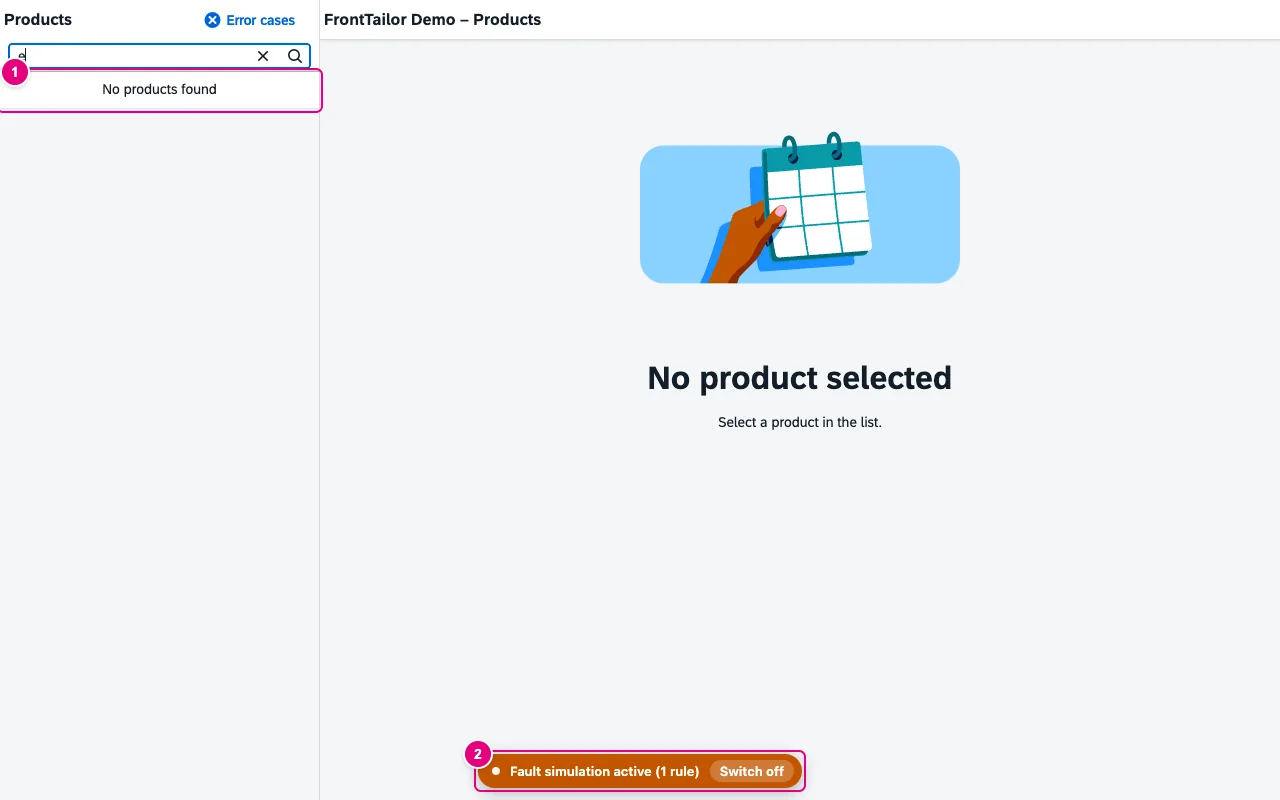
- The app shows its “no data” text – the answer came from the simulation, not from the server.
- The banner in the page. Switch off ends the simulation in this tab.
In the OData console, simulated answers are marked simulated (for $batch: “n simulated”), and the details say “Simulated by FrontTailor – rule …”.
Create a rule of your own
- In the Fault simulation tab, click New rule.
- Under Which requests, set service, entity set, method and where – empty means “all”.
- Under What happens, choose the effect, for example HTTP error with status 500 and your own error message.
- Under How often, choose Once, N times or Always.
- Save and switch on. Then trigger the action in the app.
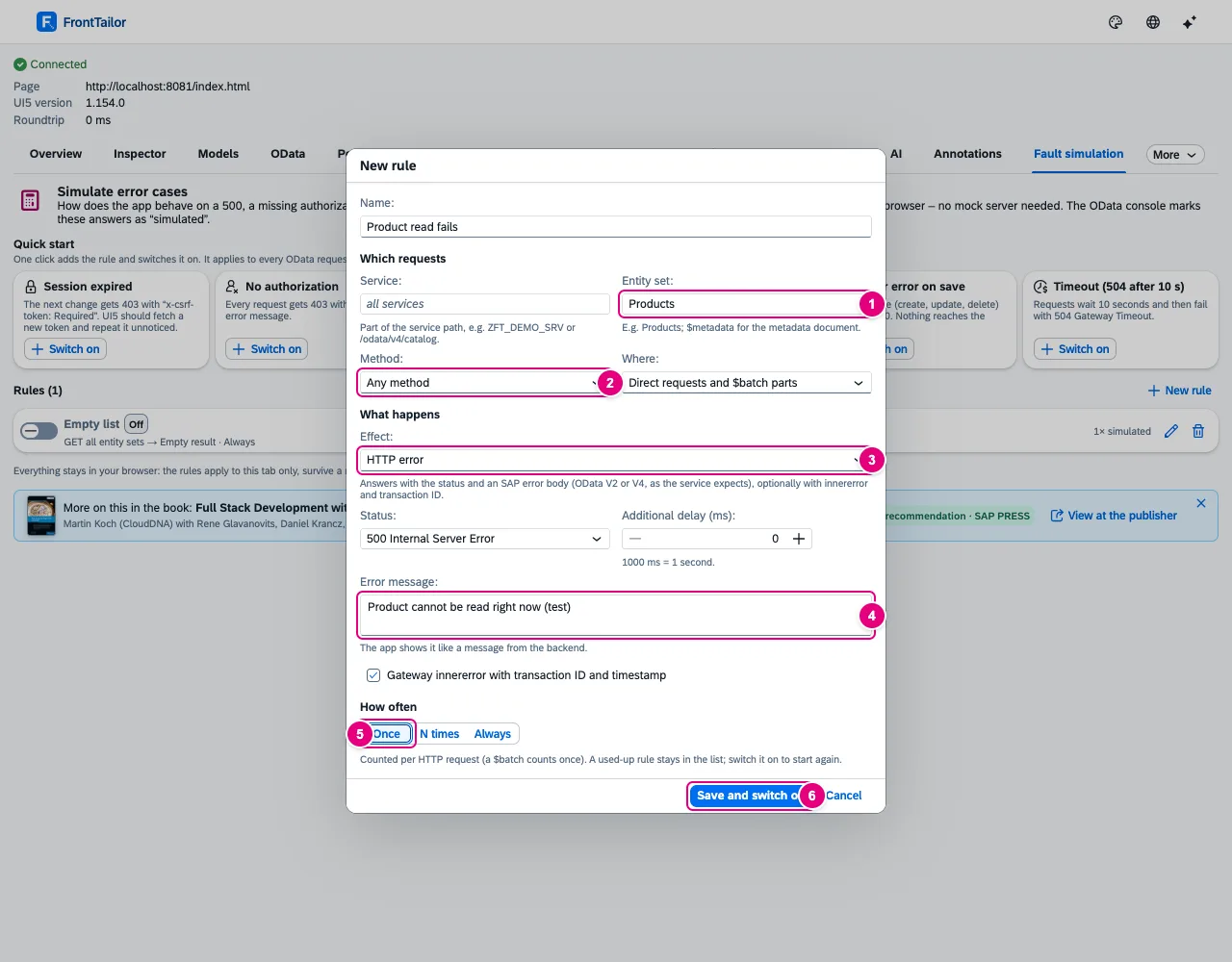
Products: one HTTP 500 with its own message.- Entity set, e.g.
Products;$metadatamatches the metadata document. Empty matches all except$metadata, the service document and the token fetch. - Method: any, read (GET), change (POST, PUT, PATCH, MERGE, DELETE) or a single one. Next to it Where: direct requests,
$batchparts or both. - Effect, see the table below.
- Error message: the app shows it like a message from the backend. Below, optionally a Gateway
innererrorwith transaction ID and timestamp. - How often: counted per HTTP request, a
$batchcounts once. - Save and switch on.
| Effect | What the app gets |
|---|---|
| HTTP error | Status 400–599 with an SAP error text, as OData V2 or V4 – the way the service expects it. Code FT_SIMULATION/<status>. |
| Delay | The real answer arrives later (up to 120,000 ms). For $batch, the whole batch waits. |
| Empty result | Lists empty, $count returns 0, a single entity returns 404. Only for reads. |
| Custom JSON | Your JSON body with status 200–599. |
| Network error | No answer, as if the connection broke. For $batch, the whole batch fails. |
| Expired session (CSRF) | 403 with x-csrf-token: Required for changes. UI5 fetches a new token and repeats once; with Always the repeat fails too. |
Every effect can get an additional delay in ms. The first matching rule wins.
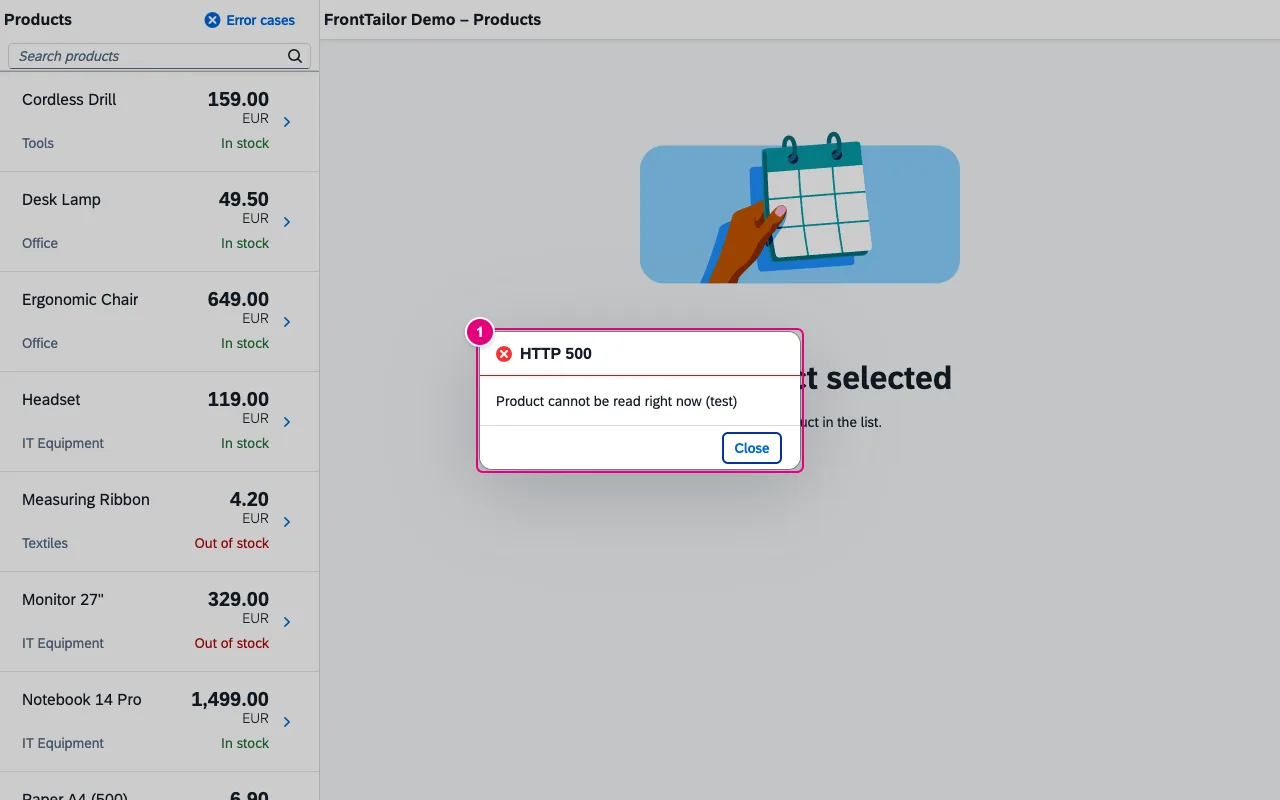
- The app’s error dialog with the status and the message from the rule.
The rule list

- The switch turns the rule on or off. Switching on restarts a used-up rule.
- The state: Active, Off or Used up.
- How often the rule has answered so far, e.g. “1× simulated”. To the right, edit and delete the rule.
Below each rule is its summary: method, entity set, effect and count. Switch everything off above the list ends all rules at once.
A rule from a real request
In the OData console, a request’s details offer Simulate error for this request. It opens the editor with the request’s service, entity set and method; for a $batch part also with “only $batch parts”.
$batch and change sets
Rules match direct requests and single $batch parts, never the envelope. A simulated part is removed from the real request – changes do not reach the server. The other parts go to the server, and its answer is merged with the simulated parts. Change sets stay atomic: an error answers the whole change set. Delay, network error and CSRF act on the whole HTTP request.
All buttons
| Button | Effect |
|---|---|
| Switch on (quick start) | Add the rule and activate it right away. |
| New rule | Editor for a rule of your own. |
| Save and switch on · Cancel | Store and activate the rule · close the editor. |
| Switch per rule | Turn the rule on or off. |
| Edit rule · Delete rule | Open the editor · remove the rule. |
| Switch everything off | Turn off all rules of this tab. |
| Switch off (banner in the app) | Like “Switch everything off”, right from the page. |
Typical problems
| Problem | Solution |
|---|---|
| The rule does not apply | Service or entity set do not match, or an earlier rule matches first. The hit count in the list shows which rule answers. |
| Errors at app start cannot be simulated | Create the rule and reload the page. With active rules, FrontTailor holds back OData requests at start briefly (at most 1.5 seconds) until the rules are there. |
| Empty result has no effect when saving | It applies to reads only. For changes, use HTTP error or the quick start Server error on save. |
| A success inside a change set is ignored | Change sets are atomic; only an error acts on the whole change set. |
| Some requests are never simulated | Synchronous XHR, navigator.sendBeacon and requests of the app’s service worker are out of reach. JSON $batch (OData 4.01) is not simulated partially. |
| The tab is locked | Fault simulation needs from Pro; on PROD hosts it is always locked. See Licence and editions. |
See also
- Features at a glance Features · OData
- Further reading Full Stack Development with SAP (SAP PRESS)
- Further reading SAPUI5 – The Comprehensive Guide (SAP PRESS)
- Help from people Release and transport quality
- Docs OData console
- Docs Host profiles and PROD
- Docs Licence and editions
- Sources ADR-0371